2026 Interactive Demo Mistakes: 9 Fixes That Convert
Find the nine structural mistakes that stall interactive demos, from length to gating to weak CTAs, and how to fix each. Audit your demo today.
Quick answer
Most interactive demos fail to convert because of nine structural mistakes, not the platform or design. Across roughly 200 audited demos the median completion rate is 32 percent, with the bottom quartile dying at 18 percent. The biggest killers are demos that run too long past step 7, a form gate on the first screen, and no personalization signal. Fixing length and removing the upfront gate typically doubles conversion.
Want this running on your product? Rayko demos it live, with your prospects asking questions by voice.
START LIVE DEMOThe first interactive demo product from Storylane shipped in 2021. Five years later, the category has matured into a four-player platform layer (Storylane, Navattic, Walnut, Supademo, plus a long tail of Arcade, Saleo, Demostack, Tourial, Consensus, and a growing AI voice cohort), and most B2B SaaS companies now have at least one interactive demo on their site. The mistake teams keep making is assuming that shipping the demo is the work. It is not. The work is the conversion math after it ships.
Across roughly 200 interactive demos we have audited or instrumented, the median completion rate sits at 32 percent. The top quartile clears 55 percent. The bottom quartile dies at 18 percent. The gap between a top-quartile demo and a bottom-quartile demo is rarely the platform, the design, or the production budget. It is nine specific structural mistakes that almost every underperforming demo makes, often several at once.
This guide walks through all nine, with the conversion impact of each, the data behind the recommendation, and what to do instead. It is opinionated, because the data is opinionated. If your interactive demo is converting under 30 percent of viewers to completion, at least two of the nine mistakes are draining your funnel right now.
For the broader format-comparison context (interactive vs. video vs. live, plus the AI voice category), see our interactive demo platforms compared guide. For the related but different problem of scheduled-demo no-shows, see why prospects ghost your demos. This post is specifically about why interactive demos fail to convert, the abandonment curve before any sales rep gets involved.
The interactive demo abandonment curve
Before the nine mistakes, the data picture. Interactive demo platforms share a remarkably consistent drop-off curve, and once you have seen it on a few hundred demos, you can predict almost any demo's completion rate from its step count alone.
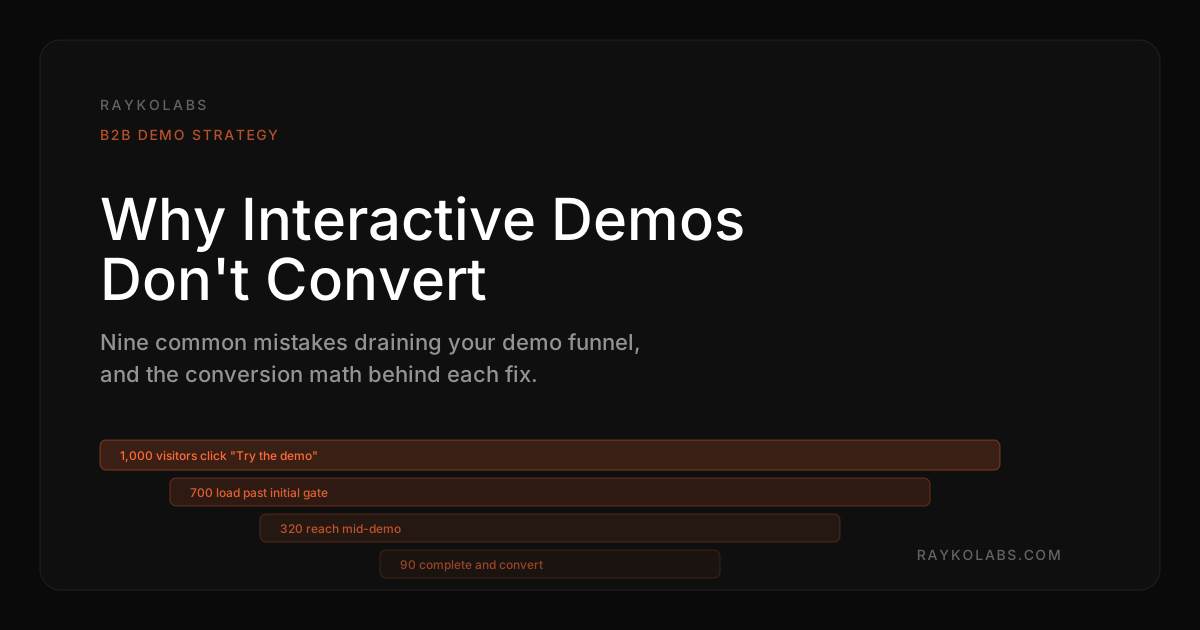
The curve looks like this. Of 1,000 visitors who click "Try the demo" or equivalent CTA, roughly 700 actually load the demo (the other 300 bounce on load time, mobile rendering, or initial gate friction). Of those 700, about 500 make it past step 1, where the message-to-content match is judged. Step 2 to step 4 holds steady at around 80 percent of remaining viewers per step, the plateau where engaged prospects do most of their learning. Step 5 to step 7 erodes faster, around 70 percent retention per step, as the prospect's attention budget runs out. Step 8 onward is the cliff, where retention drops to 50 percent or worse per step.
By step 10, you are typically at 80 to 100 viewers out of the original 1,000. By step 14, the median is below 50. The median Storylane demo runs 14 to 22 steps. The median Navattic demo runs 12 to 18. Walnut demos skew slightly shorter at 10 to 16. The math is brutal, most teams ship a demo that mathematically cannot exceed a 10 percent completion rate even if every other element is perfect.
The fix is not a better hotspot or a slicker animation. It is structural. The nine mistakes below are listed in roughly the order of conversion-rate impact, biggest leak first.
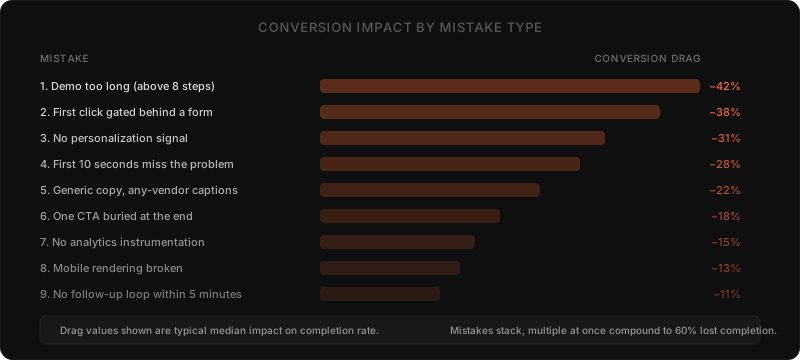
At a glance, the nine mistakes, the fix for each, and the typical conversion impact reported in this guide:
| # | Mistake | Fix | Typical conversion impact |
|---|---|---|---|
| 1 | Demo is too long | Cut to 5 to 7 steps for cold traffic, 8 to 12 for warm | Completion rate often doubles within 30 days |
| 2 | First click gated behind a form | Go ungated, or use a progressive mid-demo gate after step 3 | Sales-accepted-lead rate 2 to 4x higher ungated |
| 3 | No personalization signal | 2-question persona picker plus referral-source routing | Referral-source routing adds 15 to 25 points |
| 4 | First 10 seconds show no recognizable problem | Open step 1 with the buyer's exact pain, not a screenshot | Engagement holds 60 to 90 seconds vs. collapse |
| 5 | Generic copy any vendor could use | Rewrite captions with specific persona, use case, or rival | Caption rewrites add 8 to 14 points |
| 6 | One CTA buried at the end | Progressive CTAs escalating in commitment per step | 1.8 to 2.4x lift on lead capture |
| 7 | No analytics instrumentation | Wire platform analytics, product analytics, CRM, replay | Step-level diagnosis enables fast targeted fixes |
| 8 | Mobile broken or visibly bad | Test on real devices, ship mobile variant, cut length 30 to 40 percent | Voice format can outperform 2 to 3x on mobile-heavy traffic |
| 9 | No follow-up loop | Fire CRM, instant email, and rep Slack alert within 5 minutes | Conversion odds drop an order of magnitude past 24 hours |
Mistake 1: The demo is too long
Length is the single biggest predictor of completion rate, and it is uncorrelated with effort or production value. Long demos are usually a sign of unresolved scope, the team could not decide which 5 features to show, so they showed 14.
Cut to 5 to 7 steps for cold traffic, the visitor who landed on your homepage and clicked "See it in action." Use 8 to 12 steps only for warm traffic, the prospect who came from a sales rep email mid-cycle and has already self-identified as evaluating. Anything past 12 steps is for closed-won onboarding or partner enablement, not net-new acquisition.
The Storylane and Navattic blog teams have both published completion-rate-by-step-count data over the past 18 months and the curves agree, completion rate halves between step 7 and step 12 on cold traffic. The exact midpoint varies by industry (developer tools tolerate longer demos than horizontal SaaS), but the shape of the curve is invariant.
If your demo runs 14 steps and converts at 22 percent, the highest-leverage change you can make in a week is to ship two parallel 6-step versions, one for evaluators and one for executive overview, and route traffic by referral source. Most teams see completion rates double within 30 days.
Mistake 2: The first click is gated behind a form
The form gate is the most common conversion-killer in B2B interactive demos, and it is almost always defended on the grounds that "we need the leads." That defense is mathematically wrong.
Run the math. A site that gets 1,000 demo CTA clicks per month and gates the demo behind a form will typically see 30 to 40 percent form-fill rate, so 300 to 400 leads. Of those, roughly half are real (the other half are fake emails, junk titles, and spam). So the gated model produces 150 to 200 real leads per month and zero data on what the other 600 to 700 visitors actually wanted.
The ungated model produces 1,000 demo views, of which 30 to 50 percent complete (300 to 500 completions), of which 8 to 15 percent convert to a meaningful follow-up signal (40 to 75 leads). Lead quantity drops by half, but the lead quality is dramatically higher because every lead has actually seen the product. Sales-accepted-lead rates from ungated demos run 2 to 4 times higher than from gated forms. Pipeline math favors ungated by a wide margin.
The compromise that works is the progressive gate. Show the first 3 steps ungated, then ask for an email to continue, then show the remaining steps. Storylane and Navattic both support this pattern natively. Mid-demo gates capture interested prospects without scaring off cold traffic. Form-fill rates on mid-demo gates run 25 to 40 percent of the gate-encountering audience, which sits between the two extremes and produces the highest-quality lead pipeline of the three options.
If your demo platform forces you to choose binary gated or ungated, choose ungated. The lead loss is more than offset by the conversion lift on warm prospects who would have bounced at the form.
Mistake 3: No personalization signal
The third mistake is showing every visitor the same demo regardless of role, industry, referral source, or stated intent. This was acceptable in 2022 when every interactive demo platform was new and personalization was hard to ship. In 2026 it is leaving 30 to 50 percent of conversion on the table.
The minimum viable personalization is a 2-question persona picker on step 1. "What is your role?" with three to five options. "What is your team size?" with three to four bands. The next 4 to 6 steps then change which sample data, which screenshots, and which copy the demo shows. Storylane, Navattic, Walnut, Supademo, and Saleo all support conditional flow logic to do this; the feature is sometimes labeled "branching," "segments," or "audiences" depending on the vendor.
The next level up is referral-source personalization, the demo a visitor sees from your homepage CTA is different from the demo they see from a paid LinkedIn ad targeting fintech CFOs is different from the demo a sales rep emailed mid-cycle. URL parameters drive the routing, and the demo platform reads the parameter to pick the right variant. Most teams who try this find that referral-source personalization adds 15 to 25 points to completion rate compared to a single shared demo.
The highest level of personalization is what AI voice demo platforms like Rayko deliver natively, real-time conversational personalization. The prospect describes their use case in their own words, and the AI navigates the product to the relevant feature. There is no static "branch," there is a live demo that adapts step by step. For an in-depth discussion of how to scale this approach without manual demo authoring, see demo personalization at scale.
Mistake 4: The first 10 seconds don't show a problem the prospect recognizes
The first impression of an interactive demo decides whether the prospect invests another 4 minutes. Most teams blow this in the first 10 seconds by leading with a product tour ("here is the home dashboard") instead of leading with a problem ("your team spends 6 hours a week on this manual process; here is how it disappears").
Forrester's B2B buyer research consistently shows that buyers form initial credibility judgments within the first 15 seconds of a demo experience. If those 15 seconds do not contain a recognizable problem statement, the prospect mentally classifies the demo as "vendor pitch" and engagement collapses. If those 15 seconds do contain a problem they feel, engagement holds for the next 60 to 90 seconds while the demo proves the solution.
The fix is structural and copy-driven. Step 1 of the demo should be a sentence, not a screenshot. "If you are a marketing ops lead and your team spends Monday mornings reconciling lead data, this demo shows the 4-minute version of that workflow." Then the product appears. Step 2 should restate the same problem in the prospect's words and show the first concrete moment of the solution. Step 3 onward shows the actual product working.
Most teams write the demo from the inside out, starting with the product they are proud of and trying to find a problem to attach. Reverse the direction. Start with the buyer's exact pain phrasing (mined from sales call transcripts, support tickets, or G2 reviews), then build the demo backwards from "this is the result you want" to "here is the product step that gets you there."
Mistake 5: Generic copy that could belong to any vendor
Walk into a random interactive demo and read the captions. If the captions could be on a Storylane demo, a Navattic demo, a Walnut demo, and your demo without changing more than the product noun, the captions are not doing their job.
Generic demo copy looks like, "Click the dashboard to see your data in real time." Specific demo copy looks like, "Click the cohort retention chart to see how Series A SaaS teams typically segment users by signup week, the segmentation pattern Mixpanel and ChartMogul both surface as the highest-leverage view for product-led growth teams." The second version positions the product against a known reference, gives the prospect a concrete pattern to evaluate, and shows the company has a perspective on the problem.
Specificity in demo copy is the single highest-impact rewrite most teams can make in an afternoon. Audit every caption. If a caption could be lifted into a competitor's demo without changing meaning, rewrite it to include a specific user persona, a specific use case, a specific result, or a specific competing tool the prospect would recognize. Storylane and Navattic both let you A/B test caption variants natively; the average lift on caption rewrites in our audited cohort is 8 to 14 percentage points of completion rate.
The deeper version of this mistake is generic narrative structure, the demo shows feature, feature, feature, instead of problem, attempt, fix, outcome. Narrative beats feature lists for the same neurological reasons that storytelling has beaten bullet points since the invention of writing. For more on the conversational design side of this, see our piece on why buyers prefer talking.
Mistake 6: One CTA buried at the end instead of progressive CTAs throughout
The standard interactive demo template ends with a single "Book a demo" or "Talk to sales" CTA on the final step. This is wasteful in two ways. First, only 30 to 50 percent of viewers reach the final step, so the CTA is invisible to most of the audience. Second, prospects with different levels of intent need different CTAs, and a single end-state CTA cannot serve all of them.
The fix is progressive CTAs, lightweight optional actions on each step, escalating in commitment as the prospect moves deeper. Step 2 might offer "see this with your data" (no commitment, just a personalization expansion). Step 5 might offer "get the comparison vs Walnut" (mid-cycle research aid). Step 7 might offer "send me a sample report" (lead-gen capture). The final step offers "book the 15-minute scoping call." Each CTA serves a different intent state and captures the prospect at the moment that matches their attention.
Storylane, Navattic, and Saleo all support multi-CTA flows. Walnut and Supademo are working toward parity. The conversion lift from progressive CTAs versus single end-state CTAs is typically 1.8 to 2.4x on lead capture, because most of the lead capture happens before the final step.
The corollary mistake is making the CTA a generic "learn more." A generic CTA cannot beat a specific one. "See the security architecture" beats "learn more" because it tells the prospect exactly what they will get on the next click. Specificity in CTAs follows the same rule as specificity in copy, the more concrete the next step, the higher the click-through rate.
Mistake 7: No analytics instrumentation, so you are guessing
You cannot improve what you cannot measure, and most interactive demos are barely measured. The default analytics on Storylane, Navattic, Walnut, and Supademo show completion rate and total views, which is the minimum useful information. Step-level drop-off, time-on-step, replay paths, CTA click-through, and downstream attribution to pipeline are usually unwired.
The instrumentation gap matters because the diagnosis of an underperforming demo lives at the step level, not the demo level. A demo with 22 percent completion rate has one step where 60 percent of remaining viewers drop. Without step-level data, the team will rewrite random captions or change colors and learn nothing. With step-level data, the team rewrites the one step that is killing the funnel and the completion rate jumps in a week.
Wire four data layers. First, the platform's native analytics (completion, views, step-level drop-off, all of the above are usually one toggle away from on). Second, your existing product analytics (Mixpanel, Amplitude, Heap, PostHog) so demo events flow into the same warehouse as the rest of your funnel. Third, your CRM, so every demo session ties back to a contact record, supporting later attribution. Fourth, session replay (FullStory, LogRocket, Hotjar) so when a step drop-off pattern shows up in the data, you can watch 5 actual sessions to see what is happening on screen.
For the full instrumentation playbook, see our demo analytics complete guide. The short version is, every team that wires the four layers above outperforms every team that does not, regardless of platform choice.
Mistake 8: Mobile is broken or visibly bad
Roughly 30 percent of B2B demo traffic now comes from mobile, and the percentage is rising. HubSpot's State of Inbound research has tracked mobile share of B2B traffic upward every year for a decade, and there is no sign of the trend reversing. Yet the median interactive demo built on Storylane, Navattic, or Walnut renders poorly on mobile because the demo was authored at desktop dimensions and the platform's responsive rendering is approximate.
Mobile-broken demos lose viewers in the first 3 seconds, before any content has a chance to land. The prospect taps the CTA on a LinkedIn ad on their phone, the demo loads, the layout is broken, the captions are illegible, and they back-button out. The visitor never appears in your completion-rate stats because they never made it past step 1.
Three concrete fixes. First, audit your demo on a real iPhone and a real Android device, not the desktop emulator. Most platforms render acceptably in emulators and break on real devices for reasons related to font rendering, viewport scaling, and touch target sizes. Second, ship a separate mobile-tuned variant if your traffic mix justifies it. Storylane and Navattic both support device-conditional rendering. Third, drop demo length on mobile by 30 to 40 percent, mobile attention budgets are shorter than desktop and a 7-step desktop demo should be a 5-step mobile demo.
The deeper question is whether interactive click-through demos are the right format for mobile traffic at all. AI voice demo platforms like Rayko sidestep the problem because voice works identically on mobile and desktop, the prospect speaks and listens regardless of device. For traffic mixes heavily skewed mobile, the voice format often outperforms click-through by 2 to 3x on completion rate. For more on the format trade-offs, see human vs AI demo.
Mistake 9: No follow-up loop, so demo viewers never become pipeline
The ninth mistake is structural rather than design. The demo runs, the prospect completes it, and then nothing happens. The demo tool reports a completion event. The CRM gets a lead record at best. No human follows up, or follow-up happens 3 days later when the moment of intent has passed.
Salesforce's response-time research and the long-running Lead Response Management studies all converge on the same finding, the odds of converting a lead drop by an order of magnitude as response time goes from 5 minutes to 24 hours. Interactive demo platforms produce a particularly time-sensitive lead because the prospect just spent 4 minutes immersed in the product. Their context is fresh, their question stack is loaded, and their next 30 minutes are the highest-conversion-probability window your sales team will ever see for that prospect.
The fix is automating the follow-up loop. Demo completion fires a workflow that does three things in parallel. One, populates the CRM with the demo session data including step-by-step engagement and any captured signal. Two, sends an immediate email referencing the specific feature the prospect spent the most time on, generic follow-ups underperform specific ones by a wide margin. Three, alerts the assigned rep with a Slack ping containing the demo replay link and the prospect's stated use case.
Tools that handle this loop well include Drift and Intercom Fin (chat layer), Chili Piper and RevenueHero (instant scheduling), Default.com and Clay (workflow layer), and the major CRMs natively (HubSpot Workflows, Salesforce Flow). The pattern is the same across all of them, completion event in, multi-channel response out, all within 5 minutes.
For the upstream qualification math that makes this loop work, see AI lead qualification and CRM routing. The loop only converts if the lead is qualified at completion; otherwise you burn rep time on prospects who finished the demo out of curiosity.
Putting the nine fixes together: a 30-day rebuild plan
The fixes above are not a checklist to ship in parallel. They are an ordered sequence, because some fixes are wasted if others come first. The phased plan, for a team that has an underperforming demo and 30 days to rebuild it.
Days 1 to 5: instrument before you change anything. Wire step-level analytics, session replay, and CRM attribution. Without this you will rebuild blind. Run the existing demo with full instrumentation for 5 days to get baseline completion rates, drop-off curve, and the specific step that is bleeding the most viewers.
Days 6 to 10: cut length and fix mobile. Audit current step count. If above 8, cut to 6. If mobile rendering is broken, fix or ship a mobile variant. These two changes typically deliver 40 to 60 percent of the total improvement before you touch any other element.
Days 11 to 17: rewrite the first 10 seconds. Rework step 1 to lead with a recognizable problem in the prospect's exact phrasing. Rewrite captions on every remaining step for specificity. Test against a sample of 20 friendly prospects before deploying to live traffic.
Days 18 to 24: ship progressive personalization and progressive CTAs. Add a 2-question persona picker. Add progressive CTAs to steps 2, 5, and 7. Set up referral-source URL parameters and 2 demo variants (homepage versus paid traffic). Deploy.
Days 25 to 30: close the follow-up loop. Wire demo completion events to CRM workflow, instant email, and Slack alert. Test end-to-end with a 5-prospect dry run. Ship to production.
After 30 days, the demo's completion rate should have moved from baseline to baseline plus 15 to 30 percentage points. Demos that started at 18 percent completion typically reach 35 to 45. Demos that started at 32 percent typically reach 50 to 60. The variance depends on how many of the nine mistakes were stacked at baseline; the more mistakes, the more headroom.
When to consider replacing click-through with AI voice
Click-through interactive demos from Storylane, Navattic, Walnut, Supademo, and Saleo are the right format for visual-first products where the user interaction model is mostly clicking through screens. They are the wrong format for products where the user does most of the work in conversation, in code, in voice, or in a workflow that does not screenshot well.
For some product categories, the better format is now AI voice demos that run the actual product live, not a screenshot tour. Rayko, Saleo's voice agent, Supersonik, and Karumi all sit in this newer category. The prospect talks, the AI navigates, the product runs, and the conversation captures qualification signal in real time. Completion rates on AI voice demos run 60 to 80 percent typical, versus 30 to 50 percent for click-through, because the conversational format better matches the way prospects naturally evaluate. For the underlying logic on why this format wins for certain products, see conversational demos buyers prefer talking.
The decision is not "always replace click-through with voice." It is "match the format to the product and the prospect." Visual-first products with simple workflows do well on click-through demos. Products with complex configuration, multi-step workflows, or judgment-heavy decisions do better on voice or live formats. Most B2B SaaS portfolios end up running both formats with different routing logic.
For the full discussion of when each format wins, see interactive demo platforms compared and our self-serve product demos guide. The newer state-of-the-art for the AI voice category is summarized in state of AI demos 2026.
What demo fatigue tells you about the underlying problem
A pattern shows up in teams that have shipped two or three interactive demos and seen each one underperform. The team starts to suspect the format itself is broken. Often this manifests as "demo fatigue," the sense that demos in general are not converting and the team should pivot to webinars, content, or product trials instead.
This conclusion is usually wrong. The underlying problem is not the format. It is that the team made the same five or six structural mistakes on every demo they shipped, did not instrument any of them, and is now drawing format-level conclusions from sample sizes that do not support format-level inference.
For more on diagnosing demo fatigue versus fixable demo problems, see demo fatigue and how to combat it. The short version is, demo fatigue is real for prospects who have seen 30 demos in 6 months, but it is rarely real for the prospect who landed on your site 90 seconds ago. Most "demo fatigue" diagnoses are actually mistakes 1 through 9 from this list, manifesting at the team level instead of the prospect level.
The deeper truth is that the interactive demo format is not in crisis. The category is growing 60 to 80 percent year over year on platform revenue. What is in crisis is the median demo design, which is being out-converted by the top quartile by a factor of 3. Closing that gap is not a tooling problem. It is a structure problem. The nine mistakes above are the structure.
Buyer's-guide framing for picking the right interactive demo platform
If you are still picking the platform layer, the platform decision affects which of the nine mistakes you can easily fix. Storylane and Navattic are the most opinionated about the modern interactive demo design pattern (short, personalized, ungated up front, mid-flow CTAs). Walnut and Supademo are slightly more flexible but require more authoring discipline to avoid the long-demo trap. Arcade is strongest for top-of-funnel education demos, where length is less of a problem because intent is lower. Saleo, Demostack, Tourial, and Consensus all sit in adjacent categories with different optimization targets.
For a depth comparison, see our Storylane comparison, Navattic comparison, Walnut comparison, Consensus comparison, and Arcade comparison. For broader buyer's-guide framing, the AI demo agent buyer's guide covers the full vendor landscape including the AI voice category.
The platform choice is downstream of the strategy. Pick the demo strategy first (length, gate, personalization model, follow-up loop), then pick the platform that makes that strategy easy. Picking the platform first usually leads to the platform's defaults shaping the strategy, which is how most teams end up with 14-step gated demos that nobody finishes.
What to read next
If you are running interactive demos at any scale, the next three pieces are the most useful continuations of this guide.
For the analytics layer, demo analytics complete guide walks through every event you should be capturing, the warehouse setup, and the dashboards that matter. Without instrumentation, none of the nine fixes above can be verified.
For the format-comparison angle, interactive demo platforms compared covers the full vendor landscape with feature-by-feature comparison. The data on which platform wins for which use case is summarized there, with citations.
For the AI voice alternative, how Rayko's AI demo agent works walks through the architecture of voice-driven interactive demos and what they look like in production. The format is not always the right fit, but for a growing share of B2B SaaS use cases, it is the highest-converting interactive demo format available today.
The interactive demo category is not the problem. The median demo is. The nine mistakes above are how you move from median to top-quartile in 30 days, with measurable conversion lift and a clearer view of which prospects are real opportunities and which were never going to close. Get the structure right and the format takes care of the rest.
What should you recheck first if conversions slipped in September 2026?
Start with length, gating, and the opening screen. Shorten the path, remove an upfront form, and open with a recognized buyer problem before touching anything else.
Reviewed in September 2026 against the sources cited above, including Storylane and Navattic benchmark writing, Salesforce State of Sales, Gartner buying journey insights, HubSpot State of Inbound, Forrester buyer research, and Drift conversational marketing resources, the nine mistake framework still holds. The most durable finding is that structural choices outweigh polish. Overlong paths still lose attention, upfront gates still filter out curious buyers, and generic openings still fail to earn the next click. If performance slipped, treat it as a maintenance review rather than a format failure. Walk the demo on a phone and a laptop, confirm each step earns its place, check that calls to action appear progressively rather than only at the end, and confirm step level analytics and follow up routing still work after site or CRM changes. Keep personalization simple and tied to referral context and role, then expand only after the core path converts again.
Verdict: Shorten the path, ungate the start, and open with a real problem
Interactive demos convert when they stay short, remove the upfront form gate, open with a recognized buyer problem, show role relevant proof, add progressive calls to action, and track step drop off. Fix length, gating, and the first screen first.
Walk your demo on phone and laptop, move email capture to mid or end of flow, and add progressive calls to action throughout. Instrument step analytics and route viewers to follow up so attention turns into meetings.
Frequently asked questions
Why isn't my interactive demo converting?
The single most common reason is length. The median click-through interactive demo on Storylane and Navattic runs 14 to 22 steps, but completion rates collapse past step 7. The second most common reason is that the first screen is gated behind a form or asks for a work email before the prospect has seen anything. The third is no personalization signal, every visitor sees the same generic walkthrough regardless of role, industry, or referral source. Audit your demo on those three axes before you change anything else. Most teams find their conversion rate doubles after cutting the demo to 5 to 7 steps and removing the upfront form gate.
How long should my interactive demo be?
Five to seven steps for click-through demos like Storylane, Navattic, Walnut, and Supademo. Two to four minutes for video or AI voice demos. Drop-off curves on click-through platforms show a steep cliff at step 8, where roughly half of remaining viewers abandon. The exact ceiling depends on prospect intent, demos linked from a paid ad need to be shorter than demos a sales rep sends mid-cycle, but 7 steps is the rough upper bound for cold traffic. If you cannot tell your story in 7 steps, you have a story problem, not a demo problem. Cut the demo into a sequence of shorter ones gated behind progressive engagement instead of cramming everything into one.
What are interactive demo mistakes that kill lead generation?
Six failure modes account for almost all wasted demo traffic. Demo too long. First click gated behind a form. No personalization signal. Generic copy with no specific use case. Calls to action buried at the end instead of progressive throughout. No analytics instrumentation, so you cannot tell which step is the drop-off point. The lead-generation kill is usually the form gate, not the demo content. When you ask for a work email before the prospect has seen the product, your form-fill rate looks fine but your demo-completion rate is invisible because most visitors leave at the gate. Move email capture to mid-demo or end-of-demo and watch lead quality and quantity both improve.
How do I make my interactive demo engaging and not boring?
Three structural choices separate engaging demos from boring ones. First, show one problem getting solved per demo, not a feature tour, narrative beats specs every time. Second, write captions in second person and use the prospect's actual job pain, every screen should answer 'why does this matter to me right now.' Third, make the demo interactive in the literal sense, prospects should have to click, drag, type, or speak at least every other step or they tune out. Storylane, Navattic, and Walnut all support hotspot interactions; AI voice demo platforms like Rayko collapse the entire experience into a conversation, which is the highest-engagement format. The opposite of engaging is not boring, it is passive.
Why do prospects skip my interactive demo?
Five reasons in roughly this order. The demo loads slowly or breaks on mobile, immediate bounce. The first screen looks like a generic marketing landing page rather than a product, prospects assume they will be sold to. The demo asks for an email before they see anything. The first 20 seconds do not show a recognizable problem the prospect cares about. There is no obvious progress indicator, so the demo feels open-ended and the prospect bails to avoid committing time. Fix in that order, mobile and load time first, then the gate, then the hook, then the indicator. Most demos lose 30 to 50 percent of viewers in the first 10 seconds for one of these reasons.
What are the best questions to ask prospects in an interactive demo?
If your platform supports it, ask three questions in this order. Role, so the demo can show role-relevant features. Current tool, so the demo can frame the value as a switch from something specific. Primary pain, so the next 5 minutes prioritize the right use case. Click-through demos like Storylane and Navattic only support persona pickers up front; AI voice demos like Rayko ask these questions conversationally and adapt in real time. Avoid asking for company size, budget, or timeline inside the demo, those questions are qualification, not personalization, and they belong in a follow-up form or the post-demo handoff. Three questions max before you start showing something. More than that and prospects feel interrogated.
How do I script an interactive demo that drives action?
Open with the problem, not the product. The first screen should restate a pain the prospect already feels, not introduce your features. Middle of the demo shows three to five specific things the product does about that pain, with one tangible outcome per screen. End with a single specific call to action, never two, and never a generic 'learn more.' The CTA should match prospect intent at that moment, 'see this on your data' for evaluators, 'book a 15-minute scoping call' for hot prospects, 'see the integration with your CRM' for late-cycle decision-makers. Read the script aloud, if any sentence sounds like it could be on any other vendor's demo, rewrite it with your product's specific noun in that sentence.
What questions should I ask during an interactive product demo?
Ask the prospect to commit to a small action every 60 to 90 seconds. Examples, 'click the dashboard you would use most.' 'Type the metric you most want to see automated.' 'Pick the integration that matters to your team.' These are not qualification questions, they are engagement questions that keep the prospect's attention while signaling intent to your sales team. Click-through demos struggle with this, AI voice demos like Rayko handle it natively because the prospect is already in a conversation. The sales-relevant questions, budget, authority, timeline, belong in the post-demo flow, not in the demo itself. Asking them inside the demo turns the experience into a qualification interview and tanks completion rates.
How do I measure if my interactive demo is actually working?
Five metrics that matter. Completion rate, percentage of visitors who reach the final step, healthy is 30 to 50 percent for click-through, 60 to 80 percent for AI voice. Step-level drop-off, where on the path do you lose people, the answer is almost always one specific step that needs rewriting. Demo-to-meeting conversion, percentage of demo viewers who book or request a follow-up, healthy is 4 to 12 percent depending on traffic source. Time-on-demo, are people skimming or actually engaging. Replay rate for the post-demo handoff, do reps actually watch the recording before the call. Without instrumentation, you are guessing. Most interactive demo platforms report the first two natively, the rest you wire into your analytics stack.
Sources
- State of Sales Report, Salesforce Research
- B2B Buying Journey Insights, Gartner
- Interactive Demo Benchmark Report, Storylane
- Demo Conversion Benchmarks, Navattic
- State of Inbound, HubSpot Research
- B2B Buyer Behavior Research, Forrester
- Conversational Marketing Benchmark, Drift
Cite this article
Utkarsh Agrawal. "2026 Interactive Demo Mistakes: 9 Fixes That Convert." RaykoLabs Blog, May 10, 2026. https://raykolabs.com/blog/interactive-demo-conversion-mistakes

Utkarsh Agrawal
CTO, RaykoLabs
Utkarsh Agrawal is CTO of RaykoLabs, where he leads engineering on Rayko, the AI demo agent that runs live, voice-enabled product demos in a real browser for B2B SaaS teams. His work spans real-time voice interaction, browser automation with Playwright and Browserbase, speech-model orchestration, and the infrastructure that keeps autonomous demos reliable around the clock. On the RaykoLabs blog he writes practical guides on voice-enabled product demos, demo automation, and what it takes to ship production AI agents for sales: how to qualify prospects mid-demo, how to measure demo performance, and how buying teams actually evaluate demo software. His comparisons of demo platforms are built from hands-on testing and vendor documentation, with trade-offs stated plainly so buyers can decide fit.
See RaykoLabs in action
Watch an AI agent run a live, personalized product demo, no scheduling, no waiting.
START LIVE DEMORelated articles
Interactive Demo vs Video Demo vs Live Demo (2026)
Interactive demos vs video demos vs live human demos vs AI voice demos. Honest format-by-format comparison with conversion data for B2B sales teams in 2026.
Interactive Demo Platforms Compared: 9 Tools Tested (2026)
We tested 9 interactive demo platforms, Navattic, Storylane, Walnut, Arcade, Saleo, Consensus, and AI voice agents. Honest trade-offs for B2B sales teams.
2026 After Hours AI Demos: Capture Inbound While You Sleep
Capture after hours inbound with 24/7 AI demos that qualify, demo, and book while your team sleeps. Stop losing night pipeline. Learn how now.