AI Lead Qualification and CRM Routing: B2B Inbound Guide
How to qualify inbound leads with AI and route warm prospects into your CRM automatically. Tools, workflows, and patterns for B2B sales teams in 2026.
Quick answer
Qualifying inbound leads with AI and routing them to your CRM is a four-stage pipeline: capture, qualify, route, and sync. A capture layer collects the prospect's identity and intent, an AI conversation scores BANT or MEDDIC signals against your ICP, routing logic decides where each lead goes, and a CRM integration writes the lead, score, transcript, and next action. The real bottleneck is the gap between capture and qualified handoff.
Want this running on your product? Rayko demos it live, with your prospects asking questions by voice.
START LIVE DEMOThe B2B inbound funnel has a structural problem. Demand generation teams are getting better at driving traffic, but the conversion rate from website visitor to qualified opportunity has stayed roughly flat for a decade. Companies invest more in ads, content, and SEO every quarter, then watch most of the leads vanish into form-fill purgatory or get qualified out by an SDR three days later, after the buyer already moved on.
The bottleneck is not awareness. It is the gap between capture and qualified handoff. When a buyer fills out a "Request a Demo" form at 9:47 PM on a Tuesday, what happens next determines whether they close, churn out of the funnel, or end up in your competitor's pipeline.
Once that handoff lands, the deal room matters: see how AI demos fit digital sales rooms. This guide walks through the architecture for closing that gap with AI: capture, qualify, route, sync. It is opinionated about what works for B2B SaaS based on what we have seen across the Rayko customer base and the broader market. It covers the tooling landscape, the integration patterns, the metrics that matter, and the pitfalls that wreck most inbound automation rollouts.
Why inbound automation matters more in 2026 than ever
Three forces are compressing the window in which a buyer is reachable.
First, response time decay is real and getting worse. The classic Lead Response Management study found that the odds of contacting a lead drop by a factor of 10 if you wait an hour instead of five minutes. A decade later that gap has widened. Buyers now research five to seven vendors in parallel, and the first vendor to engage substantively often wins by default, not because of product superiority.
Second, buyers want to self-serve before talking to anyone. Gartner's research on the B2B buying journey shows that buyers spend only 17 percent of the total purchase cycle interacting with sales reps. The other 83 percent is independent research, peer conversations, and content consumption. Inbound automation is how you stay useful during the 83 percent without consuming rep time.
Third, sales team economics are tightening. SDR ramp time is 4 to 6 months. Burdened cost is $80,000 to $150,000 per year. Most SDR teams handle 200 to 400 inbound leads per rep per month, of which fewer than 10 percent become opportunities. Anything that filters bad-fit leads before they hit the rep's queue compounds in dollars saved.
The four-stage inbound automation pipeline
A modern inbound automation stack has four stages: capture, qualify, route, and sync. Each stage is a discrete responsibility, and most failures come from blurring the boundaries between them.
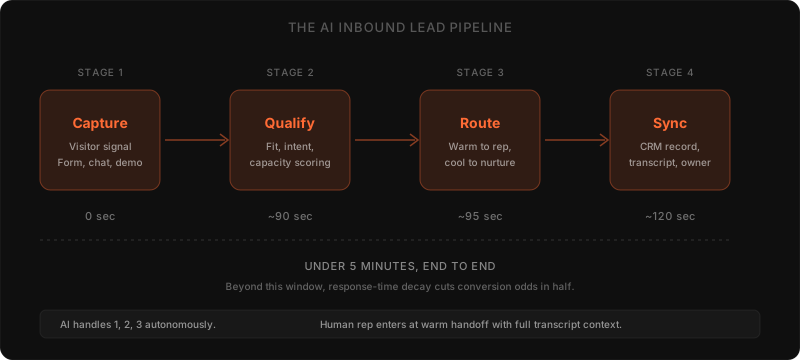
The diagram shows the timing budget. From the moment a visitor hits the site, you have under five minutes before response-time decay starts cutting your odds in half. Most inbound stacks blow this budget at the qualification stage, where a human SDR is asked to evaluate the lead before routing.
Let's walk through each stage.
Stage 1: Capture
Capture is where the visitor declares interest. The traditional artifact is a "Request a Demo" form. The modern alternative is a live AI conversation, an interactive demo, or a chat thread, all of which collect the same information but in a less friction-laden way.
The capture choice matters for two reasons. The form-fill model collects 4 to 8 structured fields and ends. The AI-conversation model collects the same 4 to 8 fields plus a transcript of the prospect's actual phrasing, which is high-signal data for the next stage. Form-fill captures intent at a snapshot. Conversation captures intent in motion.
Common capture surfaces:
- Static form (Pardot, Marketo, HubSpot Forms). Lowest friction to implement; lowest signal captured.
- Live chat with human handoff (Intercom, Drift, Front). Higher signal; bottlenecked on human availability.
- AI chat agent (Drift Conversations, Intercom Fin, Qualified). 24/7 capture; quality depends heavily on the AI's ability to ask differentiating questions.
- AI voice or interactive demo (Rayko, Saleo, Supersonik, Karumi). Highest signal; converts the capture moment into an actual product experience.
For Rayko specifically, the capture surface is the live AI demo agent. A prospect clicks "Start Demo," and within seconds is in a voice conversation with an AI that runs the actual product. The capture stage and the demo stage collapse into one experience, which is structurally different from a form-fill model and changes the qualification math at the next stage.
The choice of capture surface defines the data quality available to qualification. You cannot qualify on signals you didn't capture.
Stage 2: Qualify
Qualification is where AI adds the most leverage. A human SDR qualifying a lead does it in 5 to 15 minutes, plus follow-up emails. An AI does it during the capture conversation, which means the qualification result is available the instant the prospect says they want to talk to sales.
The frameworks every B2B sales team uses (BANT, MEDDIC, MEDDPICC, CHAMP) all decompose into the same three buckets:
Fit. Is this prospect's company in your ICP? Industry, size, geography, technology stack, regulatory profile. This is mostly a firmographic check, and modern data-enrichment APIs (Clearbit, Apollo, ZoomInfo) resolve most of it from an email domain.
Intent. Is the prospect actively evaluating a solution to a real pain? This is what the AI conversation extracts that no enrichment API can. The phrasing the prospect uses to describe their pain ("we have to renew our Walnut contract in March and the team hates it" vs. "just looking around") is what separates a real opportunity from a tire-kicker.
Capacity. Does the prospect have authority, budget, and a timeline? The classic BANT signals. Most B2B teams over-index here, asking budget questions too early and disqualifying buyers who would have closed if given six more weeks of nurture.
A well-designed qualification flow asks 4 to 7 questions, never more. Each question is calibrated to differentiate qualified from unqualified at your specific company. For most B2B SaaS sellers, the highest-signal questions are:
- "What tool are you using today?" (current vendor reveals competitive position and switching cost)
- "What is the specific pain that brought you here today?" (intent signal in their words)
- "What is your timeline for making a decision?" (capacity signal, also urgency)
- "Who else is involved in evaluating this?" (DMU mapping, also single-threading risk)
Notice that "What is your budget?" is not on the list. Budget is downstream of the conversation. Asking it first telegraphs commodity sales.
The AI's job at this stage is to score the answers and produce a structured output: fit score, intent score, capacity score, plus the verbatim transcript. That structured output is what Stage 3 (routing) consumes.
Stage 3: Route
Routing is the decision of what happens to the lead next. There are usually four outcomes:
- Warm to rep (high fit, high intent, high capacity): book a meeting now, within the same conversation if possible.
- Lukewarm to rep (high fit, medium intent): book a discovery call later, with full context attached.
- Cool to nurture (high fit, low intent): drop into a marketing nurture sequence, do not consume rep time.
- Cold to close-out (low fit): send a polite "thanks, we are not a fit" auto-response, do not waste anyone's time.
| Bucket | Lead profile | Routing action |
|---|---|---|
| Warm to rep | High fit, high intent, high capacity | Book a meeting now, within the same conversation if possible |
| Lukewarm to rep | High fit, medium intent | Book a discovery call later, with full context attached |
| Cool to nurture | High fit, low intent | Drop into a marketing nurture sequence, do not consume rep time |
| Cold to close-out | Low fit | Send a polite not-a-fit auto-response |
Most teams get the warm and cold buckets right and butcher the middle two. The lukewarm bucket is where teams either lose deals to "we'll follow up next quarter" or burn rep time on premature meetings.
The right routing logic is opinionated. Set the warm-threshold high (better to over-qualify than to send a rep on a bad meeting). Set the cold-threshold conservatively (better to nurture a marginal lead than to close them out). Tune over 30 to 60 days based on actual conversion data.
Tools that handle routing logic:
- Native CRM workflows (HubSpot Workflows, Salesforce Flow, Pipedrive Automations). Free with the CRM, sufficient for most teams up to ~$10M ARR.
- Workflow tools (n8n, Zapier, Make). Higher flexibility, useful when integrations span multiple SaaS apps.
- Lead-routing platforms (Chili Piper, RevenueHero, Distribute). Specialized for round-robin scheduling, territory rules, and instant-meeting booking.
- AI-native routing (Default.com, Clay, Apollo). Newer category that combines enrichment, scoring, and routing in one tool.
For most B2B SaaS teams under $50M ARR, the right pattern is: use the CRM's native workflow engine, add Chili Piper or RevenueHero for instant scheduling, plug in Clearbit or Apollo for enrichment, and let the AI capture agent (Drift, Intercom Fin, Qualified, or Rayko) feed the structured qualification data into the workflow.
Stage 4: Sync to CRM
The final stage is writing everything into the CRM with enough context that the rep walking into the meeting feels prepared, not surprised. This is where most automation pipelines silently fail, because the data lands in the CRM in a shape that reps don't read or trust.
Four artifacts every CRM record should carry after AI qualification:
- Structured fields: company, role, fit score, intent score, capacity score, and the qualification timestamp.
- Verbatim transcript: the full conversation, attached as a Salesforce Activity, HubSpot Engagement, or Pipedrive Note. Reps read this. AI summaries lose the signal a rep would have caught.
- Next-action assignment: who owns the lead, by when, with what outcome. Without ownership, leads sit in queue.
- Source provenance: which campaign drove the lead, what page they entered on, what they were viewing before they engaged.
Skipping any of these four creates a "garbage in, garbage out" failure mode. The lead is technically in the CRM, but the rep can't act on it because they don't have the context to call confidently.
A good sync layer also handles deduplication and merge logic. If the prospect already exists in the CRM (maybe they downloaded a whitepaper six months ago), the new qualification data should append, not overwrite. Most CRMs handle this natively; the trap is when middleware does the writing and bypasses CRM dedupe rules.
The tools landscape
The inbound automation market splits into roughly five categories. Choose based on which stage of the pipeline you most need to upgrade.
Conversational marketing platforms. Drift, Intercom (Fin), Qualified. Strong on Stage 1 (capture) and Stage 2 (qualify) for chat-based inbound. Weakest on Stage 4 (CRM sync depth). Pricing $1,500 to $10,000 per month for B2B SaaS use cases.
Live AI demo platforms. Rayko, Saleo's AI agent, Supersonik, Karumi. Strong on Stage 1 because the capture moment becomes an actual product experience. Strong on Stage 2 because the prospect is engaging with the product, which generates higher-signal qualification data than a chat thread. See our interactive demo platforms comparison for the full landscape.
Click-through interactive demo platforms. Storylane, Navattic, Walnut, Arcade, Supademo. Capture-focused. Good for top-of-funnel education, less effective at qualification because they cannot ask the prospect questions in real time.
Lead routing and meeting booking. Chili Piper, RevenueHero, Distribute, Default.com. Strong on Stage 3 (routing) and Stage 4 (sync). Designed to bolt onto whatever capture surface you already have.
Data enrichment and ICP scoring. Clearbit, Apollo, ZoomInfo, Crustdata. Cross-cutting; feed into Stages 2 and 3 as the firmographic layer of qualification.
The pattern most successful B2B SaaS teams settle into is: pick one capture-and-qualify tool (conversational marketing or live AI demo), one routing-and-booking tool (Chili Piper or equivalent), one CRM (HubSpot or Salesforce), and one enrichment provider (Apollo or Clearbit). Glue them together with the CRM's native workflow engine. Add no more tools than that until something breaks at scale.
Common pitfalls and how to avoid them
We have seen these mistakes repeat across teams adopting inbound automation. They are predictable and avoidable.
Pitfall 1: Disqualifying too aggressively at launch. Teams set the qualification threshold high to "save rep time" and discover six weeks later that the AI is rejecting good leads because the threshold was tuned on intuition, not data. Fix: launch with a permissive threshold, audit every rejected lead for the first 60 days, then tune down based on actual conversion data.
Pitfall 2: Treating the transcript as optional. Reps don't trust AI summaries because the summary loses the prospect's exact phrasing. Fix: always attach the verbatim transcript to the CRM record. Pretty UI is not a substitute for raw text reps can read in 30 seconds.
Pitfall 3: Routing logic in code instead of in the CRM. When routing rules live in Zapier or n8n, the sales ops team can't see them, can't audit them, and can't change them without engineering involvement. Fix: keep routing rules in HubSpot Workflows or Salesforce Flow where the people who own routing can see them.
Pitfall 4: Sounding like a robot. AI capture flows that read like a form-fill survey lose prospects in the first two questions. Fix: the AI's first message is conversational, asks an open-ended question, and only switches to structured qualification once the prospect has invested in the conversation. See our piece on why buyers prefer talking for the underlying psychology.
Pitfall 5: Ignoring the long tail of "missed but warm" leads. Even a tuned AI rejects leads it shouldn't. Fix: build a weekly review of the bottom 10 percent of rejected leads and have a human spot-check. The leads recovered from this review often outperform the leads the AI accepted, because they are real prospects whose phrasing didn't match the model's training distribution.
Pitfall 6: Single-threading the AI. If the AI captures one decision-maker but never asks "who else is evaluating this," you single-thread the deal and lose to vendors who multi-thread. Fix: every qualification flow ends with a question about the buying committee. Our buying committees post covers this in depth.
Implementation: the first 30 days
If you are starting from a manual SDR-led inbound process, the migration to AI-led capture and qualification takes about 30 days for a team under 20 reps. The phased plan:
Week 1: Instrument the baseline. Measure your current state. Average time from form-fill to first rep contact. Conversion rate from form-fill to discovery call. Conversion rate from discovery call to opportunity. Without these baselines, you can't measure improvement and can't justify the investment.
Week 2: Pick the stack. Choose one capture-and-qualify tool, one routing tool, and confirm your CRM is ready to receive the data. Resist the urge to evaluate seven tools; pick the obvious one for your category and ship.
Week 3: Build the qualification flow. Write the 4 to 7 questions the AI will ask. Define the scoring logic. Define the four routing buckets (warm, lukewarm, cool, cold) and what happens at each. Define the CRM fields that will be populated. Have a rep dry-run the flow ten times to catch awkward phrasings.
Week 4: Soft launch. Run 50 percent of inbound traffic through the AI flow and 50 percent through your existing process. Compare conversion rates and rep feedback. Tune the AI based on what you learn.
After 30 days, move to 100 percent AI-led capture for inbound. Keep human SDRs on outbound and on accounts that explicitly request a human, but stop using SDRs as the front door for inbound. The math doesn't justify it once the AI flow is tuned.
Cost analysis: AI capture versus SDR-led inbound
The financial case for AI-led inbound qualification is straightforward when you do the math at scale. Consider a B2B SaaS team handling 1,500 inbound leads per month with 5 SDRs at $100,000 fully-burdened cost per rep, and an industry-typical inbound-to-opportunity conversion of 7 percent.
Under the SDR-led model, total annual cost is $500,000 in rep salary, plus tooling (CRM seats, dialer, sales engagement platform) of roughly $50,000. Of the 18,000 leads handled per year, 1,260 become opportunities. Cost per opportunity: $437.
Under the AI-led model, the qualification layer costs $30,000 to $60,000 per year depending on the tool (Drift, Qualified, Intercom Fin, Rayko all sit in this band for a mid-market deployment). The SDR team shrinks to 2 reps focused on outbound and the warm-handoff close, costing $200,000. Total cost: $260,000 to $290,000. Conversion rate typically improves 30 to 60 percent because response time drops from hours to seconds, so opportunity count rises to roughly 1,640. Cost per opportunity: $158 to $177.
The savings are real but the structural change is more important than the dollars. AI-led inbound makes the team less sensitive to traffic spikes (the AI scales linearly, the SDR team does not), removes the bottleneck of SDR hiring during growth periods, and makes inbound a measurably engineered system rather than a function of how good your SDR manager is at hiring this quarter.
The counterargument worth taking seriously is that AI-led capture under-performs human-led capture for high-ACV enterprise deals where the prospect expects a human at first touch. For deals over $100,000 ARR, our recommendation is to use AI for first-pass qualification (which captures the prospect's pain in their words, in real time) and route to a human within 60 seconds for the warm handoff. The AI does not replace the human; it makes the human's first conversation 10x more informed.
Compliance, data handling, and enterprise concerns
Inbound automation captures and processes prospect data in ways that touch GDPR, CCPA, and increasingly the EU AI Act. The compliance questions that come up in every enterprise procurement review:
Data residency. Where is the conversation transcript stored? For European prospects, EU data residency is increasingly mandatory. Most modern AI capture tools (Drift, Intercom, Rayko) offer EU residency on enterprise plans; verify this is contractually committed, not just marketed.
Consent capture. Is the prospect informed that they are talking to an AI, that the conversation is being recorded, and that the data is being used to qualify them? Plain-language disclosure at the start of the conversation handles this for most jurisdictions. Avoid burying the disclosure in a footer link.
Right to deletion. Under GDPR Article 17, prospects can request deletion of their data. Your AI capture tool should support a programmatic delete that propagates to the CRM and any downstream systems. This is rarely a default; ask explicitly during procurement.
Training data isolation. Your AI capture tool should not train its underlying models on customer conversation data. Most tools commit to this contractually but few enforce it technically. Ask for the SOC 2 report and the data-processing addendum, and read what they actually say about training data isolation.
Cross-border transfers. If the AI tool processes data in the US but your prospect is in the EU, you need Standard Contractual Clauses or an adequacy decision. The post-Schrems II landscape has tightened this; rely on your DPO, not vendor marketing copy.
For B2B SaaS sellers in regulated industries (fintech, healthtech, govtech), see our specific guides on AI demo automation in fintech, healthcare, and security and compliance. The qualification flow itself does not change much across regulated verticals, but the data-handling layer underneath does.
Ongoing tuning: what changes after launch
The qualification flow you launch on day one is not the flow you should be running on day 90. Three things drift over time and require periodic retuning.
Your ICP shifts. As you find product-market fit in adjacent segments, the firmographic signals that defined a "good lead" at launch will start under-counting good leads from new segments. Audit the bottom 10 percent of accepted leads and the top 10 percent of rejected leads quarterly. If a pattern emerges (a vertical you are now winning in is being filtered out), update the scoring weights.
Your product changes. Every meaningful product release changes which competitive comparisons matter, which pain points your demo should emphasize, and which questions are most differentiating. Rayko customers rebuild their qualification flow on a 90-day cadence to match product release cycles. Static flows go stale.
Buyer language shifts. The phrasing buyers use to describe their problem changes faster than most marketing teams realize. New entrants in your category coin new terms; analyst reports rename categories; LLMs trained on Reddit and X push specific jargon into mainstream usage. Your AI capture tool's question phrasing and recognition patterns need to keep pace. Read the rejected-conversations log monthly to catch this drift.
The teams that see the biggest sustained ROI from inbound automation treat the qualification flow as a living artifact, the same way they treat their pricing page or onboarding email sequence. Set, forget, and the flow rots.
Metrics that actually matter
Four metrics tell you whether your inbound automation is working. Anything else is vanity.
Time to first qualified contact. From visitor's first interaction to first rep touch on a qualified lead. Target: under 5 minutes for warm, under 30 minutes for lukewarm.
Qualification accuracy. Of leads the AI rated as warm, what percentage convert to opportunities. Target: 35 to 55 percent for B2B SaaS, depending on ICP tightness.
Rep time reclaimed. Hours per rep per week previously spent on first-touch qualification. Target: 6 to 12 hours per rep on a 30-rep team.
Conversion rate from inbound visitor to opportunity. The whole-pipeline metric. Target: improvement of 30 to 80 percent versus baseline within 90 days. Teams that hit lower numbers usually have a pre-existing capture problem (low-traffic site, weak offer) that automation can't fix.
Avoid celebrating "leads captured" as a metric. Capture is easy. Qualified opportunities are hard.
What to read next
If you are designing the qualification flow itself, our deep dive on why prospects prefer talking covers the conversational design choices that improve completion rates. The ROI business case breaks down the financial math on inbound automation versus SDR teams. And the interactive demo platforms comparison covers the capture-surface options in detail.
For Rayko specifically, the live AI demo agent collapses capture, qualification, and product experience into a single conversation, which is a structural difference from chat-based capture tools. If you want to see what that looks like, the public demo runs Rayko on Rayko itself and asks you the same qualifying questions a real prospect would get.
Inbound automation is not a single product purchase. It is a stack decision that touches capture, qualification, routing, and CRM. Get any one stage wrong and the whole pipeline leaks. Get all four right, and you compound a 30 to 80 percent conversion improvement that sales teams can feel within a quarter.
Reviewed September 2026: does the capture qualify route sync pipeline still hold?
Yes. The four stage pipeline described in this guide still reflects how B2B inbound stacks are built in September 2026. Capture, qualify, route, and sync remain separate responsibilities, and the response time and handoff problems cited from Salesforce, Gartner, and HubSpot research still apply.
We rechecked the source hubs listed in this post in September 2026. The Salesforce State of Sales hub, the Gartner B2B buying journey hub, the HubSpot State of Marketing hub, the Drift learn hub, and the Lead Response Management study hub remain the canonical references for response decay, self serve buying, and conversational benchmarks. No change in those sources requires a rewrite of the four stages or the BANT and MEDDIC framing used above.
The tooling guidance also holds without edit. HubSpot Workflows, Salesforce Flow, and Pipedrive Automations remain the default place to keep routing logic visible to sales operations, with Chili Piper, RevenueHero, Distribute, Default, Clay, Apollo, Clearbit, and ZoomInfo filling the scheduling and enrichment roles described above. If you are auditing this post before implementation, focus revalidation on your own thresholds and CRM field maps rather than on the architecture. The conservative threshold start, the verbatim transcript attachment, and the weekly review of rejected leads remain the controls that prevent missed good leads.
Frequently asked questions
How do I qualify leads automatically before my sales team sees them?
Run inbound visitors through a structured AI conversation that captures BANT or MEDDIC signals (budget, authority, need, timing, metrics, decision criteria, paper process, identified pain, champion) before any rep involvement. The AI asks 4 to 7 questions tailored to your ICP, scores the response, and only forwards prospects who meet a threshold. Tools like Drift, Qualified, Intercom Fin, and live AI demo agents like Rayko all do this with different depths. The key is defining your qualification criteria clearly, the AI is only as good as the rules you set.
How do I set up automated lead routing to my CRM?
Three components are required. First, a capture layer (form, chat, demo agent) that collects the prospect's identity and qualification signals. Second, a routing logic layer (rules, scoring, or AI classification) that decides where each lead goes. Third, a CRM integration layer (HubSpot, Salesforce, Pipedrive) that writes the lead, its score, the conversation transcript, and the next-action assignment. Most modern stacks use a workflow tool (n8n, Zapier, Make, native CRM workflows) to glue capture and CRM together, with AI handling the qualification in between.
What questions should my AI sales assistant ask prospects?
Ask for company size, role, current solution, timeline to decision, and the specific pain triggering the search. Skip questions whose answers you can derive from data enrichment (Clearbit, Apollo, ZoomInfo) like industry or revenue band. Lead with the question whose answer most differentiates qualified from unqualified prospects in your historical data. For B2B SaaS, that is usually company size and current tooling, not budget.
How do I know if my leads are actually qualified?
Three layered signals. Fit (does the prospect match your ICP on firmographic and technographic data), intent (how urgent and specific is their pain), and capacity (do they have authority, budget, and timeline). A truly qualified lead clears all three. Most teams over-index on fit and under-index on intent, which is why so many MQLs convert at single-digit rates to opportunities.
How do I pass full lead context into my CRM automatically?
Map every captured field to a CRM property and pass the full conversation transcript as an attached note or activity record. The transcript matters more than the structured fields, reps want to read what the prospect actually said before the first call. Salesforce Activities, HubSpot Engagements, and Pipedrive Notes all support this. Avoid summarizing the conversation in code, the AI summary loses signal that a rep would have caught.
Should my AI assistant transcribe calls or just qualify leads?
Both, when feasible. Transcripts capture the prospect's exact phrasing of their pain, which is gold for personalized follow-up and product-marketing feedback. Qualification fields are the structured layer that drives routing. Voice-based AI agents (Deepgram, AssemblyAI, native models) do streaming transcription for under $0.01 per minute, so the cost of capturing both is negligible.
How do I make sure automation doesn't miss good leads?
Set the qualification threshold conservatively at first (catch more, false-positive rate higher), then tune down over 30 days based on rep feedback. Always include an explicit fallback path, if the AI is uncertain, route to a human. Build a dashboard of leads the AI rejected and have a human review the bottom 10 percent weekly for the first 60 days. Most missed-lead failures come from too-aggressive filtering at launch, not from AI capability.
How do I set up my AI assistant to only pass warm leads to reps?
Define warm explicitly. For most B2B SaaS teams, a warm lead is one who has confirmed three things: ICP fit, an active evaluation process, and decision-making influence. The AI captures these in the conversation, scores them, and applies a threshold (most teams start at 70 out of 100, then tune). Cold and lukewarm leads route to nurture sequences instead, which preserves rep time without losing the lead.
Can I use AI to qualify leads before my sales team gets involved?
Yes, and most modern inbound stacks do exactly this. AI handles the first 90 seconds of every inbound interaction, captures structured qualification, and only escalates to a rep when the prospect meets thresholds for fit, intent, and capacity. Reps see only conversations that have already passed qualification, with the full transcript attached. Average time freed per rep is 6 to 10 hours per week on small teams, more on larger ones.
Sources
- State of Sales Report, Salesforce Research
- B2B Buying Journey Insights, Gartner
- State of Inbound, HubSpot Research
- Conversational Marketing Benchmark, Drift
- Lead Response Management Study, MIT / InsideSales
Cite this article
Utkarsh Agrawal. "AI Lead Qualification and CRM Routing: B2B Inbound Guide." RaykoLabs Blog, May 10, 2026. https://raykolabs.com/blog/ai-lead-qualification-crm-routing

Utkarsh Agrawal
CTO, RaykoLabs
Utkarsh Agrawal is CTO of RaykoLabs, where he leads engineering on Rayko, the AI demo agent that runs live, voice-enabled product demos in a real browser for B2B SaaS teams. His work spans real-time voice interaction, browser automation with Playwright and Browserbase, speech-model orchestration, and the infrastructure that keeps autonomous demos reliable around the clock. On the RaykoLabs blog he writes practical guides on voice-enabled product demos, demo automation, and what it takes to ship production AI agents for sales: how to qualify prospects mid-demo, how to measure demo performance, and how buying teams actually evaluate demo software. His comparisons of demo platforms are built from hands-on testing and vendor documentation, with trade-offs stated plainly so buyers can decide fit.
See RaykoLabs in action
Watch an AI agent run a live, personalized product demo, no scheduling, no waiting.
START LIVE DEMORelated articles
2026 After Hours AI Demos: Capture Inbound While You Sleep
Capture after hours inbound with 24/7 AI demos that qualify, demo, and book while your team sleeps. Stop losing night pipeline. Learn how now.
2026 Interactive Demo Mistakes: 9 Fixes That Convert
Find the nine structural mistakes that stall interactive demos, from length to gating to weak CTAs, and how to fix each. Audit your demo today.
Interactive Demo vs Video Demo vs Live Demo (2026)
Interactive demos vs video demos vs live human demos vs AI voice demos. Honest format-by-format comparison with conversion data for B2B sales teams in 2026.