Loading...

2026 Rayko AI Demo Agent: Setup to Live Demo Guide
See how the Rayko AI demo agent learns your product, runs live voice demos, and hands off qualified context to sales. Watch it work. Try the live demo.
Quick answer
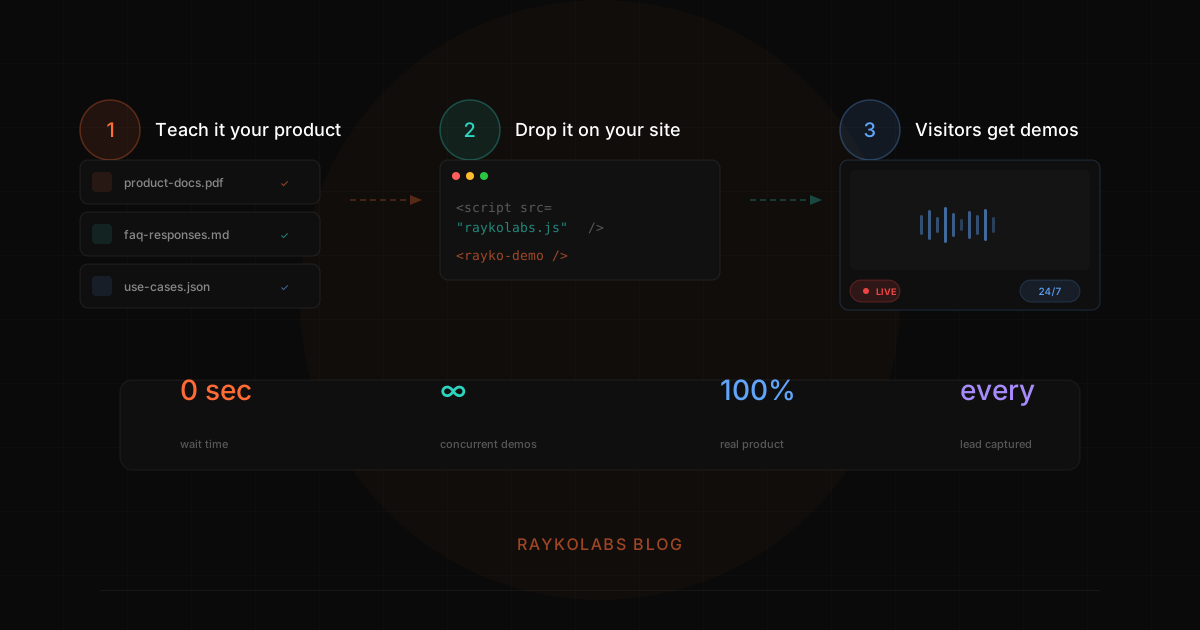
RaykoLabs is an AI agent that controls your actual product in a live browser and talks to prospects while doing it, not a stitched-together slideshow. Setup has five steps: teach it your product from docs and FAQs, connect your product, deploy on your site, let a prospect start a voice demo where the agent navigates and answers questions live, then hand qualified context back to your sales team.
Want this running on your product? Rayko demos it live, with your prospects asking questions by voice.
START LIVE DEMOMost "AI demo" tools are glorified slideshows. They capture screenshots, stitch them together, and call it interactive. We know because we evaluated every one of them before deciding to build something different.
RaykoLabs is an AI agent that controls your actual product in a live browser and talks to your prospects while doing it. This post walks through exactly how it works, from initial setup to a live demo session. No hand-waving, no buzzwords, just the technical reality of what happens when a prospect clicks "Start Demo."
If you also need click-through tours alongside the AI agent, our no-developer interactive demo setup guide covers that path. At a glance, the path from setup to live demo runs in five steps:
| Step | What happens | What you provide or get |
|---|---|---|
| 1. Teach it your product | The agent learns features, FAQs, positioning, use cases, and persona mapping | You provide docs, FAQs, competitive positioning, use cases |
| 2. Connect your product | Playwright on Browserbase drives a real browser of your live product | You configure starting URL, navigation paths, context markers |
| 3. Deploy on your site | A single line snippet, or a shareable tracked demo link | You add the snippet or share the link |
| 4. A prospect starts a demo | Browserbase session launches, product loads, voice agent navigates and answers live | The prospect gets a real-time voice walkthrough |
| 5. After the demo | Session captured and summarized for sales follow-up | You get transcript, feature engagement, recording, lead score, follow-up |
Step 1: Teach it your product
RaykoLabs starts by learning your product. You provide:
- Product documentation, feature descriptions, how-to guides, release notes
- FAQs, the questions your sales team hears most
- Competitive positioning, how you compare to alternatives (this is critical for handling objections mid-demo)
- Use case descriptions, who your ideal customers are and what problems they solve
- Persona mapping, which features matter most to which buyer roles
This becomes the agent's knowledge base. It does not just memorize facts, it understands the relationships between features, use cases, and customer pain points so it can have intelligent conversations. For background on what AI demo agents are and how they differ from chatbots, see our complete guide to AI demo agents.
Step 2: Connect your product
RaykoLabs controls a real browser session running your actual product. When a prospect sees a demo, they are watching the real application being used in real time, not a screenshot, not a recording, not a simulation.
Under the hood, we use Playwright for browser automation and run sessions through Browserbase, which gives us cloud-hosted browsers that scale horizontally. You configure:
- The starting URL, where the demo begins
- Navigation paths, key workflows the agent should know how to demonstrate
- Context markers, UI elements that help the agent understand where it is in the application
The agent uses our three-layer navigation system to move through your product: context detection reads the current page state, navigation planning determines the optimal path, and LLM integration generates contextual responses. This is the same architecture we describe in our browser automation deep dive.
After building this system, we learned something counterintuitive: less context to the LLM actually produces better demos. Early versions sent entire DOM trees to the model and got slow, confused responses. Stripping context down to just the relevant UI elements and navigation state cut token usage by about 85% and made the agent faster and more accurate.
Step 3: Deploy on your site
Adding RaykoLabs to your website is a single line:
<rayko-demo />
Or you can use a shareable demo link that works anywhere, in emails, on landing pages, or in LinkedIn messages. Each link tracks who clicks it and what they do.
Step 4: A prospect starts a demo
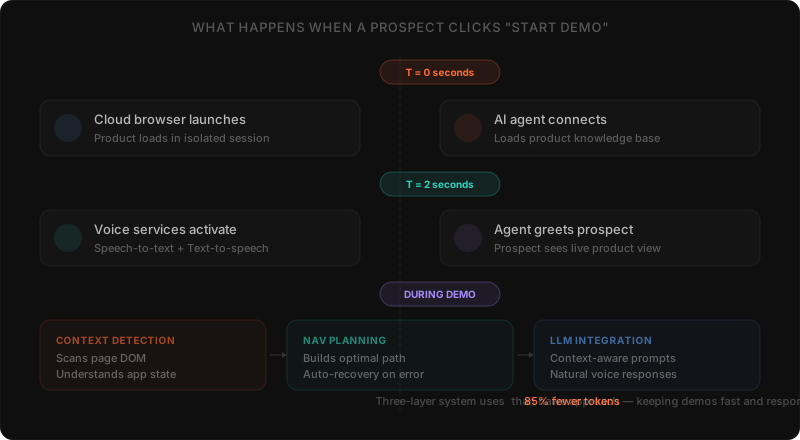
Here is what happens behind the scenes when someone clicks "Start Demo":
The first 2 seconds
- A fresh Browserbase session launches in the cloud
- Your product loads in that browser via Playwright automation
- The AI agent connects with full knowledge of your product
- Deepgram activates for streaming speech-to-text; Cartesia activates for text-to-speech
- The prospect sees a live view of your product and hears the agent greet them
All of this happens before most scheduled demos even get past the "Can you see my screen?" phase.
During the demo
The agent and prospect have a real-time voice conversation. The prospect can:
- Ask anything, "How does reporting work?" "Can this integrate with Salesforce?" "Show me the admin panel." "How do you compare to [competitor]?"
- Request specific features, the agent navigates there immediately
- Interrupt, the agent handles mid-sentence redirects gracefully
- Go deep on one area, the agent adapts its explanations based on the questions being asked
Meanwhile, the agent navigates the product, clicking, scrolling, filling in forms, and explains what it is showing. It tracks which features the prospect explored and what questions they asked, capturing lead information naturally through conversation.
In our production traffic, a typical demo session runs eight to twelve minutes with eight to fifteen prospect questions, much longer engagement than the 30-90 seconds most click-through tours sustain, and longer on average than scheduled video demos once you account for the silence and screen-share latency on a live Zoom call. The driver is not gimmickry; it is that the prospect is actually answering their own questions in real time, which is the kind of activity people are willing to spend time on.
Behind the scenes
The three-layer system works continuously:
- Context detection scans the current page to understand the application state
- Navigation planning determines the optimal path to whatever the prospect wants to see
- LLM integration generates natural, contextual responses in real time
This architecture uses about 85% fewer tokens than a naive approach. The session is recorded with rrweb so your sales team gets a pixel-perfect replay of everything that happened. Not a summary, the actual session.
Step 5: After the demo
When the session ends, RaykoLabs captures everything:
- Full transcript, every question asked and every response given
- Feature engagement, which parts of the product the prospect explored
- Session recording, a replayable rrweb recording of the entire browser session
- Lead score, an AI-generated assessment of prospect interest and fit
- Suggested follow-up, recommended talking points for when your rep reaches out
All of this flows into your dashboard. Your sales rep gets a notification with a complete summary, so when they follow up, they already know exactly what the prospect cares about. No more "So, what are you looking for?", the rep already knows. This is what turns a discovery call into a closing conversation.
Across the teams we have shipped this for, AEs who consistently review the transcript and intent summary before a follow-up call report meaningfully higher conversion to a second meeting than reps who don't, anecdotally in the 1.5-2x range, though the cohort is small enough to treat as directional rather than statistically tight. The mechanism is simple: when the rep can open a call with "I saw you spent six minutes in the audit-trail view, let me show you the SOC 2 mapping for that workflow," the conversation is already two stages further along than a discovery script could ever start it.
What makes this different
It is your real product
Not a simulation, not a prototype, not a video. The prospect watches your actual application being used. This builds trust in a way that no static content can match. Compare this to the screenshot-based approach of tools like Navattic or Walnut.
It is voice-first
Text chat is fine for support tickets. For a product demo, where you want someone to feel the energy and capability of your product, voice creates an entirely different experience. The prospect talks naturally and the agent responds naturally. We have found that voice demos generate longer sessions and more questions asked than text-based alternatives.
It makes your reps better
By the time a rep talks to a prospect, that person has already seen the product, asked their initial questions, and self-qualified. The rep's call becomes a closing conversation. For a detailed comparison of when to use AI vs. human reps, see human vs. AI demos.
Getting started
Setting up RaykoLabs takes less than a day. Upload your knowledge base, configure your demo flows, and drop the snippet on your site.
For most launch customers, the path from account creation to a live demo running on the website lands inside one business day, typically four to eight working hours of effort spread across knowledge-base upload, demo-flow configuration, brand styling, and snippet deployment. The longer the product, the longer the knowledge-base curation step takes; the rest of the setup is roughly fixed. Customers with denser products (deep API surfaces, multi-tenant configuration, role-aware permissions) tend to land closer to two or three days as they iterate on the agent's guardrails.
Here is one thing we did not expect when we built this: the sales teams that get the most value from RaykoLabs are not the ones trying to replace their reps. They are the ones using AI demos to make their reps' time 10x more valuable. The AI handles volume and discovery. The human handles nuance and closing. That division of labor is where the ROI compounds. See the full business case for AI demos if you want to model this for your team.
Buyer expectations have changed. People want to see your product now, not next Thursday. RaykoLabs makes that possible.
How long does setup take and what should you prepare
Setup moves fastest when you arrive with a clear starting point, a small set of representative demo data, and one owner who can approve language. Most teams can go from account creation to a live demo quickly when those inputs are ready, because the remaining work is configuration and review rather than custom engineering or content production from scratch.
What to gather before you begin:
- Product sources the agent should trust, such as help docs, FAQs, release notes, and one or two strong sales decks. Mark which sources are current and which are legacy so outdated pages do not shape answers.
- A demo tenant with realistic sample records, plus login details or access rules for the starting URL. Avoid empty states and avoid sensitive customer data. The agent shows what the tenant contains, so believable data matters more than exhaustive data.
- One primary flow to launch with, described the way a good rep would frame it: who the buyer is, what problem they bring, which screens prove the point, and which topics should route to a human.
- Brand and tone notes, including how you refer to plans, roles, and competitors, plus any phrases to avoid. A short style note prevents more rework than a long feature list.
- A reviewer from sales who can watch the first sessions and flag wording that feels off. Early feedback on tone and scope is the highest leverage input in the whole setup.
If you need a category level checklist for the click through side of the same launch, use our no developer setup guide alongside this page.
How do you train the agent on your product voice and positioning
You train the agent by giving it curated product knowledge, example answers for common questions, and clear rules for edge cases, then reviewing real sessions and correcting gaps. The agent learns your positioning from the materials you provide and from the corrections you make after watching how prospects respond to its explanations in practice.
Start with positioning before scripts. Provide your standard description of each core workflow, the proof point that supports it, and the competitor framing you want used when comparisons arise. Include the objections your team hears most and the responses your best reps actually use, written in plain language rather than marketing slogans.
Then shape behavior with boundaries:
- Define what the agent should do when it does not know an answer. A good pattern is to acknowledge the limit, capture the question for follow up, and offer a path to a human rather than improvising.
- List topics that always need a human, such as custom pricing, legal terms, or security reviews, and give the exact handoff line you want used.
- Provide persona notes that explain which proof matters to operators, managers, and technical reviewers, so the agent can adjust depth without changing facts. Our personalization guide offers a useful structure for those notes.
- Review transcripts in the first weeks with an eye for wording, not just accuracy. Small edits to how a step is introduced or how a trade off is framed compound across every future session.
How do you keep the demo accurate as your product changes
You keep the demo accurate by treating the knowledge base and demo tenant as living assets with owners and a simple update routine. Because the agent drives your live product rather than replaying captures, interface changes do not break the demo path, but outdated docs, stale sample data, and retired messaging can still cause confusing answers over time.
A lightweight routine that works for most teams:
- Assign one owner for knowledge content and one for demo data. When a feature ships or a message changes, those owners update the source note and the tenant in the same cycle as the release.
- After each release, run a short smoke walkthrough of the primary flow and two common questions. Confirm navigation still lands where expected and that new labels are reflected in answers.
- Retire or archive outdated pages promptly. Agents reflect what they are given, so a legacy help article that contradicts the current product will surface at the worst moment.
- Revisit guardrails quarterly, including read only rules, routed topics, and CRM fields captured for sales. Needs evolve as you add flows for new personas or verticals.
- Keep sales in the loop with a brief changelog note that explains what changed in the demo and what reps should listen for in follow up calls. This keeps the human handoff sharp and prevents drift between what the agent shows and what reps promise.
Verdict: Rayko runs your live product with voice while your team keeps control
The Rayko AI demo agent works by learning your docs and product, driving your product in an isolated browser, narrating by voice, answering questions in real time, and sending structured context to your CRM so sales follows up with full visibility.
Setup takes about a day from knowledge upload and sandbox access to smoke test. Each session stays isolated, guardrails keep the agent read only where needed, and every handoff includes what was shown and asked. Try the live demo to see it.
Frequently asked questions
How does the Rayko AI demo agent work?
Rayko uses Playwright running on Browserbase to control a real browser instance of your live product. Deepgram handles streaming speech-to-text from the prospect; Cartesia handles text-to-speech for the agent's voice. A three-layer navigation system (page understanding, intent routing, action execution) decides what to click next based on the prospect's question and the current product state.
How long does Rayko take to set up?
One day. Customers upload a knowledge base (existing docs, FAQs, product spec, sales decks) and provide either a sandbox tenant or a demo-data tenant. Rayko ingests the knowledge base, validates against your product, and runs a smoke-test demo flow. Most customers go from contract to first live demo in under 24 hours.
What does Rayko cost?
Free 30-day pilot with full product access. After the pilot, $9 per completed demo (consumption pricing). No per-seat fees, no setup fees, no platform fee. Enterprise plans with SSO, SLA, and custom integrations are available with custom pricing.
Does Rayko work with my product?
Rayko works with any web-based B2B SaaS product. The agent uses standard browser automation, so anything a human could navigate via Chrome, Rayko can navigate. Native mobile apps and on-premise software are not currently supported.
Is Rayko secure for enterprise demos?
Yes. Each session runs in an isolated Browserbase tenant with no cross-session data leakage. Customer data is processed only for the demo session lifetime; Rayko does not train on customer product data. SOC 2 in progress, GDPR-compliant data handling. Enterprise plans include SSO, custom security review, and procurement support.
Can I see Rayko before I sign up?
Yes. The live demo at https://demo.raykolabs.com/d/raykolabs runs Rayko on Rayko itself. You can have a voice conversation with the agent, ask product questions, and see the browser automation in real time. No form, no scheduling.
Sources
- Playwright Documentation, Microsoft
- Browserbase Documentation, Browserbase
- Real-Time Speech AI, Deepgram
- Cartesia Voice Models, Cartesia
- Web Speech API, MDN Web Docs
Cite this article
Utkarsh Agrawal. "2026 Rayko AI Demo Agent: Setup to Live Demo Guide." RaykoLabs Blog, February 18, 2026. https://raykolabs.com/blog/how-rayko-ai-demo-agent-works

Utkarsh Agrawal is CTO of RaykoLabs, where he leads engineering on Rayko, the AI demo agent that runs live, voice-enabled product demos in a real browser for B2B SaaS teams. His work spans real-time voice interaction, browser automation with Playwright and Browserbase, speech-model orchestration, and the infrastructure that keeps autonomous demos reliable around the clock. On the RaykoLabs blog he writes practical guides on voice-enabled product demos, demo automation, and what it takes to ship production AI agents for sales: how to qualify prospects mid-demo, how to measure demo performance, and how buying teams actually evaluate demo software. His comparisons of demo platforms are built from hands-on testing and vendor documentation, with trade-offs stated plainly so buyers can decide fit.
See RaykoLabs in action
Watch an AI agent run a live, personalized product demo, no scheduling, no waiting.
START LIVE DEMO