Loading...

2026 Self-Serve Product Demos: Convert Buyers Faster
2026 guide to self-serve product demos: why click-through tours stall buyers and how live AI voice demos answer questions and lift conversions fast.
Quick answer
A self-serve product demo lets prospects experience your product without booking a sales call. Most are click-through tours: screenshot walkthroughs on fixed paths that cannot answer the use-case questions real B2B buyers have, which is why they convert poorly. Demos that actually serve buyers run on the live product and answer questions in real time, typically through an AI voice agent, converting 2 to 3 times better than static tours.
Want this running on your product? Rayko demos it live, with your prospects asking questions by voice.
START LIVE DEMOA prospect lands on your pricing page at 11 PM on a Sunday. She has been comparing three vendors all weekend. Two of them offer a "self-serve demo", one is a Navattic tour with 14 click targets and a progress bar, the other is a Storylane walkthrough with annotated screenshots. She clicks through both in under three minutes. Neither answers her actual question: can this product handle SSO provisioning for 2,000+ users across multiple identity providers? She leaves both sites and books a call with the third vendor, who happens to have the worst product but was the only one willing to let her explore the answer on her own terms.
The data here is consistent across multiple buyer studies. Buyers who can fully self-serve through their evaluation reach a purchase decision noticeably faster than those routed through traditional sales-gated funnels, and analyses of B2B revenue funnels show that buyers who complete substantial product exploration before a sales conversation convert at meaningfully higher rates than those who book a call cold. The interesting twist: this is not an either-or. Buyers who self-serve and then talk to a rep convert better than either path alone, but only when the self-serve experience is substantive enough to actually answer their questions.
This is the state of self-serve product demos in 2026. Everyone offers them. Almost nobody gets them right.
The self-serve demand is not slowing down
Buyers have been moving away from scheduled sales calls for years now, and the trend accelerated hard during and after the pandemic. Gartner's B2B Buying Journey research shows that 75% of B2B buyers prefer a rep-free sales experience. TrustRadius's Buyer Disconnect research found that nearly all B2B buyers want to self-serve at least part of the buying journey. Not 80%. Not 95%. All of them.
The reasons are obvious to anyone who has been on the buying side. Scheduling a demo takes days. Sitting through 45 minutes of feature narration you didn't ask for is a waste of time. Getting added to a sales cadence of 14 follow-up emails feels adversarial. Prospects are not avoiding your sales team because they are lazy, they are avoiding it because the process is designed for the seller, not the buyer. If your prospects are ghosting your demos, this is why.
So companies added self-serve demos. Problem solved, right?
Not even close.
What self-serve demos look like today
Most self-serve demos aren't self-serve at all, they're predetermined click paths disguised as exploration.
Here is the typical setup. A company uses Navattic, Storylane, or a similar platform to capture screenshots of their product. A product marketing manager arranges those screenshots into a sequence, adds hotspots and tooltips, writes a few lines of explanatory copy, and publishes the tour on the website. The prospect clicks where the blue dot tells them to click. They advance through 10 to 20 screens. They reach the end. That is the "self-serve demo."
There is nothing wrong with this for what it is. Click-through tours are fast to build, easy to embed, and give prospects a visual sense of the product. For top-of-funnel awareness, "What does this product look like?", they work fine. Our Navattic alternatives post covers the category in detail.
When those tours underperform, the cause is usually one of these interactive demo conversion mistakes. The problem is that companies treat these tours as if they replace the demo. They do not. A click-through tour answers the question "What does this look like?" It does not answer "Does this work for my use case?" or "How does this compare to what I'm using today?" or "Can I see the admin panel instead of the end-user view?" The moment a prospect has a question that deviates from the script, the tour is useless.
What is the difference between a product tour and a self-serve demo?
A product tour is a fixed click path through captured screens that shows what the interface looks like. A self-serve demo lets prospects explore the product and get answers without booking a call. Tours are scripted awareness content, while true self-serve demos support open questions, role-specific paths, and live product behavior.
If prospects cannot ask a question or deviate from the path, the asset is a tour. Label it honestly and pair it with a conversational layer for evaluation-stage buyers.
For teams using self-serve as a growth motion, voice demos as a PLG motion show what happens when the tour itself can talk.
The spectrum of self-serve: an evolution framework
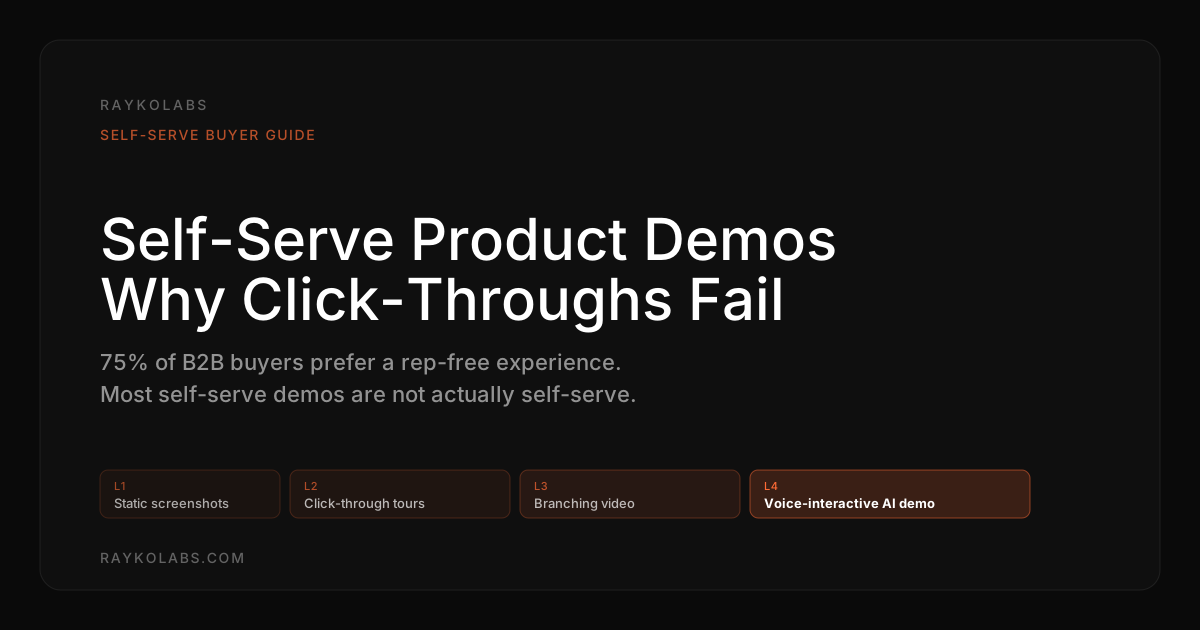
Self-serve product demos exist on a spectrum, and most companies are stuck at level two.
| Level | Format | Key limitation |
|---|---|---|
| 1 | Static screenshots and GIFs | Passive, no interaction at all |
| 2 | Click-through HTML captures | Fixed path, fake data, identical for every visitor |
| 3 | Video segments and branching demos | Constrained to pre-recorded branches, passive video |
| 4 | Voice-interactive AI demos on live product | None of the above, no path, no fake data, no script |
Level 1: Static screenshots and GIFs. The earliest form of self-serve. Marketing captures product screenshots, arranges them on a landing page, adds captions. Prospects scroll and look. No interaction. This still exists, plenty of companies rely on feature pages with annotated screenshots. It is better than nothing, but the experience is passive.
Level 2: Click-through HTML captures. This is where Navattic, Storylane, and similar platforms operate. They capture the product's front-end code or screenshots, overlay interactive hotspots, and let prospects click through a guided path. The step up from static screenshots is real, the prospect feels like they are inside the product. But the path is fixed, the data is fake, and the experience is identical for every visitor regardless of their role, industry, or questions.
Level 3: Video segments and branching demos. Some teams use platforms like Consensus or Demostack to create video-based demos with branching logic. The prospect watches a video clip, chooses a path at decision points, and follows that branch. More flexible than click-through tours, but still constrained to the branches someone anticipated and recorded. And video has its own engagement ceiling, demo fatigue hits hard when the format is passive.
Level 4: Voice-interactive AI demos on live product. The prospect speaks to an AI demo agent that controls the actual product in a real browser. They ask questions. They get answers. They say "show me the reporting module" and watch the product navigate there. They say "what about integrations with Okta?" and hear an informed response while the agent pulls up the relevant screen. No predetermined path. No fake data. No script.
Most of the industry is selling level 2 as if it were level 4. The gap between a click-through tour and a voice-interactive demo is not incremental, it is a category difference.
Where click-through tours fall short
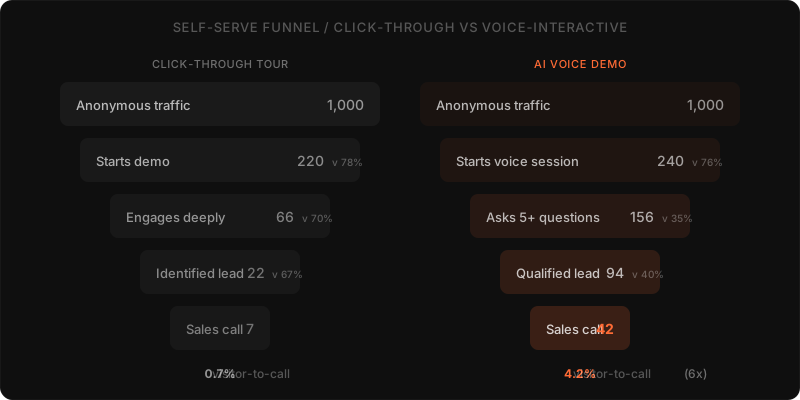
Credit where due: click-through tours moved the industry forward. Before them, the only way to see a product was to book a call. But now that they are table stakes, their limitations are harder to ignore.
Every visitor gets the same experience. A CISO evaluating your security product gets the same 14-screen tour as a junior analyst. A healthcare buyer sees the same demo as a fintech buyer. The tour cannot adapt because it has no idea who is clicking through it. Real buyers need answers specific to their context, not a generic walkthrough.
Questions go unanswered. Midway through a click-through tour, the prospect wonders: "Does this integrate with our HRIS?" There is no way to ask. They can't type a question. They can't deviate from the path. They either find the answer on their own (unlikely) or leave with the question unanswered (very likely). Unanswered questions kill deals quietly.
Maintenance is a hidden tax. Every time your product UI changes, a button moves, a new feature launches, a redesign ships, someone needs to re-capture and re-build the tour. Companies with fast release cycles spend hours per month maintaining demos that are perpetually out of date. This is the cost nobody talks about in vendor evaluations.
No real discovery happens. Sales teams learn nothing from a click-through tour beyond "X people started it and Y people finished it." There is no signal about what the prospect cared about, what confused them, or what objection they left with. Compare that to a conversation, even a short one, where every question is a data point.
The completion rate problem. Click-through tours suffer from steep drop-off. Prospects click through the first three or four screens and then leave. Not because they are uninterested, but because they hit a screen that is not relevant to them and there is no way to skip ahead to what matters.
How do you measure self-serve demo performance?
Start with demo starts, completion rate, and visitor-to-lead rate, then add question depth and sales follow-up quality. Completion shows whether the path held attention, question transcripts show what prospects cared about, and CRM outcomes show whether sessions created pipeline. Demo analytics beats completion rate alone because it captures intent.
Review drop-off screens weekly, read the questions asked after each drop-off, and revise the entry path so the most requested workflows appear first.
Voice-enabled self-serve: the next generation
Here's what self-serve looks like when it actually works.
A prospect arrives on your site. Instead of clicking through screenshots, they start a conversation. They say, "I'm an IT manager at a mid-size fintech company. I need to understand how your platform handles role-based access control." The AI demo agent responds, out loud, while navigating the live product to the access control settings. It walks through the RBAC model, shows the permission hierarchy, and demonstrates how to create a custom role. The prospect interrupts: "What about audit logs for compliance?" The agent navigates to the audit trail and explains what gets logged.
Four minutes. That is how long the whole interaction takes. She saw exactly what she needed, got her questions answered, and did it on her schedule. No form. No calendar. No waiting.
This is what voice-enabled product demos make possible. Under the hood, the technology stack is real: Deepgram converts the prospect's speech to text with sub-second latency. The LLM interprets intent and generates a response grounded in product knowledge. Cartesia converts that response to natural-sounding speech. Playwright controls the browser session, navigating the actual product. Browserbase hosts the cloud browser. And a three-layer navigation system, context detection, navigation planning, and LLM integration, handles the hard problem of going from "show me access controls" to the right sequence of clicks in a live application. For the full technical breakdown, see how the RaykoLabs AI demo agent works.
Notice what changed. It is not just a technology upgrade. It is a philosophical shift. Click-through tours assume the vendor knows what the prospect wants to see. Voice-interactive demos assume the prospect knows what they want to see, and gives them the tools to explore it.
What buyers actually want from self-serve
The disconnect between what buyers want and what most self-serve demos deliver is wide.
TrustRadius's annual B2B Buying Disconnect Report and 6sense's research on B2B funnel behavior both arrive at the same finding from different angles: buyers under 45 increasingly prefer to complete most of their evaluation without speaking to a vendor at all, and the median buyer is well past the halfway mark of their decision before they ever fill out a contact form. Forrester's tracking of rep-free buyer preference shows that share has roughly doubled since 2018, with the steepest growth in software purchases. The buyer has not suddenly become anti-social, they have simply realized that a vendor's website often answers their questions faster than the vendor's sales team can.
They want to explore, not follow. Buyers do not experience products in a linear sequence. They jump around. They start with the feature that matters most to their use case, skip the rest, and come back for details later. A guided tour forces linearity on an inherently non-linear process.
They want answers, not tooltips. A tooltip that says "This is where you configure SSO" is not useful to a buyer who wants to know whether you support SAML 2.0 with just-in-time provisioning for Okta. The depth of information buyers need at the self-serve stage is far beyond what a tooltip or annotation can provide.
They want the real product. Buyers are sophisticated enough to recognize a curated screenshot environment versus the actual application. When they see perfect data, suspiciously clean interfaces, and no edge cases, trust drops. Showing the live product, warts and all, builds more credibility than a polished mockup.
They want it right now. Not tomorrow. Not after a qualifying call. Right now, while they are thinking about it and motivated to evaluate. The voice-first buyer experience aligns with this urgency in a way that scheduled calls never will.
Let me be transparent about something as a builder in this space. When we started working on RaykoLabs, we assumed the hard part would be the voice AI. It wasn't. The hard part was navigation, getting an AI agent to reliably find its way through a complex SaaS product in real time, without scripted paths, handling loading states and edge cases and UI that was never designed for automated traversal. That's why the three-layer system exists. Context detection reads the page. Navigation planning maps the route. LLM integration ties it together. Getting all three layers to respond within our 800ms latency target, fast enough that a live conversation feels natural over WebSocket, took us months. Anyone claiming this problem is trivial either hasn't built it or is using a simplified version with heavy pre-scripting.
How to implement self-serve demos that actually work
If you want to move beyond click-through tours toward genuine self-serve experiences, here is a practical path.
Step 1: Audit what "self-serve" means on your site today
Look at your current demo experience from the buyer's perspective. Can a prospect ask a question? Can they deviate from the path? Can they see the feature that matters to their specific role? If the answer to all three is no, you have a guided tour, not a self-serve demo. That is fine as a starting point, but be honest about the gap. Our AI demo automation guide covers the full spectrum of what's available.
Step 2: Identify where prospects drop off and why
Look at your click-through tour analytics. Where do people abandon? What page does the drop-off happen on? If you have a live chat or support channel, look at the questions that come in right after someone views a demo. Those questions are the gap between what your self-serve experience provides and what buyers actually need.
Step 3: Layer in conversation, even if you start small
You do not need to jump from a Storylane tour to a fully autonomous voice agent overnight. Start by adding a way for prospects to ask questions during the self-serve experience. A chat widget backed by your product knowledge base is a meaningful step up. Then graduate to voice. The goal is to eliminate the dead-end feeling of hitting a question you can't ask.
As a starting baseline: most teams find that adding even a basic question-and-answer layer (a chat widget tied to product documentation) lifts mid-tour engagement noticeably within the first month, because it removes the dead-end frustration that drops people off when they hit a question they can't ask. From there, the upgrade path is to swap text Q&A for voice, then swap captured screenshots for live product, in that order.
Step 4: Move to live product, not captures
The maintenance cost of screenshot-based demos compounds every month. Every product update, every UI change, every new feature means re-capturing and rebuilding. Running demos on the actual product, using browser automation and cloud-hosted browsers, eliminates this entirely. The demo is always current because the demo is the product.
Step 5: Capture intent data, not just completion rates
Click-through tours give you completion metrics. Voice-interactive demos give you intent data, what the prospect asked about, what features they explored, what objections they raised, what competitors they mentioned. This data feeds directly into sales follow-up, making the first human conversation targeted and informed instead of generic. Our demo analytics guide breaks down exactly what signals to track and how to act on them.
How much does a self-serve demo platform cost?
Click-through platforms typically charge per seat per month with embed and gating features included. Enterprise video and sandbox tools use annual contracts with higher minimums. Voice AI agents typically bill per completed demo with no seat minimums. The right comparison is cost per qualified outcome at your traffic volume, not list price.
Model three inputs before signing: monthly sessions, seats required, and maintenance hours after each product release. Capture-based tools look cheaper until re-capture labor is included.
Self-serve is the future. Bad self-serve is not.
Here is a strong opinion to close on: the companies that win the next five years of B2B sales will not be the ones with the best products. They will be the ones that make it easiest for buyers to evaluate the product without talking to a human. The human vs. AI demo debate is already settled for top-of-funnel, self-serve is no longer optional.
But slapping a click-through tour on your website and calling it "self-serve" is the 2023 version of putting a chatbot on your site and calling it "AI." It checks a box. It does not move pipeline.
Buyers who have experienced a voice-interactive demo, where they spoke their question and watched the product respond in real time, will not go back to clicking blue dots on screenshots. The gap between a click-through tour and a real self-serve demo is the same gap between a product brochure and a live conversation. Both give you information. Only one gives you understanding.
Every piece of the technology to build real self-serve demos exists today. Streaming STT, fast TTS, browser automation, cloud-hosted sessions, and capable LLMs are all production-ready. The question is no longer "Can we do this?" It is "How long are you going to make buyers wait while you figure it out?"
Frequently asked questions
What is a self-serve product demo?
A self-serve product demo lets a prospect experience your product without booking a sales call. Traditional self-serve demos are click-through tours, screenshot-driven walkthroughs prospects navigate alone. Modern self-serve demos use AI voice agents that run on the live product and respond to questions in real time, removing the limitations of static tours.
Why do click-through self-serve demos fail to convert?
Click-through tours follow predetermined paths, cannot answer ad-hoc questions, and go stale after every product release. Prospects with specific use cases (most B2B buyers) cannot get their questions answered in a static tour, so they either book a sales call (slow) or leave (worse). The conversion gap between static tours and conversational demos is typically 2-3x in favor of conversational.
How do AI voice demos compare to click-through tours for self-serve?
AI voice demos run on the live product, answer prospect questions in real time, and adapt navigation based on what the prospect asks. Click-through tours show pre-captured screens with hotspot tooltips. For high-question-density products (most B2B SaaS), AI voice demos convert significantly better. For low-question-density products with linear flows, click-through tours are sufficient.
What's the right CTA after a self-serve demo session?
Match the CTA to the buyer's signal. Long sessions with deep product engagement should route to 'Talk to sales' or 'Start pilot'. Short sessions should route to 'Read the docs' or 'Watch the overview video'. AI demo agents can detect engagement signals (questions asked, sections visited, session duration) and serve different CTAs based on signal strength, which improves conversion vs a single static CTA.
How much does a self-serve demo platform cost?
Click-through tour platforms (Storylane, Navattic) typically charge $300-$1,500 per seat per month. AI voice demo agents (Rayko) bill per completed demo at $9 per session with no per-seat fees. For self-serve at scale (hundreds of demos per month), per-completed-demo pricing usually beats per-seat by 3-5x.
Do interactive demos work as a lead magnet?
Yes, and well above the conversion rate of static lead magnets like ebooks or whitepapers. The reason is that an interactive demo lets a prospect answer their own evaluation question on the spot, which is exactly the moment buying intent peaks. Form-gated PDFs collect emails but lose intent during the gap between download and follow-up. A demo placed at the top of a pricing or features page typically converts visitors to identified leads at 3 to 7 percent versus 1 to 2 percent for an ebook gate. The trick is requiring identification only after the prospect has invested 30 seconds in the demo, not before, which preserves the early experience that builds the conversion.
Can interactive demos work as a marketing lead magnet?
They are arguably the highest-converting lead magnet category for B2B SaaS in 2026. Storylane and Navattic publish customer case studies showing 20 to 40 percent of demo viewers convert to identified leads when the demo is embedded on high-intent pages. AI voice demo agents like Rayko go further by capturing the prospect's actual qualification signals (current tool, role, timeline, pain) inside the demo conversation, so the lead lands in the CRM with context, not just an email address. For most B2B teams, replacing the ebook gate on a pillar page with a live interactive demo lifts MQL volume and quality at the same time.
How do I turn website visitors into leads automatically?
Replace the contact form with a live capture surface that collects identification as a side effect of value delivery. Three patterns work. Conversational chat (Drift, Intercom Fin, Qualified) captures email after the prospect asks two or three questions. Click-through demos (Storylane, Navattic) gate later screens behind a form once the prospect is invested. AI voice demos (Rayko) blend the two, the prospect starts a real product conversation, the AI captures identification mid-flow once the prospect is engaged. The key principle: never ask for the email before the visitor has received something useful. The before-value form is what kills modern B2B conversion rates.
Can I use AI to qualify leads before my sales team gets involved?
Yes, and most modern inbound stacks do exactly this. AI handles the first 60 to 90 seconds of every inbound interaction, captures structured qualification signals (fit, intent, capacity), and only escalates to a rep when the prospect meets defined thresholds. Reps see only conversations that have already passed qualification, with the full transcript attached to the CRM record. Tools like Drift, Qualified, Intercom Fin, and Rayko all do this with different depths. The average B2B SaaS team using AI qualification frees 6 to 12 hours per rep per week previously spent on first-touch screening, while improving conversion to opportunity by 30 to 60 percent because response time drops from hours to seconds.
Sources
- Product Engagement Benchmarks, Pendo
- State of the Cloud, Bessemer Venture Partners
- State of Sales, Salesforce Research
- The B2B Buying Journey, Gartner
- B2B Marketing and Sales Research, Forrester
Cite this article
Utkarsh Agrawal. "2026 Self-Serve Product Demos: Convert Buyers Faster." RaykoLabs Blog, March 11, 2026. https://raykolabs.com/blog/self-serve-product-demos

Utkarsh Agrawal is CTO of RaykoLabs, where he leads engineering on Rayko, the AI demo agent that runs live, voice-enabled product demos in a real browser for B2B SaaS teams. His work spans real-time voice interaction, browser automation with Playwright and Browserbase, speech-model orchestration, and the infrastructure that keeps autonomous demos reliable around the clock. On the RaykoLabs blog he writes practical guides on voice-enabled product demos, demo automation, and what it takes to ship production AI agents for sales: how to qualify prospects mid-demo, how to measure demo performance, and how buying teams actually evaluate demo software. His comparisons of demo platforms are built from hands-on testing and vendor documentation, with trade-offs stated plainly so buyers can decide fit.
See RaykoLabs in action
Watch an AI agent run a live, personalized product demo, no scheduling, no waiting.
START LIVE DEMO