Loading...

How to Automate Product Demos: Implementation Playbook
A step-by-step playbook to automate your product demos: scope the bottleneck, build the AI knowledge base, pilot one traffic source, then scale.
Quick answer
To automate product demos, first confirm the demo is your funnel bottleneck, then pick an automation category by question density, build a knowledge base the AI can use, pilot one high-volume traffic source for 30 days against a control, iterate from session replays, and scale to more sources only after demo-to-pipeline conversion reaches parity.
Want this running on your product? Rayko demos it live, with your prospects asking questions by voice.
START LIVE DEMOThis is a hands-on implementation playbook for automating your product demos: how to scope the project, build the AI knowledge base, pilot it on real traffic, measure the right things, and scale once it works.
Rolling this playbook out through partners needs its own layer: see demo automation for partner enablement. For the conceptual overview, see our complete guide to AI demo agents. This page assumes you already know what an AI demo agent is and want to put one into production without breaking your existing funnel.
Work through the steps below in order. Skipping the diagnosis or the knowledge-base step is the most common reason rollouts underperform.
For the click-through portion of this playbook, follow our no-developer interactive demo setup guide.
What you are actually automating
AI demo automation uses artificial intelligence to deliver interactive, personalized product demonstrations without a live sales rep. Instead of a human walking through slides or a screen share, an AI demo agent navigates your actual product, responds to prospect questions, and tailors the experience based on who is watching. Knowing this is the prerequisite for the implementation steps that follow.
This is not a recorded video or a clickthrough prototype. It is a live, intelligent walkthrough of your real product. If you are coming from the world of interactive demo tools like Navattic or Storylane, the difference is stark: those tools capture screenshots. AI demo automation controls a live browser.
In our production traffic, voice-driven AI demos average eight to twelve minutes of engagement per session, versus 30-90 seconds on the typical click-through tour. The gap is not just length; it is the difference between a prospect who got their questions answered and one who hit the end of a scripted path before they could ask any.
How AI demo agents work
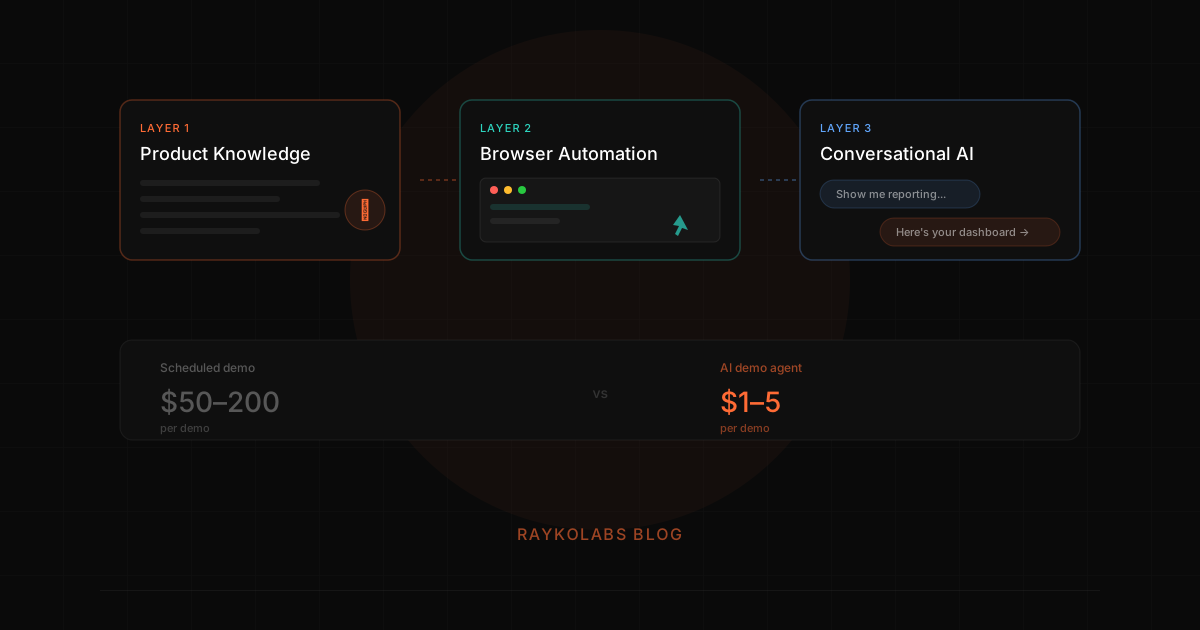
A modern AI demo agent operates in three layers. At RaykoLabs, we call this our three-layer navigation system, and getting the architecture right took us longer than we expected. For a deeper dive, see how the RaykoLabs AI demo agent works.
Layer 1: Context detection and product knowledge
The agent is trained on your product, documentation, FAQs, feature descriptions, use cases, and competitive positioning. But more than memorizing facts, the agent scans the current page state to understand where it is in your application. This context detection layer is what separates a demo agent from a chatbot bolted onto screen recordings.
Layer 2: Navigation planning and browser automation
The agent controls an actual browser session running your product via Playwright and runs those sessions in cloud-hosted browsers through Browserbase. It clicks, navigates, fills in data, and shows real workflows. The navigation planning layer determines the optimal path to whatever the prospect wants to see, and recovers when it hits an unexpected state.
Layer 3: Conversational intelligence
The agent listens via Deepgram for speech-to-text and responds using Cartesia for text-to-speech. It understands what the prospect wants to see and adapts the demo accordingly. If someone asks "How does reporting work?", the agent navigates to reporting and walks through it. Sessions are recorded with rrweb so your sales team can replay exactly what happened.
Why this is worth implementing
Scale without headcount
A single AI demo agent can run unlimited concurrent demos. No scheduling, no calendar conflicts, no timezone issues. Whether you get 10 demo requests a day or 1,000, every prospect gets an immediate experience. This matters most when your demo no-show rate is eating half your pipeline.
24/7 availability
Your website traffic does not stop at 5 PM. Neither should your demos. AI agents work around the clock, weekends, holidays, and 3 AM included. Voice-first buyer experiences capture demand that traditional sales orgs miss entirely.
Consistent quality
Every demo follows your best playbook. No off days, no forgotten features, no reps who skip the competitive differentiators.
Richer lead intelligence
Every AI demo session generates data: what features the prospect explored, what questions they asked, how long they spent on each section, and where they dropped off. This gives your sales team qualified, contextual information before they ever pick up the phone.
Faster pipeline velocity
When prospects can see your product immediately instead of waiting three days for a scheduled call, the sales cycle compresses. Interest does not have time to cool. Competitors do not have time to intercept.
Here is what most guides on this topic won't tell you: the AI demo does not need to be perfect to outperform a scheduled call. A demo that is 80% as polished as your best rep, but available instantly, 24/7, with zero no-show risk, will generate more pipeline than a perfect demo that only 50% of prospects attend. We see this pattern over and over.
In the first 60 days of a typical deployment, customers see qualified pipeline lift in the 30-60% range, driven mostly by prospects who previously fell through the cracks of the scheduled-demo funnel (late-night browsers, time-zone mismatches, the executive who treats scheduling friction as a soft no) now becoming measurable opportunities. The pattern compounds: as more inbound traffic shifts toward voice-driven first touches, the AE team's time concentrates on the deals that actually need human attention.
AI demos vs. traditional approaches
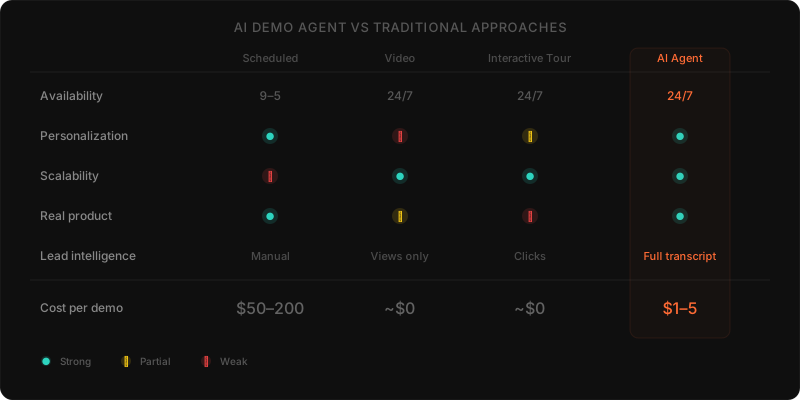
| Dimension | Scheduled demo | Recorded video | Interactive tour | AI demo agent |
|---|---|---|---|---|
| Availability | Business hours | Always | Always | Always |
| Personalization | High (human) | None | Low | High (AI) |
| Scalability | Limited by reps | Unlimited | Unlimited | Unlimited |
| Real product | Yes | Possibly | No (screenshots) | Yes |
| Lead data | Manual notes | View count only | Click data | Full transcript + behavior |
| Cost per demo | $50 to 200 | ~$0 | ~$0 | ~$1 to 5 |
AI demo agents combine the personalization of a live rep with the scalability of self-serve content. For a deeper breakdown of how this stacks up, see our comparison of human vs. AI demos.
Implementation requirements that decide success
Not all AI demo tools are equal, and not all rollouts succeed. Before you commit, check the implementation against these five requirements. Each one is a place where rollouts quietly fail.
Real product, not mockups
The agent should navigate your actual application, not a static prototype. Prospects can tell the difference. This is the core limitation of tools like Navattic and Storylane, they show captured screenshots, not living software. See our analysis of browser automation for live AI demos for why this matters technically.
Voice interaction
Text chat is fine for support tickets. For demos, voice changes everything. Prospects talk naturally, ask follow-up questions mid-sentence, and stay engaged longer. The best AI demo agents support real-time voice conversation.
Context awareness
The agent should understand where it is in the product, what it has already shown, and what the prospect seems most interested in. This requires genuine intelligence, not a scripted flow.
Lead capture without friction
Let prospects explore freely. Capture their information naturally through the conversation or offer optional identification. Gating the experience behind a form defeats the purpose.
CRM and workflow integration
Demo data should flow into your existing sales tools automatically, lead scores, transcripts, feature interests, and recommended follow-up actions.
The implementation sequence, step by step
Run these steps in order. This is the operational version of the playbook summarized at the top of this page.
- Identify your top demo flow, start with the product walkthrough that your best reps use most often
- Provide product knowledge, upload docs, FAQs, competitive battlecards, and use case descriptions
- Configure the agent, set the tone, pace, and key talking points
- Deploy on your site, add the demo experience to your website alongside (not replacing) your existing "Book a demo" flow
- Measure and iterate, track completion rates, lead quality, and pipeline impact
- Let your reps review sessions, the AI generates full transcripts and session recordings. Your reps should watch the first 20 sessions to calibrate the agent's messaging.
- Expand to additional flows, once the primary demo is working, add flows for specific personas, verticals, or product modules
Most teams see results within the first week. For the full ROI case, see building the business case for AI demos.
For most launch customers, the path from account creation to a live demo running on the website lands inside one business day, typically four to eight working hours of effort spread across knowledge-base upload, demo-flow configuration, brand styling, and snippet deployment. Customers with denser products (deep API surfaces, multi-tenant configuration, role-aware permissions) tend to land closer to two or three days as they iterate on the agent's guardrails.
After the rollout: where this goes next
Once the playbook above is running, the demo does not go away. It remains the single most effective way to convert a prospect into a customer. What changes is who delivers it and when it happens.
AI demo automation makes the product demo an always-available, infinitely scalable experience. For sales teams under pressure to do more with less, that is not just an efficiency gain, it is a competitive advantage. If you want to see the technology behind this shift, read how the RaykoLabs AI demo agent works.
Playbook phase 1: confirm the bottleneck and define one winning flow
Confirm the bottleneck before you automate anything by checking whether prospects stall between interest and first product view, whether specialists repeat the same first touch walkthrough, and whether missed meetings consume selling time. If the demo is not the constraint, fix the real constraint first, because automating a healthy step adds complexity without adding pipeline and can mask the actual problem for a quarter.
When the demo is the constraint, narrow scope to one flow. Interview two strong reps and one solutions specialist, ask which walkthrough they repeat most, which questions always arise, and which proof points change minds. Write that flow in buyer language as a short sequence: opening problem, key screens in order, common detours, and the handoff line for topics that need a human. Pair this with a demo tenant that contains believable sample records and clear starting state, since the agent can only show what the tenant holds. For background on agent mechanics that inform these choices, review how the RaykoLabs agent works and the human versus AI division of labor so scope decisions reflect who should handle what.
Checklist to exit this phase:
- One named flow with owner, audience, and success signal defined in plain terms
- Knowledge inputs gathered: current docs, FAQs, objection responses, and competitor framing marked as current
- Demo tenant prepared with realistic data and access rules confirmed
- Agreement that the existing book a demo path stays live during the pilot as a control
Playbook phase 2: pilot on one traffic source and learn from replays
Run the pilot on one high volume source rather than everywhere at once so results stay readable and fixes stay focused. Paid search, organic blog traffic, or a primary landing page all work, provided the volume supports weekly learning. Keep the existing scheduled path alongside the automated path, route a defined share of visitors to each, and compare progress on completion, lead quality, and movement to pipeline rather than on vanity counts of views or clicks.
Learning comes from replays, not surveys. Watch early sessions end to end and note where prospects pause, which questions produce weak answers, and which calls to action get used or ignored. Update the knowledge base weekly based on what you see. Common early fixes include clarifying the opening question so buyers state intent sooner, tightening persona branching so each role reaches relevant proof faster, and refining handoff triggers so high intent visitors reach a rep without repeating context. Guidance on reducing no shows through instant access and designing for buyer led exploration helps here because most early drop off traces back to waiting, gating, or rigid scripting rather than to product fit.
Operating rules for the pilot period:
- Review a fixed batch of sessions each week with sales present so wording fixes reflect real buyer language
- Track engagement depth alongside completion, including product areas explored and questions asked, using your demo analytics habits as the record
- Keep lead capture conversational and optional at first touch, collecting details through dialogue and offering human follow up as a next step rather than a gate
- Freeze scope until the primary flow performs steadily, then document what changed and why so later expansion does not reintroduce solved problems
Playbook phase 3: scale to more flows and hand qualified context to sales
Scale only after the pilot flow reaches steady performance against the scheduled control on completion and pipeline movement, because adding more flows too early multiplies maintenance while hiding the original lesson. Expansion then follows demand: add the next persona path, vertical variant, or product module that sales requests most, reusing the same knowledge structure and review routine rather than rebuilding the program for each addition.
As you add sources, keep measurement consistent across outbound, paid social, partner referrals, and content traffic so comparison stays honest. Each source brings different intent, so expect depth and follow up patterns to vary while holding the same quality bar for handoff. Route by fit plus behavior: firmographic fit sets priority, while observed exploration, questions, and objections set the talking points. Lower intent visitors enter nurture with a link back to the on demand experience so they can return with colleagues without booking a fresh meeting, which also eases demo fatigue across buying groups.
Make the sales handoff the centerpiece of this phase:
- Send reps the transcript summary, product areas explored, questions asked, and suggested follow up angle automatically, so the first human call opens mid conversation rather than with rediscovery
- Ask reps to review early scaled sessions and flag messaging drift, especially around new modules where positioning is still settling
- Agree on explicit triggers for human involvement, such as enterprise size, security review needs, or direct requests, and honor them promptly to preserve trust
- Revisit partner and field uses once the core motion holds, using partner enablement patterns to extend coverage without adding headcount
Close the loop quarterly by pruning retired flows, archiving outdated answers, and confirming integrations still carry the right fields to the CRM. A playbook that stays current compounds, while one left alone slowly drifts from the product it represents.
How to keep the playbook current without adding process overhead
You keep the playbook current by assigning clear owners for knowledge, demo data, and review cadence, then treating each product release as a small demo maintenance moment rather than a separate project. This light routine prevents drift between what the product does, what the agent says, and what reps promise in follow up conversations.
Keep the routine minimal so it survives busy quarters. After each release, the knowledge owner updates affected answers and retires outdated notes, the demo data owner refreshes sample records and confirms the starting state still looks believable, and sales reviews a small batch of recent sessions for wording that feels dated. Record each change in plain language with the reason behind it, so future reviewers understand intent without digging through chat history. When a flow no longer matches how buyers evaluate, archive it promptly rather than leaving a stale path live alongside the current one. A smaller set of accurate flows will always outperform a larger set where buyers cannot tell which path to trust.
Frequently asked questions
How do I know if demo automation is the right project for my funnel?
Audit where prospects stall. Demo automation only pays off when the demo itself is the bottleneck: prospects waiting days for a scheduled call, SEs running repetitive first-touch walkthroughs, or no-shows eating 25% or more of booked time. If the constraint is upstream lead volume or downstream closing, fix that first. Run this diagnosis before you evaluate any vendor.
What is the first implementation step?
Build the knowledge base before you configure anything else. Aggregate every public document about your product (FAQs, docs, sales decks, recorded demo transcripts) into a single source the AI can use. Most vendors offer one-day setup with this input, and skipping it produces generic demos that lose to humans. Pick your single highest-volume demo flow first rather than trying to cover everything.
How should I pilot demo automation safely?
Do not deploy everywhere at once. Pick one high-volume traffic source (usually paid search or organic blog traffic), route a percentage of those visitors to the AI demo agent, and keep your existing book-a-demo flow running alongside it. Run the pilot for 30 days and measure demo-to-pipeline conversion against a control group of scheduled demos.
What should I measure to decide whether to scale?
Track four metrics: demo completion rate, lead quality, demo-to-pipeline conversion, and time-to-pipeline. Watch session replays rather than relying on surveys, since prospects will not tell you why they bounced. Scale to additional traffic sources only once demo-to-pipeline conversion reaches parity or better with scheduled demos, typically after a 90-day stabilization period.
How long does a typical demo automation rollout take?
Most launch customers get a live demo running on the site within one business day, roughly four to eight working hours across knowledge-base upload, demo-flow configuration, brand styling, and snippet deployment. Denser products with deep API surfaces or role-aware permissions tend to land closer to two or three days as you iterate on the agent's guardrails.
Sources
- State of Sales, Salesforce Research
- The B2B Buying Journey, Gartner
- B2B Marketing and Sales Research, Forrester
- SaaS Sales Development Metrics & Trends, Bridge Group
- Sales Statistics and Benchmarks, HubSpot
Cite this article
Utkarsh Agrawal. "How to Automate Product Demos: Implementation Playbook." RaykoLabs Blog, February 25, 2026. https://raykolabs.com/blog/ai-demo-automation-complete-guide

Utkarsh Agrawal is CTO of RaykoLabs, where he leads engineering on Rayko, the AI demo agent that runs live, voice-enabled product demos in a real browser for B2B SaaS teams. His work spans real-time voice interaction, browser automation with Playwright and Browserbase, speech-model orchestration, and the infrastructure that keeps autonomous demos reliable around the clock. On the RaykoLabs blog he writes practical guides on voice-enabled product demos, demo automation, and what it takes to ship production AI agents for sales: how to qualify prospects mid-demo, how to measure demo performance, and how buying teams actually evaluate demo software. His comparisons of demo platforms are built from hands-on testing and vendor documentation, with trade-offs stated plainly so buyers can decide fit.
See RaykoLabs in action
Watch an AI agent run a live, personalized product demo, no scheduling, no waiting.
START LIVE DEMO