Loading...

How Browser Automation Powers Live AI Product Demos
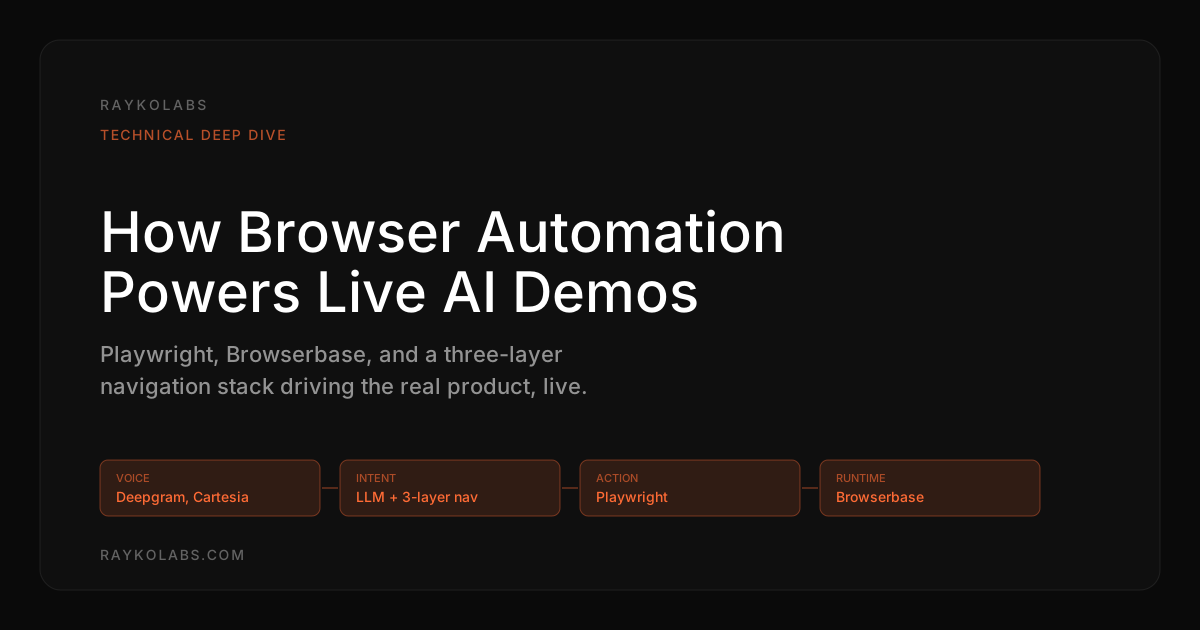
A technical look at how browser automation (Playwright, Browserbase) lets AI agents control real products during live demos, and why it matters.
Quick answer
Browser automation powers live AI demos by giving an AI agent programmatic control of a real browser, so it clicks, types, and navigates your actual product instead of replaying screenshots. RaykoLabs uses Playwright for cross-browser reliability, Browserbase cloud browsers for isolated concurrent sessions, and a three-layer navigation system to adapt in real time. The result is a demo that is always current and answers prospect questions live.
Want this running on your product? Rayko demos it live, with your prospects asking questions by voice.
START LIVE DEMOThe hardest problem in live demo automation is not controlling the browser. It is knowing what to do next when the page state is something you have never seen before.
We chose Playwright over Puppeteer for one reason: cross-browser reliability. When a prospect's demo breaks because of a browser quirk, you don't get a second chance. Puppeteer ties you to Chromium. Playwright gives you Chromium, Firefox, and WebKit, and when a prospect's IT team mandates Safari-only access to evaluate tools, that coverage is the difference between a live demo and a broken one.
In the trailing quarter, our agent has executed thousands of demo sessions across a long-tail mix of browser configurations, Chromium being the modal choice but with meaningful Firefox and WebKit volume on Mac-heavy buyer cohorts and on customer products that explicitly require Safari for evaluation. The single-browser engineering trap (only test Chromium, hope the rest works) breaks under that traffic mix. Cross-browser parity is not optional once production traffic is real.
Browser automation is what makes AI demo agents possible at scale. It is the technology that allows an agent to navigate, interact with, and demonstrate actual products, without a human touching the keyboard.
Browser automation: the short version
Browser automation means programmatic control of a web browser. Software clicks buttons and types into fields instead of a person. The browser behaves exactly as it would for a human user: pages load, JavaScript executes, APIs fire, and the UI responds.
Playwright, developed by Microsoft, has become the standard for modern browser automation. It supports Chromium, Firefox, and WebKit, handles multiple browser contexts, and provides robust APIs for waiting on network requests and page state changes. Puppeteer, maintained by Google, focuses on Chromium with a lighter-weight API.
For AI demo agents, Playwright wins on three counts: broader browser support, superior handling of complex page states, and built-in mechanisms for managing multiple concurrent sessions. At RaykoLabs, our Playwright-based agent runs against live products via Browserbase cloud browsers, with WebSocket connections streaming the visual output to prospects in real time.
Why real product demos beat screenshots and clones
Static demos, screenshot-based tours, cloned environments, recorded videos, are frozen in time. The moment your product ships a new feature or updates its UI, every static demo becomes stale. Prospects notice. A click-through prototype does not respond to unexpected inputs. A recorded video cannot answer questions. A cloned environment may look close to the real thing, but it lacks the depth and responsiveness of the genuine product.
Here is a contrarian take: most "interactive" demo tools (like Navattic, Storylane, or Walnut) are just static demos wearing a better costume. They capture screenshots, layer hotspots on top, and call it interactive. The prospect clicks through a predetermined path. That is a slideshow with extra steps.
Live product demos using browser automation run against the actual application. Every interaction is real. Data loads from real APIs. Workflows complete end to end. The prospect sees exactly what they would see as a customer. If you want to understand how this differs from a human-led demo, the gap is not quality, it is availability and consistency.
How AI agents use browser automation for demos
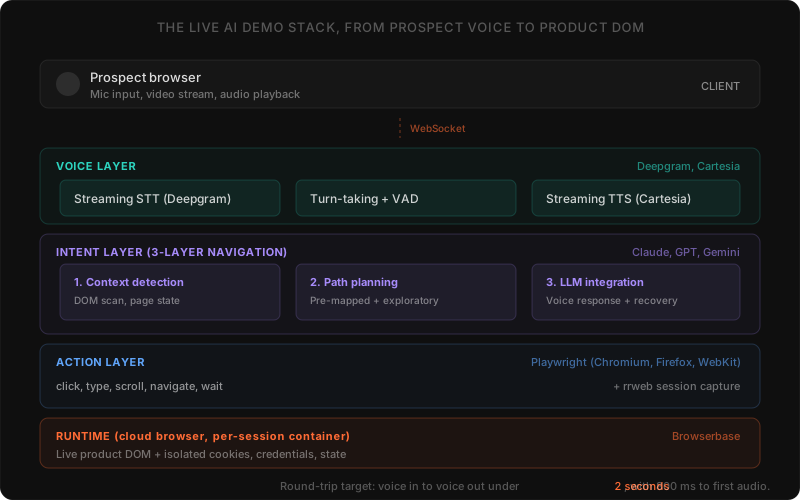
An AI demo agent combines a large language model with browser automation to create an intelligent, interactive product walkthrough. Here is how the key technical components fit together.
DOM interaction and element targeting
The agent identifies and interacts with specific elements on the page, buttons, input fields, navigation menus, dropdown selectors. This involves querying the DOM using CSS selectors, ARIA attributes, data-test attributes, or XPath expressions.
What separates a demo agent from a test automation script is resilience. Test scripts break when a CSS class changes. AI demo agents analyze the visible page structure, identify interactive elements by their role and label, and determine which element to click based on the current demo objective. A button that moved from the header to a sidebar? The agent finds it by context, not by hardcoded coordinates.
Navigation and state management
Product demos require navigating through multi-step workflows: logging in, selecting a workspace, creating a record, configuring settings, viewing results. Each step changes the application state, and the agent must track where it is and what has already been shown.
State management involves monitoring URL changes, tracking completed actions, handling loading states and transitions, and recovering gracefully when unexpected dialogs or errors appear. At RaykoLabs, we use rrweb for session recording alongside browser state tracking, this gives us both a replay artifact for sales follow-up and a real-time state model for the agent's decision-making. The agent maintains an internal model of the demo's progress and adapts its plan when the product's state diverges from expectations.
Form filling and data entry
Demos frequently require entering realistic data, creating a sample customer, configuring a dashboard, setting up a workflow. The AI agent generates contextually appropriate data and enters it through standard form interactions: focusing input fields, typing characters, selecting dropdown options, toggling checkboxes, and submitting forms.
For fintech or healthcare demos, this data must look realistic while being clearly synthetic. The agent generates plausible but fictional information that demonstrates the product's capabilities without raising data sensitivity concerns.
Cloud browsers for scalability
Running browser automation on a single machine limits you to a handful of concurrent sessions. For AI demo agents serving dozens or hundreds of simultaneous prospects, cloud browser infrastructure is non-negotiable.
Platforms like Browserbase provide managed, headless browser instances in the cloud. Each demo session gets its own isolated browser context with dedicated compute resources, network isolation, and independent state. The advantages:
- Horizontal scaling: Spin up as many browser instances as needed to match demand
- Geographic distribution: Run browsers in regions close to prospects for lower latency
- Session isolation: Each prospect's demo runs in a completely separate environment with no shared state
- Resource efficiency: Browser instances are created on demand and destroyed after the session ends
- Zero ops overhead: Patching, updating, monitoring, and capacity planning are handled by the platform
Peak-hour concurrency runs into the high hundreds of simultaneous browser sessions across our deployment base, with availability tracked above three-nines on the platform layer (Browserbase handles the underlying browser-pool autoscaling). The bottleneck during traffic spikes is rarely browsers, it is the LLM provider's rate limits and the voice pipeline's first-token latency under contention, which is why we run with multiple LLM providers in failover and warm voice connections during business-hours peaks.
One thing most people miss about cloud browsers: they also solve the credential isolation problem. Each browser instance starts with a fresh authentication context. When the session ends, every cookie, token, and cached credential vanishes. For security-conscious buyers, this is not a nice-to-have, it is a requirement.
The three-layer navigation approach
Reliably navigating a complex product during a live demo requires more than simple scripted steps. At RaykoLabs, we use a three-layer navigation architecture that combines deterministic planning with AI-driven adaptability. This is the core of how the Rayko AI demo agent works.
Layer 1: Context detection
Before taking any action, the agent must understand where it currently is within the product. This involves analyzing the current URL, visible page content, active navigation elements, and any modal dialogs or overlays. Context detection answers one question: "What is the current state of the application?"
Layer 2: Path planning
Given the current context and the desired destination (for example, "show the reporting dashboard"), the agent plans a sequence of actions to get there. Path planning considers the product's navigation structure, required intermediate steps (like selecting a workspace or applying filters), and the most efficient route.
This layer uses pre-mapped product navigation graphs for known workflows while falling back to exploratory navigation for unfamiliar states. Reliability for core demo flows. Flexibility for ad-hoc requests.
Layer 3: LLM integration
The large language model sits on top of context detection and path planning. It interprets the prospect's request in natural language, translates it into a navigation objective, evaluates whether the planned path makes sense given what has already been shown, and generates the spoken explanation that accompanies each action.
The LLM also handles edge cases: if the product shows an unexpected error, the agent can acknowledge it, explain what happened, and redirect the demo smoothly. No scripted automation can do this. And in our experience, this error-recovery capability is what separates a demo agent from a screen recording, prospects deliberately go off-script to test boundaries, and the agent needs to keep up.
| Layer | Question it answers | How it works |
|---|---|---|
| Layer 1: Context detection | What is the current state of the application? | Analyzes the current URL, visible page content, active navigation, and modal dialogs or overlays |
| Layer 2: Path planning | What sequence of actions reaches the destination? | Uses pre-mapped navigation graphs for known workflows, falls back to exploratory navigation for unfamiliar states |
| Layer 3: LLM integration | What did the prospect ask, and does the planned path still make sense? | Interprets the request, validates the path against what was shown, generates spoken explanation, and recovers from errors |
Performance optimizations
Live demos demand responsiveness. A prospect asking a question and waiting five seconds for the agent to react will lose confidence. Here is what actually moves the needle on latency.
Token efficiency
Every interaction with the LLM consumes tokens, the input context describing the page state and the output instructions for what to do next. Minimizing token usage without sacrificing quality matters. Techniques include compressing DOM representations to only include interactive and visible elements, using structured page summaries instead of raw HTML, and maintaining a concise action history rather than a full transcript of every DOM change.
Intelligent caching
Products have predictable structures. The navigation menu is the same on every page. The settings panel always has the same sections. Caching these structural elements means the agent does not need to re-analyze them on every page load. Only the dynamic content, the data, the state-specific UI elements, needs fresh analysis.
Parallel processing
While the browser executes one action, the agent can pre-compute the next likely steps based on the demo script and prospect behavior patterns. This pipelining reduces perceived latency by having the next action ready before the current one completes.
Voice pipeline latency
For voice-enabled demos, the latency chain has additional links: Deepgram for speech-to-text, LLM inference, and Cartesia for text-to-speech, all connected over WebSocket for real-time streaming. The total round-trip needs to stay under 2 seconds or the conversation feels broken. We spent more engineering time optimizing this pipeline than any other part of the stack.
Security considerations
Browser automation in a demo context introduces specific security requirements. We cover this in depth in our security and compliance post, but here are the engineering highlights.
Credential management
The demo agent needs credentials to log into the product. These credentials should be scoped to a dedicated demo environment with limited permissions, stored in secure vaults, rotated regularly, and never exposed to the prospect or transmitted to the LLM as part of the prompt context.
Session isolation
Each demo session must be fully isolated. One prospect's session should never access another's data, browser state, or interaction history. Cloud browser platforms like Browserbase enforce this at the infrastructure level, but the application layer must also ensure demo accounts do not share state.
Data handling
The AI agent processes page content to understand the product's current state. Demo environments should use synthetic data exclusively. The agent's architecture should ensure that page content sent to the LLM for analysis is not persisted or used for model training.
Session data handling is configurable per customer, but the defaults are aggressive: voice audio is never persisted at any layer, browser session containers are torn down within seconds of session end, transcripts default to 30-day retention (configurable to zero), and rrweb DOM recordings retain only what the customer explicitly enables. For customers in regulated verticals (healthcare, fintech, government-adjacent), retention defaults to zero and transcripts get generated on demand only, nothing persists past the live session window without an explicit opt-in.
Why this matters for demo quality
The technical foundation of browser automation directly impacts the prospect's experience. Fast, reliable, real-product demos build trust. Slow, glitchy, or obviously simulated demos erode it.
When browser automation is done well, the technology becomes invisible. The prospect does not think about Playwright or DOM selectors or cloud browsers. They see a product that works, explained by an AI voice agent that understands it. That seamless experience is what converts interest into pipeline.
The gap between a mediocre demo and an exceptional one is often not the product itself, it is the quality of how that product is presented. Browser automation, properly engineered, closes that gap at scale. If you are evaluating whether this approach makes financial sense for your team, our ROI analysis breaks down the numbers.
September 2026 check: is Playwright plus cloud browsers still the right stack?
Yes. Programmatic control of a real browser remains the foundation for live AI demos. Playwright still provides cross browser coverage and robust state handling, and cloud browsers still provide isolation, scaling, and geographic distribution. Screenshots and clones still go stale when the product ships.
We rechecked the documentation hubs cited in this post in September 2026. The Playwright documentation hub, the Browserbase documentation hub, the Puppeteer documentation hub, the Chrome DevTools Protocol hub, and the Deepgram learn hub remain the canonical references for the stack choices described above. The Puppeteer versus Playwright framing holds. Chromium only coverage is still a constraint when buyers require broader browser access, which is why cross browser testing remains part of production readiness.
The operating guidance also holds. Keep DOM compression and caching for token efficiency, keep parallel planning for perceived latency, keep the voice chain on streaming WebSocket connections, and keep scoped demo credentials with synthetic data and isolated sessions. No architecture claim in this post required correction in September 2026.
Frequently asked questions
What is browser automation in the context of AI demos?
Browser automation means programmatic control of a web browser, where software clicks buttons and types into fields instead of a person. The browser behaves exactly as it would for a human user: pages load, JavaScript executes, APIs fire, and the UI responds. For AI demo agents, it is the technology that lets an agent navigate, interact with, and demonstrate the actual product without a human touching the keyboard.
Why does RaykoLabs use Playwright instead of Puppeteer?
Cross-browser reliability. Puppeteer ties you to Chromium, while Playwright supports Chromium, Firefox, and WebKit. When a prospect's IT team mandates Safari-only access, that coverage is the difference between a live demo and a broken one. Playwright also handles complex page states better and has built-in mechanisms for managing multiple concurrent sessions, which matters once production traffic spans many browser configurations.
How do live product demos beat screenshots and clones?
Static demos, screenshot tours, cloned environments, and recorded videos are frozen in time and go stale the moment the product ships a UI change. A click-through prototype cannot respond to unexpected inputs and a recorded video cannot answer questions. Live product demos run against the actual application, so every interaction is real, data loads from real APIs, and the prospect sees exactly what they would see as a customer.
Why are cloud browsers necessary for AI demos?
Running browser automation on a single machine limits you to a handful of concurrent sessions. Cloud platforms like Browserbase provide managed headless browsers where each session gets an isolated context with dedicated compute and network isolation, enabling horizontal scaling, geographic distribution, and zero ops overhead. Peak-hour concurrency runs into the high hundreds of simultaneous sessions across the deployment base.
How is security handled when an AI agent drives a real product?
Credentials are scoped to a dedicated demo environment, stored in secure vaults, rotated, and never sent to the prospect or the LLM prompt. Each session is fully isolated so no prospect can access another's data or state. Demo environments use synthetic data only, voice audio is never persisted, session containers are torn down within seconds, and regulated verticals default to zero retention.
Sources
- Playwright Documentation, Microsoft
- Browserbase Documentation, Browserbase
- Puppeteer Documentation, Google
- Chrome DevTools Protocol, Google
- Real-Time Speech AI, Deepgram
Cite this article
Utkarsh Agrawal. "How Browser Automation Powers Live AI Product Demos." RaykoLabs Blog, February 6, 2026. https://raykolabs.com/blog/browser-automation-live-ai-demos

Utkarsh Agrawal is CTO of RaykoLabs, where he leads engineering on Rayko, the AI demo agent that runs live, voice-enabled product demos in a real browser for B2B SaaS teams. His work spans real-time voice interaction, browser automation with Playwright and Browserbase, speech-model orchestration, and the infrastructure that keeps autonomous demos reliable around the clock. On the RaykoLabs blog he writes practical guides on voice-enabled product demos, demo automation, and what it takes to ship production AI agents for sales: how to qualify prospects mid-demo, how to measure demo performance, and how buying teams actually evaluate demo software. His comparisons of demo platforms are built from hands-on testing and vendor documentation, with trade-offs stated plainly so buyers can decide fit.
See RaykoLabs in action
Watch an AI agent run a live, personalized product demo, no scheduling, no waiting.
START LIVE DEMO