Loading...

AI Demo Agents: What They Are and How They Work
The definitive guide to AI demo agents, autonomous systems delivering personalized product demos 24/7. How they work, what to look for, and how they compare.
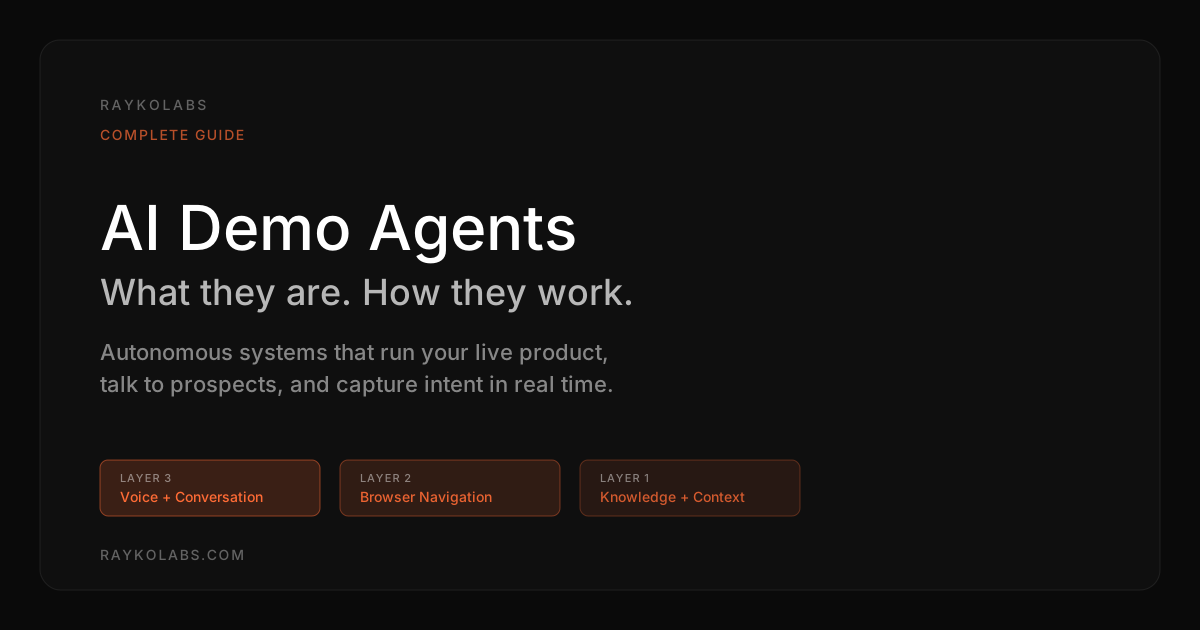
Quick answer
An AI demo agent is an autonomous software system that conducts live, interactive product demonstrations by combining artificial intelligence with browser automation. It navigates your actual product in a real browser, explains features through voice or text, answers prospect questions in real time, and adapts the walkthrough to each viewer. Unlike chatbots or recorded tours, it takes actions and makes decisions, replacing the first-touch human-led demo 24/7.
Want this running on your product? Rayko demos it live, with your prospects asking questions by voice.
START LIVE DEMOYour best sales engineers can run four, maybe five demos a day. Your website gets hundreds of visitors. Do the math, most of those visitors will never speak to a human. They read some copy, maybe watch a video, and leave. The ones who do book a demo wait days for a slot, and 20 to 30 percent never show up.
AI demo agents solve this problem at its root. They are autonomous AI systems that deliver personalized, interactive product demonstrations to any prospect, at any time, without human involvement. They don't just show the product. They explain it, answer questions, adapt to the prospect's interests, and capture detailed intelligence about what matters to each buyer.
Choosing between an agent and an AI-generated video first? See AI demo agent vs AI demo video tools. This guide covers what AI demo agents are, how they work, what separates good implementations from weak ones, and how to evaluate whether this technology fits your organization.
For how agents compare with video and live formats, see interactive demo vs video vs live.
What is an AI demo agent?
An AI demo agent is an autonomous software system that conducts live product demonstrations by combining artificial intelligence with browser automation. It navigates your actual product, explains features and workflows through voice or text, responds to prospect questions in real time, and tailors the experience based on who is watching and what they ask about.
The word "agent" is deliberate. Unlike a chatbot that answers questions from a knowledge base, or a video that plays the same content for everyone, an AI demo agent takes actions. It decides what to show, determines the walkthrough order, responds to interruptions, and adapts its narrative based on the conversation. It operates with autonomy that makes it a different category from scripted or rule-based alternatives. For a breakdown of all the terminology in this space, see our AI demo glossary.
Think of it as an always-available, infinitely patient sales engineer who knows your product inside and out and never has an off day.
How AI demo agents differ from other demo formats
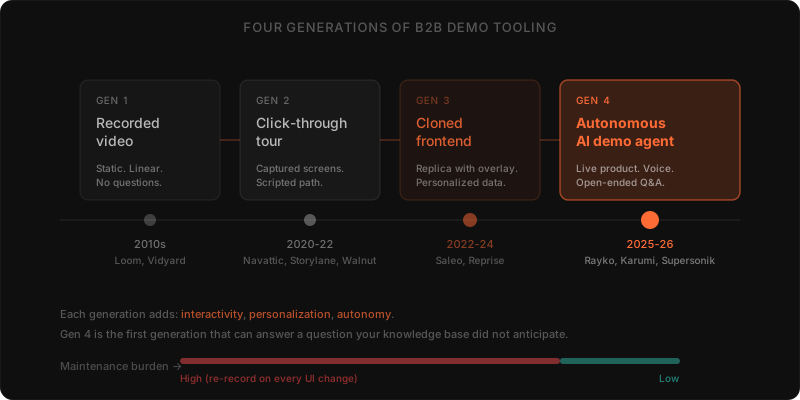
The demo technology landscape is crowded and the terminology is muddled. Here's where AI demo agents sit relative to what you're probably already using.
| Format | Answers open-ended questions | Adapts to the prospect | Runs the live product |
|---|---|---|---|
| Interactive tours and click-through demos | No, predetermined path | No, inherently linear | No, captured screenshots or HTML overlays |
| Recorded demo videos | No, it is a monologue | No, same content for everyone | No, pre-recorded |
| Live sales rep demos | Yes, with human nuance | Yes, the rep reads the room | Yes, but constrained by scheduling and headcount |
| Chatbots and virtual assistants | Text answers only | Limited | No, cannot demonstrate a workflow |
| AI demo agent | Yes, in real time | Yes, based on the conversation | Yes, real browser on the actual product |
Interactive tours and click-through demos
Platforms like Navattic, Storylane, and Walnut create guided product tours using captured screenshots or HTML overlays. The prospect clicks highlighted elements to advance through a predetermined sequence. These tools work for quick overviews but are inherently linear, the prospect cannot ask a question, deviate from the path, or explore a feature outside the script. An AI demo agent operates on the live product with open-ended navigation driven by the prospect's actual interests. We cover the full landscape in our Walnut alternatives and Navattic alternatives posts.
Recorded demo videos
Video remains the most widely used demo format because it is simple to produce and distribute. But video is a monologue. It cannot respond to questions, skip irrelevant sections, or personalize the narrative. Completion rates for demo videos are notoriously low because prospects disengage when the content does not match their needs. An AI demo agent delivers the production quality of a well-prepared walkthrough with the responsiveness of a live conversation.
Live sales rep demos
A skilled sales rep conducting a live demo remains the gold standard for high-stakes deals. The rep reads the room, builds rapport, handles objections with nuance, and closes. AI demo agents do not replace this, and anyone who tells you otherwise is selling you something. They handle the other ninety percent of demo demand, the inbound visitors who want to evaluate the product right now but aren't ready for a sales conversation. By the time a prospect reaches a rep after interacting with an AI demo agent, they're educated, qualified, and further down the funnel. For more on this distinction, see our human vs. AI demo breakdown.
Chatbots and virtual assistants
Traditional chatbots answer questions from a knowledge base using text. Some are rule-based; others use natural language processing. But they do not demonstrate the product. They cannot show a workflow, navigate an interface, or provide a visual experience. An AI demo agent combines the conversational ability of a chatbot with the visual demonstration capability of a live walkthrough.
The technology stack behind AI demo agents
Building a capable AI demo agent requires orchestrating several technologies that aren't used to working together. Here's what the stack looks like under the hood, using RaykoLabs' architecture as a reference.
Layer 1: Product knowledge and context
The foundation is the knowledge base: product documentation, feature descriptions, pricing information, competitive positioning, common objections, use case libraries, and customer success stories. This knowledge is stored in a vector database or RAG system that lets the LLM access relevant information on demand.
Beyond static knowledge, the agent needs context detection, understanding the current state of the product interface. What page is visible? What data is displayed? What options are available? This DOM awareness lets the agent make intelligent decisions about what to show next and how to describe what's on screen. At RaykoLabs, context detection is the first of three navigation layers that work together.
Layer 2: Browser automation and navigation
The demo agent controls a real browser session. RaykoLabs uses Playwright for this, running sessions on Browserbase's cloud-hosted browsers. Playwright provides programmatic control over browser actions, clicking elements, typing text, navigating between pages, scrolling, and waiting for content to load.
The hard part is navigation planning, the second layer. The agent can't follow a script because the prospect's questions determine the path. If a prospect asks to see reporting after viewing the dashboard, the agent needs to determine the sequence of clicks to get there, execute them reliably, and handle intermediate states or loading delays. The third layer, LLM integration, ties context detection and navigation planning together, letting the agent handle ambiguous requests like "show me something similar to what we just looked at, but for admins."
Robust implementations include error recovery, detecting when a click didn't produce the expected result and trying an alternative approach. Session state gets recorded via rrweb so the team can replay exactly what happened.
Layer 3: Voice and conversation
The voice layer transforms a demo automation tool into a demo agent. It consists of three components.
Speech-to-text converts the prospect's spoken words into text. RaykoLabs uses Deepgram with streaming STT that begins processing audio in real time rather than waiting for complete utterances. This reduces latency and enables natural turn-taking.
The large language model processes the transcribed text, determines intent, generates a response, and decides what actions to take in the product.
Text-to-speech converts the LLM's response back into natural-sounding audio. RaykoLabs uses Cartesia, which produces human-like speech with appropriate intonation and pacing. Streaming TTS begins playback while the response is still being generated, critical for conversational flow.
The orchestration engine
Connecting these layers is an orchestration engine that manages timing, state, and flow. The agent might be speaking, navigating the product, and processing the next user input simultaneously. WebSocket connections enable real-time communication between the prospect's browser and the agent's backend. Session management ensures each prospect gets an isolated, stable experience.
We built the RaykoLabs orchestration layer to handle a case most teams don't think about until it bites them: what happens when the prospect interrupts the agent mid-sentence to say "wait, go back"? The agent needs to stop speaking, cancel the current navigation, re-establish context, and respond to the new request, all within a second. Getting this right took us longer than any other part of the stack.
Key capabilities to evaluate
Not all AI demo agents are created equal. When evaluating solutions, here's what separates real implementations from demos-of-demos.
Real product navigation
The agent should control a live instance of your actual product, not a simulation or screenshots. Prospects can tell the difference. Ask whether the solution navigates your real product or a replica. For more on this, see our post on browser automation for live AI demos.
Conversational intelligence
The agent should handle open-ended questions, not just recognize keywords. It should maintain context across a conversation, remembering what was discussed earlier and building on it. Test this by asking unusual or off-script questions during evaluation. If the agent can't handle "wait, go back to that thing you showed me two minutes ago," it's not ready.
Latency and responsiveness
Conversational demos live or die on latency. If the prospect asks a question and waits four or five seconds for a response, the experience feels broken. Evaluate the total round-trip time from the end of the prospect's speech to the beginning of the agent's response. Under two seconds is good. Under one and a half seconds is excellent. Under 800ms is what we target at RaykoLabs.
Knowledge accuracy
The agent should never hallucinate features or misrepresent your product. Evaluate how the agent handles questions about features that don't exist. A good agent says "that's not currently available" or "let me connect you with our team to discuss that." A poor one invents an answer.
Analytics and intelligence
Every demo session should produce actionable data, what the prospect asked about, which features they explored, how long they engaged, and whether they expressed buying intent. This data should flow into your CRM and sales engagement tools.
In our session analytics, a typical voice-driven demo captures eight to ten distinct intent signals per session, company size, role, primary use case, top three feature interests, two to three explicit objections, and competitive context. A standard marketing form fill captures two to three (role, company, email, plus a free-text "what are you looking for"). The intelligence delta is large enough that AEs walking into a follow-up call after an AI demo session start the conversation roughly two stages further along than a cold discovery call does.
Implementation: getting started with AI demo agents
Deploying an AI demo agent takes weeks, not months. Here's the process.
Step 1: Define the demo scope
Identify which product features and workflows the agent should demonstrate. Start with the three to five workflows that matter most to your buyers, you can expand later. Trying to cover everything on day one leads to a shallow experience across the board.
Step 2: Build the knowledge base
Assemble the product knowledge the agent needs: feature documentation, positioning statements, Q&A, objection handling, competitive differentiation. Most companies have this scattered across sales decks, help centers, and tribal knowledge. Consolidating it is often the most valuable part of the process regardless of the demo agent project.
Step 3: Configure the demo environment
Set up a stable, representative instance of your product for the agent to navigate. Populate it with realistic sample data that tells a compelling story. If this environment goes down, so does your demo agent.
Step 4: Train, test, and iterate
Configure the agent's conversation style, navigation patterns, and response priorities. Then test extensively, have people from different personas interact with it. Identify gaps, confusing responses, and navigation failures. The iteration cycle here is where the real work happens. We've seen teams get to "good enough" in two weeks and "great" in six.
Step 5: Deploy and measure
Embed the demo agent on your website. Key metrics: demo start rate, average session duration, conversation depth, feature coverage, and downstream conversion to qualified leads and pipeline. For the full metrics framework, see our AI demo ROI and business case guide.
ROI and metrics
AI demo agents impact several measurable business outcomes. For the full analysis, see how AI voice demos reduce sales cycle length.
Pipeline generation
By making demos available on demand, AI demo agents capture demand that previously leaked. The visitor at 11 PM, the prospect in a different time zone, the buyer who wants to evaluate before committing to a sales call, all become potential pipeline.
Across our deployment data, companies switching from scheduled-only demos to on-demand AI demos typically see two to four times more prospects reach an actual product experience. Most of that gain comes from prospects who would never have made it onto a calendar at all, late-night browsers, time-zone mismatches, executives who treat the scheduling round-trip as a soft "no." Removing the wait is structurally the highest-leverage demo-funnel metric a B2B team can move.
Sales efficiency
When prospects arrive at a sales conversation already educated by an AI demo agent, the live call is more productive. Reps spend less time on product overview and more time on discovery and closing. This increases each rep's capacity without adding headcount.
Lead quality and intelligence
Demo session data, what prospects asked, which features they explored, what concerns they raised, provides richer lead qualification data than any form fill or content download.
Cost per demo
The marginal cost of an AI demo approaches zero after setup. Whether you deliver ten demos or ten thousand in a month, the infrastructure cost is roughly the same. That's a different economic model from headcount-dependent live demos.
Future trends in AI demo agents
The AI demo agent category is evolving fast. Here's what we see coming.
Collaborative demos
AI demo agents will work alongside sales reps in real time, handling product navigation while the rep focuses on relationship building and objection handling. The agent becomes a copilot rather than a replacement. This is the near-term future, and it's the one we're most excited about at RaykoLabs.
Industry-specific customization
AI demo agents will incorporate industry-specific knowledge, compliance requirements, and use case libraries. A demo for a healthcare prospect will emphasize HIPAA compliance. A fintech demo will highlight audit trails. An HR tech demo will focus on employee onboarding workflows. The security and compliance layer becomes table stakes.
Continuous learning
Future agents will learn from every conversation, automatically identifying knowledge gaps and improving response quality. The agent that runs its thousandth demo will be measurably better than the one that ran its first. This is not a "future trend", it's already happening at small scale, and the compounding effect is real.
The bottom line
AI demo agents sit at the intersection of conversational AI, browser automation, and sales enablement. They solve a problem every B2B software company faces, the inability to scale the highest-converting touchpoint in the sales process.
The technology is mature enough to deploy today. The companies that adopt AI demo agents now will build compounding advantages: better lead intelligence, faster sales cycles, broader market coverage, and more efficient use of their sales team's time.
To understand what voice-enabled demos look like in practice, read our complete guide to voice-enabled product demos. To see how RaykoLabs specifically implements this, check out how the RaykoLabs AI demo agent works.
What should teams recheck about AI demo agents in September 2026?
The core definition in this guide still holds in September 2026: an agent operates the live product in a real browser, holds a two way conversation, and adapts the path to the prospect. What to revalidate is fit and scope, not the category itself. Confirm your product is still web based and demoable in a stable sandbox, confirm your three to five core workflows still match what buyers ask first, and confirm latency, knowledge accuracy, and error recovery still pass live tests.
Two maintenance notes carry more weight this month. First, refresh the knowledge base for anything shipped since spring, including changed screens, renamed settings, revised pricing, and new objections, because stale answers erode trust faster than missing answers. Second, review session analytics for question patterns and drop off points, then tighten the demo environment data and CRM handoff fields before fall pipeline builds. The compounding advantage described above still comes from weekly iteration, clearer transcripts, and faster follow up, not from replacing the stack. Keep the pilot scope narrow and expand only after the core flows test clean.
Frequently asked questions
What is an AI demo agent?
An AI demo agent is an autonomous system that delivers personalized product demonstrations of B2B SaaS products. It typically uses real browser automation to control the actual product, real-time speech for two-way voice conversations with prospects, and a navigation layer to handle ad-hoc questions without scripts. AI demo agents replace the first-touch human-led demo for inbound prospects.
How does an AI demo agent differ from a chatbot?
A chatbot answers questions in text. An AI demo agent runs your live product and shows the answer. Chatbots tell prospects 'yes, we support SAML SSO'; demo agents navigate to the SSO settings page, show how SAML is configured, and answer follow-up questions in voice while doing so. The information density per minute is 5-10x higher with a demo agent than a chatbot.
How does an AI demo agent differ from a click-through tour?
A click-through tour replays pre-captured screenshots along a predetermined path. An AI demo agent runs your real product in a live browser and decides what to do next based on the prospect's question. Tours cannot answer questions, cannot adapt, and go stale after every product release. Demo agents do all three, in real time.
What products work well with AI demo agents?
Web-based B2B SaaS products with high question density during evaluation (security tools, dev tooling, complex platforms, multi-persona products like HR tech and martech). Products with low question density and linear flows (lightweight productivity tools) often work fine with simpler tour platforms. Native mobile apps and on-premise software are not currently supported by most demo agent vendors.
How much does an AI demo agent cost?
Per-completed-demo pricing is the most common model: typically $5-$15 per completed demo with no per-seat fees. Some vendors offer enterprise sales-led pricing in the $25,000+ per year range with SSO, SLA, and custom integrations. Free pilots are common, usually 30 days with full product access.
Sources
- State of Sales, Salesforce Research
- The B2B Buying Journey, Gartner
- B2B Marketing and Sales Research, Forrester
- AI Index Report, Stanford HAI
- SaaS Sales Development Metrics & Trends, Bridge Group
Cite this article
Utkarsh Agrawal. "AI Demo Agents: What They Are and How They Work." RaykoLabs Blog, February 15, 2026. https://raykolabs.com/blog/ai-demo-agents-complete-guide

Utkarsh Agrawal is CTO of RaykoLabs, where he leads engineering on Rayko, the AI demo agent that runs live, voice-enabled product demos in a real browser for B2B SaaS teams. His work spans real-time voice interaction, browser automation with Playwright and Browserbase, speech-model orchestration, and the infrastructure that keeps autonomous demos reliable around the clock. On the RaykoLabs blog he writes practical guides on voice-enabled product demos, demo automation, and what it takes to ship production AI agents for sales: how to qualify prospects mid-demo, how to measure demo performance, and how buying teams actually evaluate demo software. His comparisons of demo platforms are built from hands-on testing and vendor documentation, with trade-offs stated plainly so buyers can decide fit.
See RaykoLabs in action
Watch an AI agent run a live, personalized product demo, no scheduling, no waiting.
START LIVE DEMO