Loading...

What Is a Voice-Enabled Product Demo? The Complete Guide
Everything you need to know about voice-enabled product demos, how they work, why they outperform static tours, and how AI voice agents are changing B2B sales.
Quick answer
A voice-enabled product demo is an interactive demonstration where a prospect uses their voice to guide the experience. An AI demo agent listens, interprets intent, responds with natural-sounding speech, and simultaneously navigates the actual product to show relevant features live. It is not a recording or click-through tour but a real conversation, orchestrated from streaming speech-to-text, an LLM, text-to-speech, and live browser automation, typically with an under-two-second round trip.
Want this running on your product? Rayko demos it live, with your prospects asking questions by voice.
START LIVE DEMOPicture this: a VP of Engineering lands on your website at 9 PM, curious about your product. She doesn't want to fill out a form. She doesn't want to wait three days for a sales rep. She clicks "Talk to our product," and within seconds, she's having a voice conversation with an AI agent that's navigating her through the live application, answering her questions about API rate limits, and showing her the exact integration workflow she asked about.
That's a voice-enabled product demo. Not a recording. Not a click-through tour. A real conversation with an agent that controls the product in real time.
This guide covers how voice-enabled demos work under the hood, why they outperform every other demo format, and where this technology is heading. If you're new to the category, our AI demo glossary defines the key terminology.
To place voice demos among the other formats, see interactive demo vs video vs live.
Defining the voice-enabled product demo
A voice-enabled product demo is an interactive demonstration where a prospect uses their voice to guide the experience. An AI demo agent listens to what the prospect says, interprets their intent, responds with natural-sounding speech, and simultaneously navigates the actual product to show relevant features and workflows.
The prospect is not clicking buttons on a scripted tour. They're talking. They might say "Show me how reporting works" or "Can I filter this by date range?" and the demo responds, both verbally and visually, in real time.
The experience feels like having a knowledgeable product expert sitting next to you, walking you through exactly what you want to see, whenever you want to see it.
How voice-enabled demos work
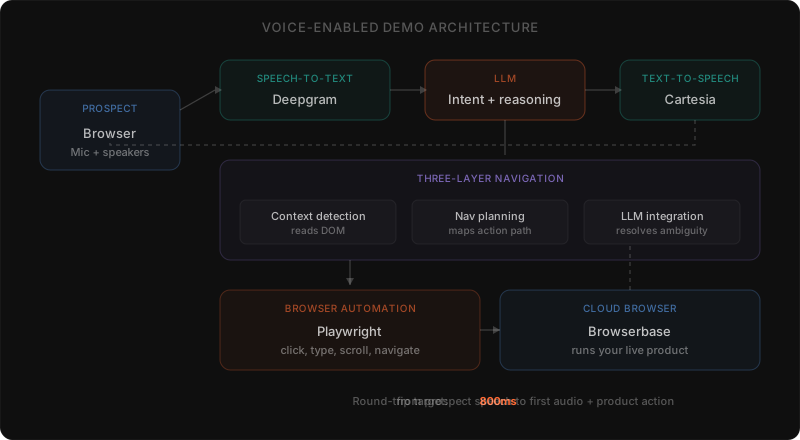
A voice-enabled demo is not a single technology. It's an orchestration of several AI and automation systems working together. Understanding the architecture helps explain both what's possible and where the hard problems are.
Speech-to-text (STT)
When a prospect speaks, their audio is captured through the browser microphone and streamed to a speech-to-text engine. At RaykoLabs, we use Deepgram for this, it handles accents, background noise, and domain-specific vocabulary with the low latency that conversational demos demand.
The key is streaming STT, which begins processing audio as the prospect speaks rather than waiting for them to finish. Batch-mode STT adds hundreds of milliseconds of dead air, and in a conversation, that delay feels wrong. Streaming eliminates it.
Large language model (LLM) processing
Once the prospect's speech is transcribed to text, it is passed to a large language model. The LLM does several things simultaneously. It interprets the intent behind the words, distinguishing between a navigation request ("show me the dashboard"), a product question ("does this integrate with Salesforce?"), and a general comment ("that looks interesting"). It generates an appropriate response grounded in the product's documentation, feature set, and competitive positioning. And it determines what actions the demo agent should take in the product interface.
The LLM operates with a rich context window that includes the product knowledge base, the current state of the demo, what the prospect has already seen, and any information known about the prospect's company or role.
Text-to-speech (TTS)
The LLM's text response is converted back into natural-sounding audio using a text-to-speech engine. RaykoLabs uses Cartesia for TTS, it produces speech with human-like pacing, intonation, and emphasis. The audio is streamed back to the prospect's browser, beginning playback before the full response has been generated. This streaming approach is critical for maintaining conversational flow; without it, the prospect sits in silence for seconds at a time.
Browser automation
While the voice response is being delivered, the demo agent simultaneously controls a live browser session running the actual product. RaykoLabs uses Playwright for browser automation, running sessions on Browserbase's cloud-hosted browsers. The agent clicks buttons, navigates menus, fills in form fields, and scrolls to relevant sections. The prospect sees the real product responding to their requests, not a pre-rendered video or a series of screenshots.
This is what separates a voice-enabled demo from a voice chatbot. The prospect is not just hearing answers, they are watching the product respond in real time. The navigation itself relies on a three-layer system: context detection reads the current DOM state, navigation planning maps the path to the requested feature, and LLM integration ties it all together to handle ambiguous or multi-step requests.
The orchestration layer
Tying everything together is an orchestration layer that manages the flow between these systems. It handles turn-taking (knowing when the prospect has finished speaking), manages concurrent operations (speaking and navigating simultaneously), maintains session state, and handles edge cases like interrupted speech or ambiguous requests.
The entire round-trip, from the prospect finishing a sentence to hearing a response and seeing the product move, typically happens in under two seconds in well-optimized implementations.
Why voice outperforms click-through demos
Click-through demos, interactive tours, and recorded videos have been the standard for self-serve product education. They work for top-of-funnel awareness, but they hit a ceiling fast when prospects want to go deeper. Here's where voice changes the equation.
Engagement is dramatically higher
When a prospect clicks through a guided tour, they are following someone else's script. Attention drifts. Tabs get switched. The experience feels like homework. When a prospect is speaking and being spoken to, they are in a conversation, and conversations demand attention in a way that passive content never will.
In our production data, voice demo sessions average eight to twelve minutes of engagement, with eight to fifteen prospect questions per session. The click-through tours we benchmark against typically run 30-90 seconds with zero questions, because there is no way for the prospect to ask one. The duration delta is not the headline; the question count is. Each question is a piece of qualification intelligence the click-through tour structurally cannot capture.
Every demo is personalized
A click-through demo shows the same sequence to every visitor. A voice-enabled demo adapts in real time. A CFO asks about reporting and audit trails. A developer asks about APIs and integrations. A customer success manager asks about onboarding workflows. The same demo agent handles all three, tailoring both the narrative and the product navigation to what each prospect actually cares about.
Accessibility expands your addressable market
Not every prospect wants to read text and click buttons. Some are multitasking. Some have accessibility needs that make mouse-driven interfaces difficult. Some are evaluating your product from a mobile device. Voice lowers the barrier, which expands the pool of people who actually complete a demo.
Conversations reveal intent
When a prospect clicks through a demo, you know which screens they viewed and where they dropped off. When a prospect has a voice conversation, you know exactly what they asked about, what concerns they raised, what features excited them, and what objections they voiced. This is qualitative lead intelligence that no click-tracking tool can match.
The experience feels premium
There is a real psychological difference between being handed a self-serve tool and being greeted by an intelligent agent that offers to help. Voice-enabled demos communicate that your company invests in buyer experience, not just in marketing copy about buyer experience.
Here's a hot take that might be unpopular: click-through demos will become the "brochure website" of 2027. They'll still exist, but prospects will expect the same level of interactivity from a product demo that they get from a conversation with a human. The bar is moving fast.
Key benefits for sales teams
Beyond the experience advantages, voice-enabled demos create measurable operational improvements for sales organizations. For the full breakdown on how this maps to pipeline metrics, see how AI voice demos reduce sales cycle length.
Always-on availability
Voice demos don't take vacation, call in sick, or work only during business hours. A prospect in Tokyo can get a full, conversational product demo at 2 AM Eastern time. This matters more than most teams realize, prospects ghost demos partly because the scheduling window never aligned with their peak curiosity.
Consistent messaging
Every voice demo delivers the same core narrative with the same accuracy. There is no risk of a junior rep misstating a feature, making an unsupported claim, or forgetting to mention a key differentiator. The AI agent stays on message while still being flexible enough to answer unexpected questions.
Lead intelligence at scale
Every voice demo session produces a transcript. Those transcripts can be analyzed, manually or with AI, to identify buying signals, common objections, feature gaps, and competitive mentions. This intelligence feeds directly into CRM enrichment, sales follow-up, and product roadmap decisions.
Reduced demo no-shows
Scheduled demos have no-show rates of 20 to 40 percent. Voice-enabled demos available on demand eliminate this problem entirely. The prospect demos when they are ready, not when a calendar slot happens to be available.
Faster time to value
Prospects who can demo your product immediately move through the funnel faster. No three-day wait for a sales rep. No fifteen minutes of company overview slides before seeing the product. They speak, and the product responds.
In our latency benchmarks, the time from a prospect clicking the demo CTA to the agent's first spoken response averages under two seconds, bounded by an 800ms target on the voice pipeline. Compare that to a typical scheduled-demo path: form submission, BDR triage, calendar exchange, demo two to five business days later. The on-demand path compresses the funnel by a factor that shows up as roughly six orders of magnitude in elapsed time.
Voice demos compared to other demo types
Understanding where voice-enabled demos fit in the broader demo landscape helps clarify when and how to deploy them.
| Format | Interactivity | How voice-enabled demos compare |
|---|---|---|
| Live sales demos | Highest touch, rep reads cues and builds rapport | Voice augments, handles the first touch and qualifies |
| Recorded video demos | Zero interactivity, prospect cannot ask or branch | Keeps video's scale, adds live conversation |
| Click-through interactive demos | Constrained to a predefined path | Open-ended navigation on the live product |
| Sandbox environments | Full access but no guidance, prospects get lost | Adds structured guidance within an open environment |
Live sales demos
A live demo with a sales rep remains the highest-touch experience. The rep can read body language, adapt to social cues, and build personal rapport. Voice-enabled demos do not replace this for high-value enterprise deals. They augment it, handling the first touch, qualifying interest, and ensuring that when a prospect does meet with a rep, they are already educated and engaged.
Recorded video demos
Video demos are easy to produce and distribute but offer zero interactivity. The prospect cannot ask questions, skip to relevant sections naturally, or see how the product handles their specific use case. Voice-enabled demos retain the scalability of video while adding the interactivity of a live conversation.
Click-through interactive demos
Platforms like Navattic, Storylane, and Tourial create guided product tours using screenshots or sandboxed environments. These work for quick overviews but constrain the prospect to a predefined path. Voice-enabled demos operate on the live product with open-ended navigation, making them better suited for deeper evaluation. See our Walnut alternatives and Storylane alternatives posts for detailed comparisons.
Sandbox environments
Some companies offer free trial sandboxes. These give the prospect full access but no guidance. Many prospects get lost, fail to find the features that matter, and abandon the trial. A voice-enabled demo provides the guidance of a structured demo within the freedom of an open environment.
Implementing a voice-enabled demo
Deploying a voice-enabled demo requires several components to work together reliably.
Product preparation
The AI agent needs a knowledge base covering your product's features, workflows, value propositions, common questions, and competitive positioning. This is typically assembled from existing documentation, sales playbooks, and subject matter expert interviews. The quality of this knowledge base determines the ceiling of demo quality, garbage in, garbage out.
Environment configuration
The browser automation layer needs a stable, representative instance of your product to navigate. This is usually a dedicated demo environment populated with realistic sample data. The environment must be configured so the agent knows which elements to interact with and how to navigate between features.
Voice pipeline setup
The STT, LLM, and TTS components must be connected with minimal latency. This involves WebSocket connections for streaming audio and careful optimization of each component's response time. We learned this the hard way building RaykoLabs: anything over 800ms to first audio feels broken. Two seconds is tolerable. Three seconds and prospects start talking over the agent. The latency budget is tighter than most teams expect, and it's the reason we chose Deepgram and Cartesia, both are built for streaming, not batch.
Testing and iteration
Voice interactions have far more variability than click-based interactions. Prospects ask questions in hundreds of different ways. Thorough testing with diverse speakers, accents, and question patterns is essential before deployment. Most teams go through several iteration cycles to handle edge cases and improve response quality.
Deployment and measurement
Voice-enabled demos are typically embedded on a company's website, often on the homepage, a dedicated demo page, or within product marketing landing pages. Key metrics to track include session start rate, average session duration, conversation depth (number of turns), feature coverage, and downstream conversion to qualified pipeline.
The future of voice in B2B sales
Voice-enabled demos represent the beginning of a broader shift toward conversational interfaces in B2B software evaluation.
Multimodal interactions
Future voice demos will combine speech with visual annotations, highlighting relevant UI elements, drawing attention to specific data points, and using on-screen pointers to guide the prospect's eye. The voice and visual layers will become more tightly integrated.
Emotional intelligence
Advances in speech analysis will allow demo agents to detect prospect sentiment from tone, pace, and word choice. An agent that recognizes confusion can slow down and offer more detail. One that detects excitement can go deeper on a feature. This emotional awareness will make AI-led demos feel increasingly human.
Multi-language support
As TTS and STT models improve across languages, voice-enabled demos will seamlessly serve global audiences. A single demo agent will be able to conduct the same demo in English, Spanish, Japanese, or German, eliminating the need for language-specific sales teams for initial product evaluation.
Integration with sales workflows
Voice demo transcripts and insights will flow directly into CRM systems, sales engagement platforms, and revenue intelligence tools. The demo will not be an isolated event but a rich data source that informs every subsequent interaction with the prospect.
Proactive and adaptive demos
Rather than waiting for the prospect to ask questions, future voice agents will proactively suggest relevant features based on the prospect's industry, role, and behavior patterns. The demo will become a genuinely intelligent conversation partner, not just a responsive one.
The bottom line
Voice-enabled product demos combine speech recognition, large language models, text-to-speech, and browser automation into an experience that is more engaging than a video, more personalized than a guided tour, and more scalable than a live sales rep.
Teams running voice demos typically see two to three times higher completion rates than teams running click-through tours, and time-to-qualified-lead drops from a multi-day average down to single-session, meaning a prospect can move from "first website visit" to "qualified opportunity" in one continuous conversation, without the day-or-week gaps that scheduled-demo funnels structurally contain.
The organizations that move first will build a structural advantage in how they convert interest into pipeline. If you want to see the complete guide to AI demo agents, start there. If you want to understand the business case and ROI, we've broken that down too.
The technology is ready. The buyer expectation is shifting. Whether you adopt now or later is a competitive decision, not a technical one.
What should buyers confirm about voice demos in September 2026?
Confirm the agent drives the live product, handles open questions honestly, hands off cleanly to humans, respects privacy needs, and provides transcripts and analytics for follow up.
Reviewed in September 2026 against the sources cited above, including Deepgram speech resources, MDN speech API documentation, Gartner buying journey research, Salesforce State of Sales, and TrustRadius buyer insights, the definition and buying guidance in this post remain accurate. A voice demo still means spoken guidance paired with live navigation, not narration over screenshots, and the value still comes from personalization, intent signals, and faster movement to a qualified conversation. The September due diligence list is short. Verify the demo runs against a representative product environment, test interruptions and topic changes, review how unknown answers and competitive questions are handled, confirm data handling and access controls, and check that transcripts, navigation history, and CRM integration give sales usable context. Keep click through and video for broad awareness, and place voice where buyers need answers.
Frequently asked questions
What is a voice-enabled product demo?
A voice-enabled product demo is an interactive demonstration where a prospect uses their voice to guide the experience. An AI demo agent listens to what the prospect says, interprets their intent, responds with natural-sounding speech, and simultaneously navigates the actual product to show relevant features and workflows. The prospect is not clicking buttons on a scripted tour, they are talking. They might say Show me how reporting works or Can I filter this by date range, and the demo responds both verbally and visually in real time. The experience feels like having a knowledgeable product expert sitting next to you, walking you through exactly what you want to see, whenever you want to see it.
How does a voice-enabled demo work technically?
It is an orchestration of several systems, not a single technology. When the prospect speaks, audio is captured through the browser microphone and streamed to a speech-to-text engine, where streaming STT begins processing as they speak rather than waiting for them to finish. The transcribed text passes to a large language model that interprets intent, generates a grounded response, and decides what actions the agent should take. The response is converted back to natural-sounding audio with text-to-speech that begins playback before the full response is generated. Meanwhile the agent controls a live browser session running the actual product, clicking, navigating, and scrolling. An orchestration layer manages turn-taking, concurrent speaking and navigating, session state, and edge cases.
How is a voice-enabled demo different from a voice chatbot?
A voice chatbot only talks. A voice-enabled demo simultaneously controls a live browser session running the actual product, so the prospect is not just hearing answers, they are watching the product respond in real time to their requests. The navigation relies on a three-layer system: context detection reads the current page state, navigation planning maps the path to the requested feature, and an LLM integration ties it together to handle ambiguous or multi-step requests. The prospect sees the real product, not a pre-rendered video or a series of screenshots.
Why do voice-enabled demos outperform click-through demos?
Five reasons. Engagement is dramatically higher, because a conversation demands attention in a way passive content never does, and voice sessions average 8 to 12 minutes with 8 to 15 prospect questions versus 30 to 90 seconds and zero questions for click-through tours. Every demo is personalized, since the agent adapts the narrative and navigation to whether a CFO, developer, or CS manager is asking. Accessibility expands the addressable market by lowering the barrier for people who do not want to read and click. Conversations reveal intent that click-tracking cannot match. And the experience feels premium, signaling real investment in buyer experience.
Who is a voice-enabled demo best suited for?
It fits B2B products where prospects have real questions a static tour cannot answer, and any buyer who wants to go deeper than top-of-funnel awareness. Click-through demos and recorded videos work for awareness but hit a ceiling fast once prospects want depth. Voice also serves prospects who are multitasking, who have accessibility needs that make mouse-driven interfaces difficult, or who are evaluating from a mobile device. Because each question is captured as qualification intelligence, voice demos are especially valuable for sales teams that want to start follow-up conversations several stages further along than a cold discovery call.
Sources
- Real-Time Speech AI, Deepgram
- Web Speech API, MDN Web Docs
- The B2B Buying Journey, Gartner
- State of Sales, Salesforce Research
- B2B Buyer Insights, TrustRadius
Cite this article
Utkarsh Agrawal. "What Is a Voice-Enabled Product Demo? The Complete Guide." RaykoLabs Blog, February 20, 2026. https://raykolabs.com/blog/what-is-voice-enabled-product-demo

Utkarsh Agrawal is CTO of RaykoLabs, where he leads engineering on Rayko, the AI demo agent that runs live, voice-enabled product demos in a real browser for B2B SaaS teams. His work spans real-time voice interaction, browser automation with Playwright and Browserbase, speech-model orchestration, and the infrastructure that keeps autonomous demos reliable around the clock. On the RaykoLabs blog he writes practical guides on voice-enabled product demos, demo automation, and what it takes to ship production AI agents for sales: how to qualify prospects mid-demo, how to measure demo performance, and how buying teams actually evaluate demo software. His comparisons of demo platforms are built from hands-on testing and vendor documentation, with trade-offs stated plainly so buyers can decide fit.
See RaykoLabs in action
Watch an AI agent run a live, personalized product demo, no scheduling, no waiting.
START LIVE DEMO