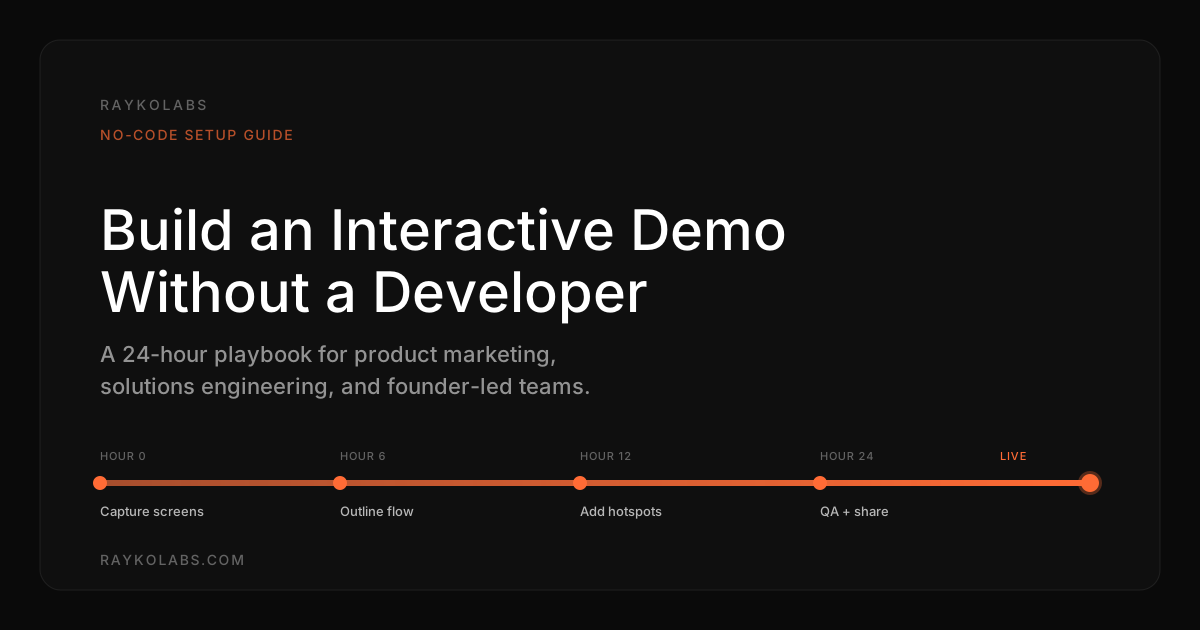
2026 Interactive Demo Setup: Launch in 24 Hours
Launch an interactive demo in 24 hours with no developer using no-code capture, buyer language, and CRM wiring. Follow the playbook. Start building today.
Quick answer
You can build an interactive product demo without a developer in roughly one workday using the modern no-code stack. Pick the single buyer question the demo must answer, capture screens with a Chrome recorder in Storylane, Navattic, Supademo, or Arcade, trim to 8 to 14 screens, add hotspots in buyer language, personalize the cover, QA on three devices, wire CRM analytics, and launch on one channel with a measurable goal.
Want this running on your product? Rayko demos it live, with your prospects asking questions by voice.
START LIVE DEMOThe fastest interactive demo we have ever seen go from kickoff to live link took 3 hours and 47 minutes. The slowest, in the same calendar quarter, at a similar-sized B2B SaaS company, took 11 weeks. The product complexity was comparable. The buyer questions were comparable. The single difference was who built it: the 3-hour demo was built by a product marketer in Storylane on a Tuesday afternoon. The 11-week demo was built by a two-person engineering team behind a Jira queue.
That gap is the gap this guide closes. You do not need a developer. You do not need a design team. You do not need an 11-week roadmap. With the modern no-code interactive demo stack, a single non-technical person can ship a credible, prospect-ready demo inside one workday and have it generating pipeline by the end of the week.
This guide is the playbook. Eight steps, named tools, real timing budgets, and the failure modes that wreck most first attempts. It is opinionated about what works for B2B SaaS, calibrated against what we see across the Rayko onboarding base, and grounded in the broader interactive demo platform landscape. Read it once, work through it once, and ship.
Why 24 hours is the right deadline
Most interactive demos that take longer than 24 hours fail not because the work is hard but because the project loses momentum. A demo that takes a week sits in review queues, accumulates stakeholder edits, gets retitled, gets rescoped, gets a logo refresh, and ships three weeks later as a worse version of what could have shipped on Tuesday.
A 24-hour deadline forces three discipline-imposing constraints. It removes the option of multi-stakeholder review (you do not have time, so the demo owner makes the call). It removes the option of feature-creep scope (one workflow, one buyer question, one CTA). It removes the option of perfectionism (ship rough, iterate from real signal).
Salesforce research on sales velocity consistently shows that the highest-performing sales teams ship more demo content per quarter and revise it more often than average teams, not because they have larger budgets, but because they have shorter cycle times. The teams that win are not the teams with the prettiest demos. They are the teams that get the second version into market while their competitors are still polishing the first.
The 24-hour window is also the natural alignment with how buyers actually evaluate. Gartner's B2B buying journey research finds that 27 percent of evaluation time is spent on independent online research. Buyers click your demo link, and either they get value in the first 90 seconds or they bounce to the next vendor. That signal loop is much faster than a typical engineering sprint, which means demos built on engineering cadence are perpetually optimizing against stale data. Demos built on a 24-hour cadence learn from the buyer in real time.
The setup time landscape
Before picking a tool, understand the time-to-launch tradeoff across the four common approaches.
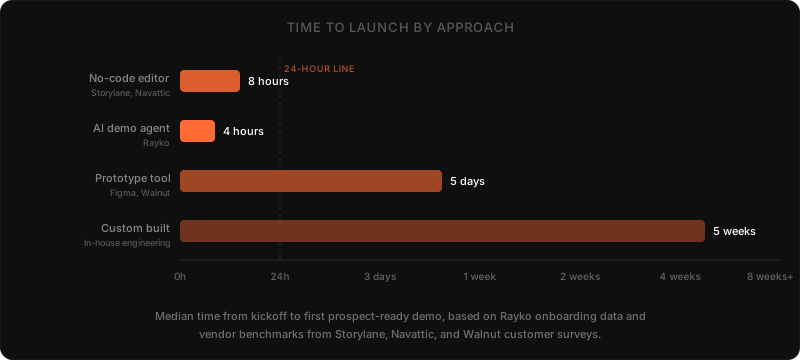
The chart shows median time-to-launch for the first prospect-ready demo, based on Rayko onboarding data and published vendor benchmarks. Four approaches dominate the market.
No-code interactive demo editors. Storylane, Navattic, Walnut, Supademo, Arcade, and Saleo all sit in this bucket. They use a Chrome extension to capture screens from your live product, then a drag-and-drop editor to assemble the flow. Median build time is 4 to 8 hours for a single workflow. The Storylane setup guide walks through the recorder extension and editor in detail; the Navattic onboarding documentation covers the equivalent path for their tool. Strengths: speed, low cost, no engineering. Weaknesses: cannot answer ad-hoc buyer questions, requires re-capture every time the UI changes.
AI demo agents. Rayko, Saleo's AI agent, and a handful of newer entrants sit here. The agent drives your live product in a cloud browser and responds to prospect questions in real time. Median setup is 2 to 4 hours because the agent generates the demo script from your sandbox URL automatically. Strengths: stays in sync with product changes, answers ad-hoc questions, captures rich intent data. Weaknesses: requires a working sandbox URL, less control over the exact screen path. See our AI demo agent buyer's guide for the full evaluation criteria.
Prototype tools. Figma, Walnut's prototype mode, and similar tools let you reconstruct your product as a clickable mockup. Median build is 3 to 5 days because every screen has to be drawn or imported manually. Strengths: full creative control, can demo features that do not yet exist. Weaknesses: slow, fragile, cannot capture real product behavior. Useful for pre-launch, miscast for live product demos.
Custom built. Engineering builds a demo environment from scratch, usually as a route in your main app or a separate React project. Median build is 4 to 8 weeks. Strengths: maximum control, can integrate any backend behavior. Weaknesses: massively expensive, owned by an engineering backlog, almost always abandoned within 12 months because nobody owns the maintenance. We do not recommend this path for any team under $50M ARR.
For 95 percent of B2B SaaS teams, the right answer is either a no-code editor (for top-of-funnel and persona-specific overviews) or an AI demo agent (for evaluation-stage and persona-specific deep dives), or both. Custom development and prototype tools are niche cases.
Step 1: Pick the buyer question your demo must answer
Before opening any tool, write down the single buyer question this demo will answer. This step is the one that, when skipped, accounts for most of the failures we see in first attempts.
The wrong framing is "show our product." That produces a 3-minute generic walkthrough that nobody finishes. The right framing is "answer the specific question a buyer asks at the specific stage where this demo runs." A few examples of well-framed questions:
- "How does a sales manager run their Monday morning forecast review with this tool?"
- "How does an IT admin enforce SSO across 500 users?"
- "How does a marketing operations lead see which campaigns generated qualified pipeline last quarter?"
- "How does a CFO get the budget vs. actuals report at the end of the quarter?"
Each of these is a single workflow, a single persona, a single moment in the buyer's week. The demo built around any of these questions will be tight, focused, and finishable.
Pull the question from one of three sources: your top three closed-won deals (what convinced those buyers), your top three lost-deal post-mortems (what would have convinced them), or your most common SDR objection ("we already use [Walnut, Storylane, Consensus, etc.]"). The question lives at the intersection of buyer pain and product capability.
If you cannot describe the question in a sentence a non-customer would understand, you are not ready to build yet. Stop, talk to a customer for 30 minutes, and try again. The 30 minutes you spend on Step 1 saves a full day of rework in Step 3.
Step 2: Capture the screens with a no-code recorder
Open Storylane, Navattic, Supademo, or Arcade in a Chrome tab and install the recorder extension. The extension is the secret of the no-code demo category: it captures a perfect snapshot of every screen you click through, including the DOM, the styling, and any in-page state.
For Rayko users, this step does not exist. The AI demo agent reads your live product directly. Skip ahead.
For everyone else, prep your sandbox before recording. Three things matter:
- Seed realistic data. A populated dashboard is dramatically more credible than an empty state. If your product is a CRM, load 50 fake deals across 5 reps. If your product is analytics, load 90 days of fake events. Buyers see through "Demo Account 1" placeholder data instantly.
- Pick a stable user account. Do not record under your personal account, where a random Slack notification might pop up. Create a dedicated "demo user" with a clean profile photo and a believable name.
- Disable distractions. Browser bookmarks bar, notification banners, browser extensions in the toolbar, all of these show up in your captures. Use a fresh Chrome profile or incognito window.
Now walk through your product the way the buyer would, clicking the exact path that answers the question from Step 1. Most extensions auto-capture screens on every click. Some let you trigger captures manually for screens that require hover-to-reveal states. Aim for 12 to 25 screens captured. You will trim hard in the next step.
Capture takes 60 to 90 minutes for a typical workflow. If it is taking longer, you are recording too many edge cases. Stick to the happy path; edge cases come in version two.
Step 3: Outline the narrative arc and trim
In the editor, drag the captured screens into the order a buyer would experience them. This is where most beginners go wrong by trying to preserve every screen. Cut everything that is not load-bearing.
A great interactive demo has 8 to 14 final screens, not 25. Each screen should advance the buyer's understanding through a four-act arc:
- Problem. What pain does the buyer feel today? One screen, often a "before" view of their existing process.
- Current state. What does the buyer's day look like inside your product? 3 to 4 screens showing the workflow setup.
- Action. What is the moment of value? 3 to 5 screens showing the buyer doing the key task.
- Result. What changes after the buyer takes the action? 2 to 3 screens showing the outcome.
Resist the urge to show every feature. The screens you cut are the ones that would have lost the buyer. HubSpot research on buyer engagement consistently shows that conversion rates drop significantly past the 90-second mark of any demo experience, and most buyers abandon at the 60-second mark if the content is not advancing their understanding. Tight beats comprehensive every time.
Add a hero card at the start with one sentence on what the buyer is about to see. Add a clear call-to-action at the end. The CTA should match the demo's intent: a top-of-funnel overview ends with "Explore more demos," a mid-funnel use case demo ends with "Talk to sales" or "Start a free trial."
Outline takes 60 to 90 minutes. Done well, this step is harder than the capture step, even though it produces less visible output.
Step 4: Add hotspots, tooltips, and branching
Walk through the demo screen by screen and add a tooltip on every meaningful element. Two sentences max per tooltip: what the element does and why it matters to the buyer.
The tooltip is where most demos either work or fail. The wrong approach is product-team language: "Click here to access the Forecasting v2.3 module with multi-period rollup." The right approach is buyer language: "This is where your team's pipeline shows up. You can drag deals between stages or change the close date inline."
Pull buyer language from sales call transcripts. If you have Gong, Chorus, or Granola in your stack, search for the phrases buyers use to describe the workflow this demo covers. If you do not have call recording, listen to one demo recording and transcribe the questions the prospect asked. The phrasing in those questions is your tooltip vocabulary.
If your tool supports branching, add one or two branches for personas. Storylane, Navattic, Walnut, and Rayko all support buyer-driven path selection. A typical branch is "I am in sales" versus "I am in operations," with each path emphasizing different screens. Skip branching if you are under time pressure on day one. Branches improve completion but add 30 to 60 minutes of setup per branch.
Hotspots take 90 to 150 minutes for a 10-screen demo. This is the longest step in the playbook. Resist the temptation to skim it. The hotspots are where buyer understanding compounds.
Step 5: Personalize the cover with prospect or company data
Replace any placeholder names, logos, and avatars with the prospect's company. Storylane and Navattic both support dynamic variables you can populate from a UTM parameter, a HubSpot contact ID, or a query string. Walnut supports the same through their personalization layer. Supademo and Arcade have similar capabilities.
At minimum, swap the company name in the hero screen. The lift from this single change is significant. Buyers who see their own logo on the first screen complete the demo at materially higher rates than buyers who see a generic placeholder. The personalization signal tells the buyer this demo is for them, not a corporate marketing artifact they happened to land on.
The full personalization stack covers four layers:
- Hero screen. Buyer's company name and logo, ideally fetched from Clearbit or a similar enrichment API.
- Demo data. Sample customer records that look like the buyer's real customers (industry, size, naming conventions).
- CTA card. Buyer's name and a sales rep's calendar link, not a generic "request demo" form.
- Email follow-up. Demo platform fires a webhook on completion that triggers a personalized email referencing what the buyer actually viewed.
For a 24-hour build, do layers 1 and 3. Layers 2 and 4 are version-two enhancements. See our deep dive on demo personalization at scale for the full architecture.
This step is 30 minutes if your tool supports variables, longer if you have to manually duplicate the demo per account.
Step 6: QA on three devices and three browsers
Open the demo on a laptop in Chrome, on a phone in Safari, and on a tablet in Firefox. Click through every step on each. Most demo platforms render fine on desktop and break in subtle ways on mobile.
The five most common QA failures we see:
- Tooltip overflow on mobile. A tooltip that fits cleanly on a 1440-wide laptop runs off the side of a 390-wide phone. Most tools auto-resize, but the auto-sizing fails on long tooltip text.
- Hover states that do not exist on touch. Demos that rely on hover to reveal information are broken on mobile. Convert hover-triggered tooltips to tap-triggered before launch.
- Text clipping in screen captures. A captured screen that included a dynamic value (date, time, dollar amount) often shows different text on the buyer's device than on yours. Lock dynamic values to static placeholders.
- Loading spinner glitches. If a captured screen included a loading spinner, the spinner is now permanently in the captured image. Re-capture without the spinner.
- Cookie banners and modals. Anything that appeared as an overlay during capture is now baked into your demo. Re-capture with overlays dismissed.
Fix every visual bug you find before sharing the link with anyone. Then have one teammate who has never seen the product run through it without coaching. Their stuck points are your final edit list. If they pause for more than 5 seconds on any screen, that screen needs better tooltip language.
QA takes 60 to 90 minutes. Skipping it is the most expensive shortcut in the playbook because every prospect who hits a broken screen never comes back.
Step 7: Wire analytics and CRM before sharing the link
Before you send a single link, connect your demo platform to your CRM and analytics stack. This is the wiring step that turns a demo from a content asset into a pipeline asset.
Storylane, Navattic, Walnut, and Arcade all support native HubSpot, Salesforce, and Marketo integrations through standard webhooks. The native integrations are mature enough that most teams can complete the connection in under 30 minutes. Forrester's research on B2B sales technology consistently identifies CRM-integrated demo platforms as outperforming standalone demo tools on pipeline attribution by a significant margin.
Map three discrete events:
- Demo viewed. Fires when a prospect lands on the demo URL. Captures source UTM, IP, and any identifying query parameters.
- Demo completed. Fires when a prospect reaches the final screen. Captures total time spent and final CTA action.
- Time spent per screen. Fires per screen. Captures dwell time, which is the highest-signal engagement metric.
Add UTM tagging to every demo URL you distribute. The convention we recommend is ?utm_source=[channel]&utm_medium=demo&utm_campaign=[demo-name]. This lets you slice demo engagement by source in any analytics tool.
Without this wiring, you are launching a black box. With it, every shared link feeds your pipeline data and your sales team sees demo engagement in the same place they see email opens. For the full integration architecture, see our guide on AI lead qualification and CRM routing.
For Rayko specifically, the analytics wiring is automatic. The AI demo agent captures every conversation as a transcript, syncs it to your CRM as a contact activity, and fires real-time events on warm-lead thresholds. The setup is a 15-minute connection wizard, not a webhook engineering project.
Step 8: Launch with one channel and a measurable goal
Resist the urge to ship the demo everywhere on day one. The teams that learn fastest pick one channel, ship, watch the data, and expand.
The four most common launch channels:
- Homepage hero. Replace your "Watch a Demo" video link with the interactive demo URL. Highest reach, best for top-of-funnel education.
- Outbound email sequence. Embed the demo link as the primary CTA in a 3-email outbound sequence. Highest intent, best for SDR-led prospecting.
- High-traffic blog post. Embed the demo as a contextual CTA inside the blog post most relevant to its workflow. Highest signal-to-noise, best for SEO-driven inbound.
- Sales rep email signature. Add the demo link to your AE and SE email signatures. Lowest reach, but every prospect they engage with sees it.
Pick one for the first two weeks. Set a single measurable goal: demo completion rate above 35 percent, three booked meetings, or a defined lift in form-fill conversion against your baseline. Watch the data. Fix the obvious problems. Then expand to a second channel.
The teams that ship everywhere on day one cannot tell what worked. The teams that ship on one channel and iterate beat them by week three.
Tooling map: which platform fits which use case
The interactive demo platform market splits into roughly four buckets. Pick based on what you are trying to demo, not on which tool has the best marketing site. For a deeper comparison, see our interactive demo platforms compared guide.
| Bucket | Example tools | Best for | Setup time | Pricing per month |
|---|---|---|---|---|
| Click-through tour platforms | Storylane, Navattic, Supademo, Arcade, Saleo | Top-of-funnel education and persona overviews | 4 to 8 hours | $300 to $2,000 |
| AI demo agents | Rayko, Saleo's AI agent | Evaluation-stage demos with ad-hoc questions | 2 to 4 hours | $1,500 to $5,000 |
| Sandbox-style platforms | Walnut sandbox mode, Saleo full-stack mode | Technical proof-of-concept for IT and security buyers | 5 to 10 days | $2,000 to $8,000 |
| Async video and presentation | Consensus, Loom, Vidyard | Executive overviews and async deal acceleration | 1 to 3 hours | $50 to $500 |
Click-through tour platforms. Storylane, Navattic, Supademo, Arcade, Saleo. Strongest on top-of-funnel education and persona-specific overviews. Setup time 4 to 8 hours. Pricing $300 to $2,000 per month. Best for product marketing teams shipping a steady cadence of demos for category education and outbound campaigns. See our Storylane comparison, Navattic comparison, and Walnut comparison for the head-to-head feature breakdowns.
AI demo agents. Rayko, Saleo's AI agent. Strongest on evaluation-stage demos where buyers ask ad-hoc questions. Setup time 2 to 4 hours. Pricing $1,500 to $5,000 per month. Best for sales engineering teams replacing the "schedule a demo" flow with a live, responsive experience. See how Rayko works for the architecture and the solutions engineer guide for the SE-team evaluation framework.
Sandbox-style platforms. Walnut's sandbox mode, Saleo's full-stack mode. Strongest on technical proof-of-concept demos for IT and security buyers. Setup time 5 to 10 days. Pricing $2,000 to $8,000 per month. Best for enterprise SaaS where the buyer expects to test real product behavior before committing.
Asynchronous video and presentation tools. Consensus, Loom, Vidyard. Strongest on executive-level overviews and async deal acceleration. Setup time 1 to 3 hours. Pricing $50 to $500 per month. Best for late-stage deals where the champion needs a shareable video to take internal. The Consensus comparison covers the async demo category in detail.
For 95 percent of teams shipping their first interactive demo, the right starting point is one click-through tour platform plus one AI demo agent. Click-through for the breadth of category education, AI agent for the depth of evaluation-stage conversation. The combination beats either tool alone.
Common failure modes in the first 24 hours
We have watched hundreds of teams build their first interactive demo. The failure patterns are predictable.
Trying to demo the entire product. The single most common failure. The team picks "show our platform" instead of one buyer question, builds 30 screens, and ships a demo nobody finishes. Fix: re-read Step 1. Cut to one workflow. Ship the second workflow as a separate demo.
Skipping the buyer language step. The team writes tooltips in product-team voice, full of feature names and version numbers. Buyers cannot parse it. Fix: pull tooltip vocabulary from sales call transcripts, not from product release notes.
Capturing under a personal account. The team records under their own login, complete with their photo, their notification badges, and their "Welcome back, Sarah" greeting. Buyers feel they are watching someone else's screen recording. Fix: use a dedicated demo user with a neutral profile.
Forgetting to seed data. The team captures screens with empty states or "Acme Inc." placeholder data. Buyers see a product they cannot picture themselves using. Fix: populate the sandbox with realistic data before recording.
Launching without analytics. The team ships the demo, watches the link views in their platform's basic dashboard, and cannot tell if any of those views became pipeline. Fix: complete Step 7 before sharing the link with anyone.
Treating the demo as a one-time launch. The team ships version one, declares victory, and never updates. Six months later the product has shipped four releases and the demo shows two-version-old UI. Fix: treat demo content as a living artifact tied to product release cadence. Set a quarterly review reminder on day one.
What changes after the first 24 hours
The 24-hour window ships version one. The next 30 days are where the demo earns its keep.
Days 1 to 7: tune the obvious. Watch the first 50 demo sessions. If completion rate is below 25 percent, the demo is too long. Cut 2 to 3 screens. If a specific screen has a dwell time of under 3 seconds, the screen is unclear. Rewrite its tooltip. If a specific screen has a dwell time of over 30 seconds, the screen is confusing. Simplify it.
Days 7 to 14: expand to a second channel. If the first channel hit its goal, add a second. If it did not, dig into why before expanding. Most channel-zero failures come from a mismatch between the demo's intent and the channel's audience (e.g., a deep-dive technical demo embedded on a top-of-funnel landing page).
Days 14 to 30: build version two. Add the branches you skipped in Step 4. Add the personalization layers you skipped in Step 5. Build a second demo for a different persona or use case. By the end of day 30, you should have 2 to 3 demos in market and a clear understanding of which one drives the most pipeline. See our guide on building a demo center for the next-stage architecture.
Day 30 onward: integrate into the broader sales motion. The demo becomes one node in a system that includes voice-enabled product demos, browser automation for live AI demos, self-serve product demos, and the broader demo personalization at scale pattern. The first 24 hours ship the artifact. The first 30 days prove the model. The first 90 days build the system.
When you genuinely need a developer (and when you do not)
The "no developer required" framing is true for the demo itself. There are three adjacent situations where a developer becomes useful.
Custom data plumbing. If you want demos to fire events into a homegrown analytics warehouse instead of a CRM, you need a developer to write the webhook receiver. Most teams do not need this; their CRM is the system of record. If you do, expect 2 to 4 hours of engineering work to wire it up.
Embedded sandbox with real backend. If your demo needs to actually execute against a backend (e.g., a SQL editor demo that runs queries against a fake warehouse), you need a developer to spin up the sandbox infrastructure. This is a different category from interactive demos and is best built with Playwright or hosted in a service like Browserbase. For 95 percent of demo use cases, this is overkill.
Single sign-on for gated demos. If you are gating demo access behind your auth system (uncommon but occasionally required for security-sensitive products), you need a developer to wire SAML or OAuth between your auth provider and your demo platform. Most platforms support this through standard SCIM connectors and the wiring is 1 to 2 hours of engineering work.
For everything else, a non-technical demo owner is faster, cheaper, and produces better outcomes than a developer-led project. The reason is structural: the person closest to the buyer should own the demo, and that person is rarely an engineer.
Cost analysis: 24-hour no-code versus engineered demo
The financial case for the 24-hour no-code approach is straightforward. Consider a B2B SaaS team building five demos per quarter to support marketing campaigns and sales enablement.
Under the no-code approach, total cost is the platform license ($500 to $2,000 per month for Storylane, Navattic, or equivalent) plus 6 hours of demo-owner time per demo. At a $150,000 burdened cost for a senior product marketer, 6 hours is roughly $432. Five demos per quarter costs $2,160 in labor plus $6,000 in platform license per year, totaling $14,640.
Under the engineered approach, total cost is two engineers at $200,000 burdened each, plus PM oversight at $180,000, allocated 30 percent of their time to demo work. Total annual labor cost: $174,000. Output: 8 to 12 demos per year (versus 20 in the no-code path) because the cycle time is longer.
The 12x cost differential plus the 2x throughput differential combine into a roughly 24x productivity advantage for the no-code path. The cost case is decisive even before factoring in opportunity cost: the engineering team that is not building demos is building product, which generally has higher leverage than demo content.
The counterargument worth taking seriously is that highly differentiated demos for high-ACV enterprise deals sometimes warrant custom engineering. We have seen this work for two specific cases: deeply technical products (developer tools, infrastructure software) where the buyer expects to interact with real backend logic, and ultra-high-ACV deals (over $500,000 ARR) where a custom demo is part of the procurement process. For everything else, no-code wins.
Compliance and security in 24-hour demo builds
A few enterprise concerns come up consistently in procurement reviews of no-code demo platforms.
Data residency. Where is the captured demo content stored? For European prospects, EU data residency is increasingly mandatory. Storylane, Navattic, Walnut, and Rayko all offer EU residency on enterprise plans; verify this is contractually committed.
PII in captured screens. If your sandbox contained any real customer data when you recorded, that data is now baked into your captured screens. Always re-record under a sandbox account with synthetic data only. The 30 minutes of seeding fake data in Step 2 is a privacy compliance step as much as a credibility step.
Cross-border transfers. If your demo platform processes screen captures in the US but your prospect is in the EU, you need Standard Contractual Clauses or an adequacy decision. Most enterprise plans handle this; rely on the platform's data processing addendum, not their marketing site.
Right to deletion. Under GDPR Article 17, prospects can request deletion of their interaction data. Your demo platform should support a programmatic delete that propagates to your CRM and analytics stack. This is rarely a default; ask explicitly during procurement.
For B2B SaaS teams in regulated industries, see our specific guides on demo automation in fintech, healthcare, and security and compliance.
What to read next
If you finished this guide and want to go deeper, three companion pieces map to the natural next questions.
For evaluating which platform to choose, the AI demo agent buyer's guide covers the decision criteria for choosing between click-through tools, AI demo agents, and hybrid approaches. The interactive demo platforms compared breakdown sits one level deeper, with feature-by-feature scoring across the major vendors.
For making the financial case to your team, the AI demo ROI business case walks through the math on demo investment versus pipeline impact, with worked examples for B2B SaaS teams at three different revenue stages.
For the broader operational pattern, the demo personalization at scale guide covers how to take the personalization layer from Step 5 and turn it into a systematic workflow across hundreds of accounts. The self-serve product demos primer covers the strategic shift from rep-led to buyer-led evaluation.
For Rayko specifically, the public demo runs Rayko on Rayko itself. Click "Start Demo" and watch an AI demo agent answer the same setup questions covered in this guide, in real time, on the actual product. The setup time you experience as a buyer is the same setup time your prospects will experience when you ship Rayko in your own funnel.
The 24-hour interactive demo is not a clever hack. It is the new baseline. Teams that ship at this cadence outlearn, outpace, and outconvert teams that ship on engineering quarters. Pick a buyer question, open the editor, capture the screens. By tomorrow night, you ship.
What still matters most in a one day no code build in September 2026?
The buyer question still decides the outcome. Pick one workflow, capture clean screens, trim hard, write in buyer language, check mobile, and connect analytics before launch.
Reviewed in September 2026 against the sources cited above, including Storylane setup guidance, Navattic onboarding documentation, Walnut help resources, Salesforce State of Sales, Gartner buying journey research, HubSpot State of Inbound, Forrester sales technology research, Playwright documentation, and Browserbase documentation, the one day playbook remains practical. No code recorders still remove the engineering queue for a first workflow, while the failure modes look familiar. Teams still try to show too much, write captions in internal language, record under personal accounts, skip seeded data, or launch without CRM wiring. The September checkpoint is simple. Confirm the demo answers one question a non customer would recognize, uses realistic sample data, reads clearly on phone and laptop, and fires viewed and completed events with source tags. Keep the second iteration scoped to branches and personalization only after the first path proves it can hold attention.
Verdict: One focused workflow can ship as a no code demo within 24 hours
You can launch an interactive demo without a developer in 24 hours by scoping to one buyer question, capturing clean screens with a no code recorder, trimming to a short path, writing in buyer language, checking mobile, and wiring analytics first.
Pick one workflow, use realistic sample data, and launch on one channel with a clear goal such as completion or booked meetings. Expand to branches and personalization only after the first path holds attention and feeds clean CRM events.
Frequently asked questions
How long does it take to create an AI demo?
For a no-code interactive demo built in a tool like Storylane, Navattic, or Supademo, expect 4 to 8 hours of focused work for a single workflow demo, spread across 1 to 2 calendar days if you are doing it alone. For an AI demo agent like Rayko, expect 2 to 4 hours of setup since the agent reads your live product and generates the script automatically. For prototype-based demos in Figma or Walnut, expect 3 to 5 days because every screen has to be reconstructed manually. Custom-built demos with engineering involvement usually take 4 to 8 weeks. The 24-hour window assumes you have decided what to demo, have access to a populated product instance, and can dedicate roughly 6 hours of focused work.
How do I train an AI agent for my specific product?
AI demo agents like Rayko learn your product through three inputs: a sandbox URL the agent can drive, a knowledge base of product documentation, and 5 to 10 example conversations that establish tone and depth. Most setups complete in 2 to 4 hours. The agent uses the live product DOM as ground truth, so unlike a static recording, it does not need retraining when your UI changes. For competitive AI demo platforms (Saleo, Supersonik), the training process is similar but each platform has its own ingestion format. Always test the trained agent with at least 20 questions a real prospect would ask before going live, including questions outside the happy path.
What data do I need to set up an AI automation system?
At minimum, three things: a working product sandbox the agent can drive, a populated dataset that looks realistic to a buyer (not lorem ipsum), and a list of the top 10 questions buyers actually ask during demos. Pull the question list from sales call transcripts, support tickets, or a 30-minute call with your top AE. If you have CRM data on which deals close and which do not, feed that to the agent so it learns which questions correlate with closed-won. Beyond the minimum, integrations to HubSpot, Salesforce, Slack, and your analytics stack let the system route warm leads, fire alerts, and close the loop on attribution.
How do I update my AI demo when my product changes?
AI demo agents that drive your live product (Rayko, Saleo) update automatically because they read the current product DOM. The agent does not store a snapshot of your UI, it sees what the user sees in real time, so a new button label or a moved navigation item resolves itself. The exception is when you change underlying workflows or terminology, which requires updating the agent's knowledge base. For static interactive demos in Storylane or Navattic, every UI change requires re-recording the affected screens, which typically takes 30 to 90 minutes per workflow. Most teams running static demos schedule a quarterly re-capture session aligned with their product release cadence.
How do I create an interactive demo for my product?
Start with the buyer question you want to answer (Step 1 above), pick a no-code tool that matches your team's skills, capture the screens, trim ruthlessly to 8 to 14 final screens, add hotspots in buyer language, personalize the cover, QA on three devices, wire analytics and CRM, and launch on one channel with a measurable goal. The full 8-step playbook fits inside a 24-hour calendar window if you have product access and decision authority. The most common failure is skipping Step 1 and trying to demo everything, which produces a long demo nobody finishes. Pick one workflow, ship it, then iterate.
Can I create an interactive demo without hiring a developer?
Yes. Every major interactive demo platform (Storylane, Navattic, Walnut, Supademo, Arcade, Saleo, Consensus) is explicitly designed for non-technical users. Product marketers, sales engineers, and founders ship demos daily with zero engineering involvement. The tools use Chrome extensions to capture screens, drag-and-drop editors to assemble flows, and standard webhook integrations to wire CRMs. The only situation where a developer is genuinely required is when you need a custom embedded sandbox running real backend logic, which is a different category from interactive demos. For 95 percent of B2B SaaS demo use cases, no-code tools are sufficient and faster.
How do I create an interactive demo without a technical team?
The same way you create one with a technical team, just without the meetings and tickets. The playbook is the same: pick a buyer question, capture screens with a Chrome extension, trim and outline, add hotspots, personalize, QA, wire analytics through native CRM integrations, and launch. The advantage of going solo is speed. The disadvantage is that you own QA, analytics setup, and the integration debugging entirely. Teams without engineering should pick tools with mature CRM integrations out of the box (Storylane and Navattic both have certified HubSpot and Salesforce apps) so you do not need a developer to wire the data flow.
How long does it take to create an interactive demo?
For a single-workflow demo using a no-code tool: 4 to 8 hours of focused work, finishable inside one workday. For a demo center with five to eight demos: roughly 5 days of work spread over 2 calendar weeks. For an AI demo agent that runs your live product: 2 to 4 hours for the first workflow, with each additional workflow taking under an hour because the agent reuses its product knowledge. The 24-hour figure in this guide assumes one workflow, one person doing the work, and product access ready on day zero. Teams that need approvals, brand reviews, and legal sign-off should plan for 5 to 10 business days end to end.
How do I get started with my first interactive demo today?
Block four hours on your calendar. Open Storylane, Navattic, Supademo, or Arcade and start a free trial. Install the Chrome recorder extension. Walk through your most-demoed workflow while the extension captures screens. In the editor, trim to 10 screens, add a tooltip to each, change the cover screen to read 'See [Your Product] for [Buyer Persona]', and publish. Send the link to one teammate for feedback. The first iteration will feel rough. That is fine. Ship it, share it with five prospects this week, and use the feedback to drive version two. Most teams ship the first version in under 6 hours when they stop polishing and start shipping.
How do I update an interactive demo when my product changes?
For static click-through demos, schedule a re-capture session within 48 hours of any release that changes a screen the demo touches. Use your release notes as the trigger. Most platforms (Storylane, Navattic, Walnut, Supademo) let you replace a single screen without rebuilding the entire flow, so updates are usually 30 to 60 minutes per affected workflow. For AI demo agents that drive the live product, no manual update is required for UI changes since the agent reads the current DOM. Update the agent's knowledge base when you ship new terminology, change pricing, or add a feature you want surfaced in conversations. Set a calendar reminder for a quarterly demo content review regardless of platform.
How do I keep my demo working when my engineering team ships new features?
Subscribe your demo owner to your product's release notes feed and schedule a 30-minute weekly check-in to walk through any released changes. For static demos in Storylane or Navattic, that walk-through becomes the punch list for which screens need re-capturing. For AI demo agents driving live product, walk through 5 to 10 representative prospect questions to confirm the agent still answers them correctly after the release. Add a Slack channel that posts the release notes and demo platform update reminders together. Treat demo content as a living artifact tied to product cadence, not a one-time launch. Demos that go stale lose pipeline silently.
Sources
- Storylane Setup Guide, Storylane
- Navattic Onboarding Documentation, Navattic
- Walnut Help Center, Walnut
- State of Sales Report, Salesforce Research
- B2B Buying Journey Insights, Gartner
- State of Inbound, HubSpot Research
- B2B Marketing and Sales Research, Forrester
- Playwright Documentation, Microsoft
- Browserbase Documentation, Browserbase
Cite this article
Utkarsh Agrawal. "2026 Interactive Demo Setup: Launch in 24 Hours." RaykoLabs Blog, May 10, 2026. https://raykolabs.com/blog/interactive-demo-setup-no-developer

Utkarsh Agrawal
CTO, RaykoLabs
Utkarsh Agrawal is CTO of RaykoLabs, where he leads engineering on Rayko, the AI demo agent that runs live, voice-enabled product demos in a real browser for B2B SaaS teams. His work spans real-time voice interaction, browser automation with Playwright and Browserbase, speech-model orchestration, and the infrastructure that keeps autonomous demos reliable around the clock. On the RaykoLabs blog he writes practical guides on voice-enabled product demos, demo automation, and what it takes to ship production AI agents for sales: how to qualify prospects mid-demo, how to measure demo performance, and how buying teams actually evaluate demo software. His comparisons of demo platforms are built from hands-on testing and vendor documentation, with trade-offs stated plainly so buyers can decide fit.
See RaykoLabs in action
Watch an AI agent run a live, personalized product demo, no scheduling, no waiting.
START LIVE DEMORelated articles
AI Demos for Healthcare Onboarding: HIPAA Guide
How healthcare onboarding teams use AI demos to train staff, answer workflow questions live, and scale adoption while staying HIPAA aligned.
AI Demos for Martech Sales Teams: 2026 Guide
How martech sales teams use AI demos to show integrations live, personalize every walkthrough by role, and shorten sales cycles without adding engineers.
AI Demos for Fintech SDRs: Pipeline Playbook
How fintech SDR teams use AI demos to qualify prospects faster, answer compliance questions live, and book more meetings without adding headcount.