Loading...

Navattic Alternatives: Best Live Demo Pick 2026
Top Navattic alternatives for 2026: RaykoLabs is our pick for live voice demos. Compare Storylane, Walnut, Supademo and more, then pick your fit.
Quick answer
The best Navattic alternatives in 2026 are Storylane, Walnut, Arcade, Supademo, and Tourial for click-through tours, Consensus for video, and RaykoLabs for live AI voice demos. Navattic pioneered HTML-capture tours, but captures need re-capturing on every UI change and cannot answer prospect questions. The strongest alternative depends on whether you want a simple embeddable tour, personalized enterprise demos, or an autonomous agent that runs your real product.
Want this running on your product? Rayko demos it live, with your prospects asking questions by voice.
START LIVE DEMONavattic pioneered the HTML capture approach to interactive demos. Capture your product's front end, let prospects click through it, embed it anywhere. For marketing teams that needed a "try before you buy" asset, it worked.
Our pick: RaykoLabs is the best Navattic alternative for teams that need live, conversational demos instead of another fixed tour. Storylane fits fast marketing tours, Walnut fits rep-personalized enterprise previews, Supademo fits quick step guides. Read on for all seven options, then choose by motion, not by feature list.
But here is the uncomfortable truth about HTML capture demos: they are a solved problem solving the wrong thing. The hard part of demos was never "How do I show screenshots in a pretty way?" It was "How do I show the right thing to the right person at the right time?" Navattic's approach means every UI change requires a re-capture, and the demos themselves cannot respond to what a prospect actually wants to learn.
If you are evaluating Navattic or looking for something that goes further, here are seven alternatives worth considering. For a deeper dive into the AI demo automation category that is replacing screenshot-based tools, start there.
What to look for in a Navattic alternative
Here are the criteria that separate demo tools that move pipeline from ones that just look good in a marketing deck:
- Interactivity depth, Can the demo respond to questions, or is it a fixed path?
- Maintenance burden, How much work is required when your product UI changes? This is the hidden cost that kills most demo programs.
- Personalization, Can the demo adapt to different personas, industries, or use cases?
- Analytics, What do you learn about prospect intent from each demo session?
- Voice and conversation, Can prospects talk to the demo, or only click through it? See why voice-first demos change the buyer experience.
The 7 best Navattic alternatives
1. RaykoLabs
RaykoLabs takes a different approach to product demos. Instead of capturing static HTML snapshots, RaykoLabs deploys an AI agent that controls your actual product in a live browser session, and talks to your prospects while doing it.
The agent uses Deepgram for speech-to-text and Cartesia for text-to-speech, creating a real-time voice conversation. Playwright handles browser automation, and sessions run on Browserbase's cloud infrastructure. If a prospect asks "How does your reporting module handle multi-currency?" the agent navigates to reporting and demonstrates exactly that. No predetermined click path. No slideshow.
Because the agent operates on your real product, there is nothing to re-capture when your UI changes. The demo is always current. For a full technical walkthrough, see how the RaykoLabs AI demo agent works.
Best for: Teams that want fully autonomous, conversational demos running on the live product, no reps required, no maintenance overhead.
- AI voice agent that listens, responds, and navigates your product in real time
- Runs on your actual product, no screenshots, no captures, no maintenance when the UI changes
- Three-layer navigation system (context detection, navigation planning, LLM integration) for intelligent product walkthroughs
- Available 24/7 with full analytics on what prospects asked and engaged with
- Session recordings via rrweb for sales team review
2. Storylane
Storylane offers a no-code editor for building guided product tours. You capture screens, add annotations and tooltips, define a click path, and publish. It has become popular with marketing teams that want to embed demos on landing pages or in email campaigns. For a deeper comparison, see our full Storylane alternatives roundup.
Storylane's strength is speed, you can build a basic demo in under an hour. The editor is intuitive, and the publishing options are flexible. The demos are linear and cannot adapt to prospect questions in real time, but for top-of-funnel awareness, that may be acceptable.
Best for: Marketing teams that need quick-to-build, embeddable click-through demos for top-of-funnel campaigns.
- No-code editor with drag-and-drop annotations and tooltips
- Multiple publishing options including embeds, standalone links, and gated access
- Built-in analytics dashboard tracking completion rates and drop-off points
3. Walnut
Walnut focuses on the sales side of the demo equation. It lets sales teams capture and customize product environments for use in live calls and leave-behinds. Reps can personalize demos by swapping text, images, and data to match a specific prospect's context. See our full Walnut comparison for details.
The personalization features are Walnut's standout. A rep preparing for a call with a healthcare company can adjust the demo to show healthcare-relevant data and terminology. The tradeoff: someone still needs to do that customization work, and someone still needs to run the call.
Best for: Sales reps who want to personalize demo environments for specific accounts and deliver polished live presentations.
- Capture and edit product screens without engineering involvement
- Personalize text, images, and data per prospect or account
- Collaborative editing so multiple reps can contribute to a demo
- Integrations with CRM platforms for tracking demo engagement
- Manual prep time required per prospect
4. Arcade
Arcade sits at the intersection of demo and content creation. It records product workflows and turns them into interactive, GIF-like experiences that are easy to share on social media, embed in docs, or include in sales outreach.
Arcade is less about replacing a full product demo and more about creating shareable micro-demos that show a single workflow or feature. If your goal is content-led growth and you want bite-sized product content, Arcade fits well. Do not expect it to replace a real demo conversation, though.
Best for: Product marketing teams creating shareable demo content for social media, help docs, and outreach.
- Screen recording with automatic conversion to interactive walkthroughs
- Easy sharing to social platforms and embedding in any web page
- Lightweight format that loads fast
5. Consensus
Consensus takes a video-first approach to demo automation. Record demo videos, organize them into a library, and let prospects self-select which segments to watch based on their role or interests. The platform tracks which videos each stakeholder watches, giving sales teams insight into buying committee engagement.
The video format means prospects watch rather than interact. But the stakeholder tracking is genuinely useful for enterprise sales teams dealing with multi-threaded deals where you need to understand which decision-makers are engaged.
Best for: Enterprise sales teams running multi-threaded deals who need to track buying committee engagement across video demos.
- Video demo library organized by persona, use case, and product area
- Prospect self-selects which demo segments to watch based on their interests
- Stakeholder tracking showing which buying committee members watched what
6. Supademo
Supademo is a straightforward screen capture tool for building step-by-step product guides. Walk through a workflow, Supademo captures each step, and you add annotations to explain what is happening. Simple, linear, easy to create.
Best for: Teams that want a fast way to create step-by-step product walkthroughs without complexity.
- Chrome extension for capturing product workflows in seconds
- AI-generated annotations that auto-describe each step
- Simple sharing via links or embeds with no login required for viewers
7. Tourial
Tourial focuses on building demo centers, collections of interactive tours organized by persona, use case, or product area. Instead of a single demo, you create a library that lets prospects self-navigate to the content most relevant to them.
The demo center concept works well for companies with broad product suites where different buyers care about different modules. Tourial's strength is in organizing and presenting multiple demos cohesively rather than the depth of any single demo experience.
Best for: Companies with broad product suites that want to organize multiple demos into a self-serve demo center.
- Demo center builder for organizing tours by persona, use case, or industry
- Micro-tour format for focused, feature-specific walkthroughs
- Prospect analytics showing which tours and features attract the most interest
- Integration with marketing automation platforms for lead scoring
- Works best when you have 5+ distinct product areas to showcase
How these alternatives compare
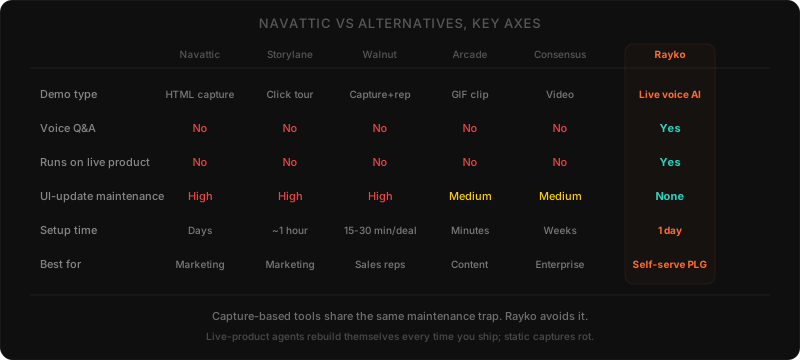
| Feature | RaykoLabs | Storylane | Walnut | Arcade | Consensus | Supademo | Tourial |
|---|---|---|---|---|---|---|---|
| Live product demo | Yes | No | No | No | No | No | No |
| Voice interaction | Yes | No | No | No | No | No | No |
| AI-driven navigation | Yes | No | No | No | No | No | No |
| No re-capture needed | Yes | No | No | No | N/A | No | No |
| Self-serve for prospects | Yes | Yes | Limited | Yes | Yes | Yes | Yes |
| Rep required | No | No | Yes | No | No | No | No |
| Dynamic Q&A | Yes | No | No | No | No | No | No |
Our recommendation
Here is what most comparison posts won't tell you: the tool matters less than the demo flow you build. A mediocre tool with a brilliant demo script will outperform a brilliant tool with a generic walkthrough. Pick any tool on this list and invest the real effort into your demo story, what you show, in what order, and why it matters to the person watching.
In our deployment data, teams that take the time to customize the agent's demo flow, defining persona-specific paths, scoping which features get surfaced first, training the agent on competitor positioning, see roughly 30-50% higher completion rates than teams running the default out-of-the-box flow. The default flow works; the customized flow works much better. The investment is hours, not weeks.
That said, the tools are not all equal. If your primary need is a simple, embeddable click-through tour for your website, Storylane, Supademo, or Tourial will get the job done. For personalized sales demos for enterprise accounts, Walnut and Consensus each bring real strengths.
If you want to move beyond static captures entirely, if you want prospects to have real conversations with your product, ask questions and get answers, and experience a demo that adapts to their interests in real time, RaykoLabs is the clear choice. It is the only platform on this list that combines AI voice interaction with live product automation, eliminating both the maintenance burden of HTML captures and the need for a human rep to run every demo.
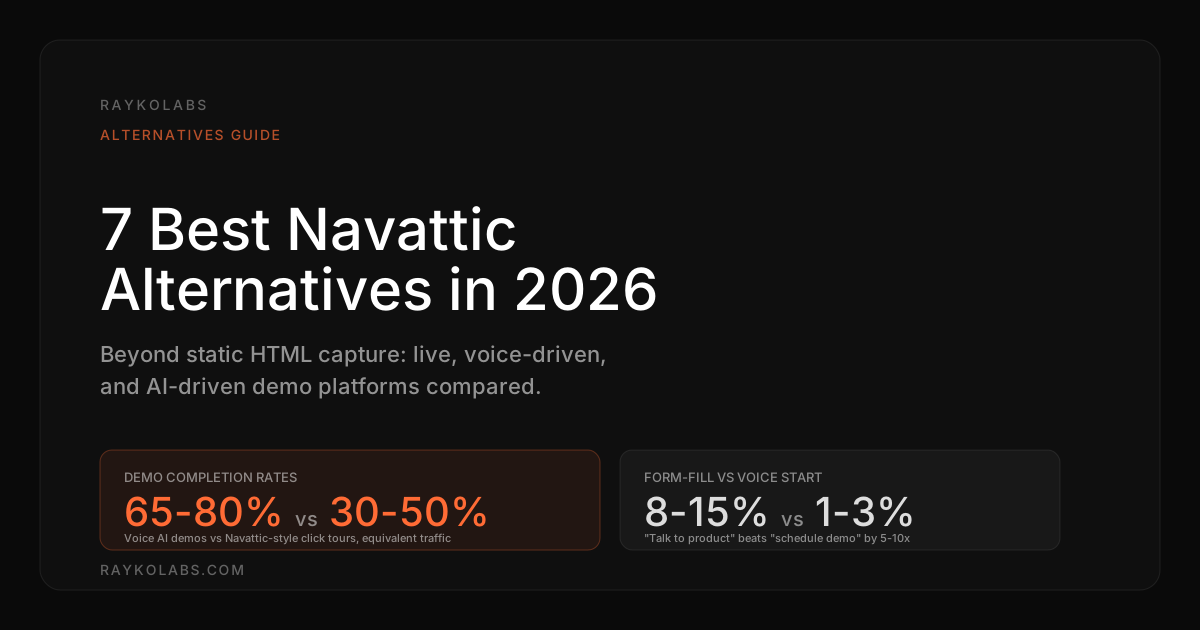
In the first 90 days of a typical deployment, voice-driven AI demos average a 65-80% completion rate, sessions where the prospect engages for at least three meaningful turns and explores at least two product areas. That sits well above the 30-50% completion rate Navattic-style click-through tours typically post on equivalent traffic.
We built RaykoLabs because we kept watching prospects ghost scheduled demos and click-through tours get abandoned halfway through. The future of product demos is not a better screenshot. It is an intelligent agent that knows your product and can show it to anyone, anytime, in a live conversation. Read the complete guide to AI demo automation to understand the full category shift.
How to compare Navattic alternatives without getting burned by a polished trial
Choose a Navattic alternative by maintenance cost, question handling, personalization depth, analytics usefulness, and fit for your primary use case, not by editor polish in a short trial. A tool that looks fast on day one can become expensive when every product change forces recaptures, branching workarounds, or rep led customization before each call.
Trials reward tools that are easy to start. Ownership rewards tools that are easy to keep current. Use the five checks below on every shortlisted option before you commit.
1. Maintenance load after a UI change. Ask what happens when you rename a page, move a button, or ship a new workflow. Capture based tools need a fresh capture plus reapplied annotations. Video libraries need re-records for affected segments. Live product agents need no recapture because they read the live interface each session. If the vendor cannot describe the update path in plain steps, assume it is manual.
2. Question handling during the session. Click through tours answer only the path you built. A prospect who asks about integrations, permissions, or pricing mid tour must leave the demo to find out. Video hubs let viewers pick segments but still cannot respond to a novel question. Voice agents and live reps can. Decide how much unscripted exploration your buyers expect, then rule out any format that forces them back to a form fill to get an answer. For context on buyer expectations, see why voice first demos change the buyer experience.
3. Personalization without multiplying assets. Many teams start with one tour, then need versions for each persona, industry, and use case. Count the assets you would need to maintain after six months, not on launch day. Tools that require a separate build per segment scale poorly unless you have a dedicated owner. Tools that branch at runtime or adapt to stated needs keep the library small. Our personalization at scale guide shows how to structure persona paths without duplicating work.
4. Analytics that help sales follow up. Completion rate alone does not help a rep. Look for signals that transfer to the next conversation, such as which product areas were explored, which questions were asked, and where the prospect spent time. Session replays and transcripts beat click counts because they preserve intent in the prospect's own words. If you plan to route leads by engagement, confirm the data flows to your CRM without manual export.
5. Fit for the job you hire it for. Website embed, outbound leave behind, partner enablement, and live call support are different jobs. A micro demo maker can excel at social clips yet fail as a first touch product experience. A sales personalization suite can shine in live calls yet add little to self serve traffic. Name your primary job first, then judge each alternative against that job rather than against a generic feature list.
Trade-offs by tool: what each Navattic alternative gives up to win its niche
Every Navattic alternative trades simplicity for depth or depth for maintenance, so the right pick depends on which pain you prefer to manage. Click through builders stay simple but cannot answer questions, sales led tools personalize well but need rep time, and live agents remove maintenance but require clear guardrails for scope, data, and handoff.
RaykoLabs: live coverage in exchange for scoping discipline. The gain is a demo that runs on your real product, answers follow up questions, and stays current without recaptures. The trade is upfront scoping. You define which tenants the agent may use, which actions are read only, which topics route to a human, and how lead context reaches sales. Teams that invest in that scoping get an always on first touch. Teams that skip it get a capable agent with unclear boundaries. Start with one core flow, review transcripts weekly, and expand scope once the handoff feels routine. See how the RaykoLabs agent works for the setup path.
Storylane: speed in exchange for linearity. The gain is a polished tour built quickly by marketing with no engineering help. The trade is a fixed path that cannot improvise. This works well for top of funnel awareness where the goal is orientation, not evaluation. It strains when buyers arrive with specific questions or when your UI ships often, because each change restarts the capture and annotate cycle. Keep tours short, keep the number of maintained tours small, and pair the tour with a live or conversational option for deeper evaluation.
Walnut: sales polish in exchange for rep effort. The gain is a tailored environment a rep can shape for a named account, which helps in considered purchases with multiple stakeholders. The trade is human time before and during the call. Someone still prepares the workspace and someone still runs the meeting. This is a good trade when deal values justify white glove prep. It is a poor trade for high volume inbound where most visitors never book. If you choose Walnut, protect rep time by reserving it for qualified opportunities and offering self serve coverage for the rest.
Arcade: shareability in exchange for scope. The gain is a lightweight, visual clip that travels well in docs, changelogs, outreach, and social posts. The trade is depth. A focused workflow demo rarely resolves evaluation questions about adjacent areas, permissions, or edge cases. Use Arcade to spark interest and teach single tasks, not to carry full discovery. Link each clip to a deeper demo surface so curious prospects have somewhere to go next.
Consensus: stakeholder coverage in exchange for passivity. The gain is a library that buying group members can browse on their own schedules, with visibility into who watched what. The trade is that watching is not doing. Prospects observe rather than direct, and unanswered questions accumulate until a rep intervenes. This works well when you already have multithreaded engagement and need to keep peripheral stakeholders informed. It works less well as a first touch for a skeptical technical buyer who wants to probe the product directly.
Supademo: simplicity in exchange for ceiling. The gain is fast creation of clear step by step guides with minimal learning curve. The trade is limited room to grow into branching, role based paths, or live Q and A. This is ideal for help content, onboarding checklists, and simple feature announcements. Plan a second layer for evaluation use cases, such as a demo center or a conversational agent, before your guide library grows into a maze of overlapping walkthroughs.
Tourial: organization in exchange for library upkeep. The gain is a structured center that groups tours by persona or use case, which helps broad suites avoid a single generic demo. The trade is governance. A center with many tours needs owners, naming standards, retirement rules, and periodic audits, or prospects face choice overload. Adopt it when you truly have several distinct audiences. If you have one core motion, a single strong entry point plus a conversational fallback will serve buyers better than a large catalog.
For head-to-head versions, see Consensus vs Navattic and Navattic vs Storylane.
What are the best Navattic alternatives for teams outgrowing click through tours?
The best Navattic alternatives are Storylane, Supademo, and Tourial for simple tours, Walnut for sales personalization, Consensus for committee review, and RaykoLabs for live AI demos on the real product. Choose by maintenance load and question handling, not by editor polish alone.
Navattic proved that HTML capture tours work for awareness stage embeds. The ceiling appears when buyers ask questions the fixed path cannot answer and when each product change forces a fresh capture. Storylane keeps the same tour model with a fast no code editor, which suits campaign teams that publish often. Supademo style step guides suit help content and onboarding checklists. Tourial style demo centers suit suites with several distinct audiences. Walnut adds account level customization for reps running considered purchases, at the cost of prep time before each call.
The table below maps each path to the trade involved.
| Alternative path | What you gain | What you manage instead |
|---|---|---|
| Click through builder | Fast launch by marketing with no engineering help | Fixed path plus recaptures after product changes |
| Sales personalization suite | Tailored environment for a named account | Rep time to prepare and run each session |
| Video board | Committee members review on their own schedules | Passive viewing with questions held for later |
| Live AI agent | Current product plus answers to follow up questions | Upfront scoping for tenants, permissions, and handoff |
If your main job is a website embed, shortlist one tour builder and pair it with a conversational fallback for evaluation questions. If your main job is enterprise leave behinds, shortlist one personalization or video option and reserve rep time for qualified opportunities. Keep the count of maintained tours small, set retirement rules, and review session transcripts to see which questions the current format cannot resolve.
How do you move from Navattic to a Navattic alternative without breaking live embeds?
Moving from Navattic to a Navattic alternative works best as a phased swap with an audit, a pilot on one flow, and updated embeds. Keep tours live, rebuild the top traffic flow first, and redirect after the replacement is reviewed.
Start with an inventory. List every live embed, standalone link, and gated asset built on Navattic, plus owner, page, and last update date. Many teams find overlapping tours that can be retired rather than migrated. Rebuild one core flow in the new tool, such as the pricing page tour in Storylane or a tailored leave behind in Walnut. Keep the scope narrow so review stays fast. Run both versions briefly, check analytics and session replays, and confirm lead capture and CRM routing still work before switching the embed.
Use the checklist below to keep the swap orderly.
| Step | Action | Exit check before moving on |
|---|---|---|
| Audit | Catalog pages, links, owners, and refresh dates | Retire duplicates and name the top traffic flow |
| Pilot | Rebuild one flow in the new tool | Stakeholders approve content and tracking works |
| Validate | Compare engagement plus sales feedback | Replacement answers questions the old tour missed |
| Cut over | Swap embeds and redirect standalone links | Old links redirect and no page shows a blank frame |
Plan the broader evaluation with buyer context in mind. The Gartner B2B buying journey research explains why committee review takes time, and the Salesforce State of Sales research covers changing response expectations. Those inputs help you decide whether the replacement should be another tour, a video board, or a live agent. Migrate one flow at a time and expand only after handoff feels routine.
For the mirror-image comparison, see Storylane vs Navattic.
Frequently asked questions
What is the best Navattic alternative in 2026?
It depends on your use case. For simple embeddable click-through tours on your website, Storylane, Supademo, or Tourial do the job. For personalized sales demos for enterprise accounts, Walnut and Consensus each bring real strengths. To move beyond static captures entirely and let prospects have a real conversation with your product, RaykoLabs is the only option on this list that combines AI voice interaction with live product automation.
Why do teams look for a Navattic alternative?
Navattic uses HTML capture, so every UI change requires a re-capture, and the demos cannot respond to what a prospect actually wants to learn. The hard part of demos was never showing screenshots in a pretty way, it was showing the right thing to the right person at the right time. Teams hitting that maintenance and interactivity ceiling start evaluating conversational or live-product tools.
How is RaykoLabs different from Navattic?
Instead of capturing static HTML snapshots, RaykoLabs deploys an AI agent that controls your actual product in a live browser and talks to prospects while doing it. It uses Deepgram for speech-to-text, Cartesia for text-to-speech, Playwright for browser automation, and Browserbase cloud infrastructure. Because the agent runs on the real product, there is nothing to re-capture when the UI changes and the demo is always current.
Do click-through tour alternatives like Storylane fix Navattic's limitations?
Only partially. Storylane, Supademo, and Tourial are solid embeddable tour builders, but they share Navattic's core constraints: the prospect follows a predetermined path and the demo cannot answer questions or run on the live product. They are good fits when you specifically need a lightweight website tour, not when you need an adaptive, conversational demo.
Which Navattic alternative has the highest completion rate?
In the first 90 days of a typical RaykoLabs deployment, voice-driven AI demos average a 65 to 80 percent completion rate, counting sessions with at least three meaningful turns and two product areas explored. That sits well above the 30 to 50 percent completion rate Navattic-style click-through tours typically post on equivalent traffic.
Sources
- Navattic, Interactive product demos, Navattic
- Storylane, Interactive demo platform, Storylane
- Walnut, Interactive demo software, Walnut
- State of Sales, Salesforce Research
- The B2B Buying Journey, Gartner
Cite this article
Utkarsh Agrawal. "Navattic Alternatives: Best Live Demo Pick 2026." RaykoLabs Blog, March 1, 2026. https://raykolabs.com/blog/best-navattic-alternatives

Utkarsh Agrawal is CTO of RaykoLabs, where he leads engineering on Rayko, the AI demo agent that runs live, voice-enabled product demos in a real browser for B2B SaaS teams. His work spans real-time voice interaction, browser automation with Playwright and Browserbase, speech-model orchestration, and the infrastructure that keeps autonomous demos reliable around the clock. On the RaykoLabs blog he writes practical guides on voice-enabled product demos, demo automation, and what it takes to ship production AI agents for sales: how to qualify prospects mid-demo, how to measure demo performance, and how buying teams actually evaluate demo software. His comparisons of demo platforms are built from hands-on testing and vendor documentation, with trade-offs stated plainly so buyers can decide fit.
See RaykoLabs in action
Watch an AI agent run a live, personalized product demo, no scheduling, no waiting.
START LIVE DEMO