Loading...

Voice Demo Accessibility: Reaching Every B2B Buyer
Voice-enabled demos make product experiences accessible to more buyers: those with motor disabilities, visual impairments, or who prefer talking to clicking.
Quick answer
Voice-enabled demos make product experiences accessible to buyers click-through tours exclude: people with motor or visual impairments, cognitive differences, non-native speakers, and mobile-only users. An estimated one billion people worldwide live with some disability, and screenshot-overlay tours are often completely inaccessible to screen readers. Because the buyer talks instead of navigating an interface, voice demos align with all four WCAG principles. Accessibility here is a revenue channel most teams ignore.
Want this running on your product? Rayko demos it live, with your prospects asking questions by voice.
START LIVE DEMOA blind procurement analyst at a Fortune 500 company needs to evaluate your SaaS platform. She opens your interactive demo. The clickthrough tour is built entirely on screenshot overlays with image-based hotspots. Her screen reader cannot parse any of it. She tabs through the page and gets nothing, no alt text, no semantic markup, no way to understand what she is supposed to click. She closes the tab and moves to your competitor, who lets her talk to an AI demo agent instead. She says "Show me the reporting dashboard" and the agent walks her through it verbally while navigating the live product. She completes the evaluation in twelve minutes.
That is not a hypothetical. Scenarios like this play out constantly, and most SaaS companies have no idea they are losing these deals.
An estimated one billion people worldwide live with some form of disability. In the workplace, that includes people with motor impairments, visual impairments, and cognitive or learning differences that make rapid visual interfaces overwhelming. Beyond disability, there are situational factors: the buyer on a mobile device during a commute, the executive who prefers listening over clicking, the prospect in a region where rich interactive content loads poorly.
Voice-enabled demos address all of these cases by meeting the buyer in conversation, not in a mouse-dependent interface.
Where current demo tools fail on accessibility
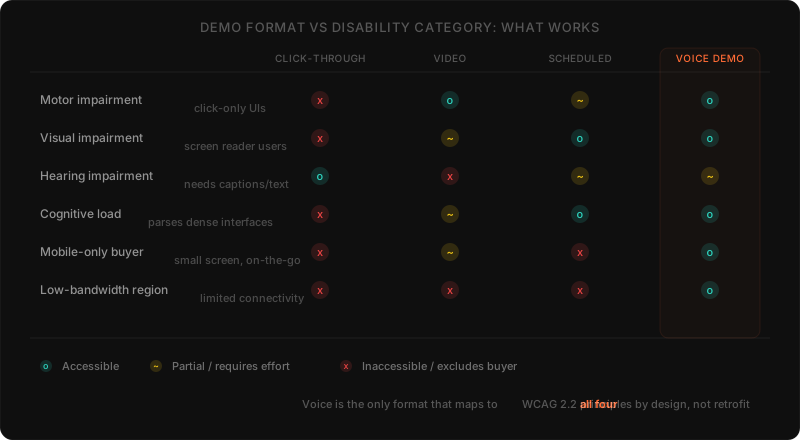
Each format excludes a different group of buyers:
| Format | Motor impairment | Visual impairment, screen readers | Hearing impairment |
|---|---|---|---|
| Clickthrough tours | Demands precise motor control | Often completely inaccessible, image hotspots, no semantic markup | Visual only, no audio dependency |
| Recorded video | Passive, no self-directed control | Excludes low vision, no narration of actions | Excluded, most lack captions |
| Live scheduled demos | Adaptable but assumes live video call | Rep can narrate, but timezone friction and poor scale | Adaptable rep, but assumes comfort on call |
| Voice-enabled demos | Buyer talks, no mouse or keyboard needed | Agent narrates actions as an audio channel | Offer captions or transcript as the alternative |
Clickthrough interactive tours
These tools, Navattic, Storylane, Walnut, and similar platforms, capture screenshots and overlay hotspots. They require precise motor control, visual acuity to read interface text, and sustained visual attention. For screen reader users, these tours are often completely inaccessible. The hotspots are image-based with no semantic markup.
Recorded video demos
Video adds an audio channel, which helps. But without captions (most do not have them), video excludes people with hearing impairments. It is also passive, no questions, no skipping, no self-directed exploration.
Live scheduled demos
Human-led demos are the most adaptable format. A skilled rep adjusts their approach. But scheduling creates timezone friction, the format scales poorly, and it assumes the prospect is comfortable on a live video call.
Every format shares the same flaw
They were all designed around the provider's convenience, not the buyer's accessibility needs. They assume a specific body, a specific device, and a specific comfort level with visual interfaces.
How voice changes the accessibility equation
Instead of requiring the buyer to navigate an interface, the buyer talks. The AI agent handles everything else.
Motor accessibility
For buyers with cerebral palsy, repetitive strain injuries, arthritis, or temporary injuries, voice removes the need to manipulate a mouse or keyboard. "Show me how user management works" replaces a series of clicks and scrolls.
This is not only about severe impairments. Many people experience minor motor difficulties that make click-heavy interfaces frustrating. Voice removes that friction entirely.
Visual accessibility
A well-built voice demo agent narrates its actions: "I am opening the analytics dashboard. Here you can see three main sections: real-time metrics, historical reports, and custom dashboards." RaykoLabs uses Cartesia for text-to-speech synthesis, which produces natural-sounding narration, not the robotic voice that makes users want to mute the tab. The narration creates an audio channel for product information that does not depend on the buyer seeing the screen.
For buyers with low vision, voice means they do not need to read interface labels to navigate. They tell the agent what they want to see. The agent handles the rest.
Cognitive accessibility
Complex interfaces overwhelm first-time users. Menus, buttons, panels, notifications, it is disorienting. Voice demos reduce this load. The buyer focuses on conversation. The agent presents information sequentially. If something is unclear, the buyer asks for clarification the same way they would ask a colleague.
Language and literacy
Voice accommodates different comfort levels with written language. Non-native speakers who understand spoken language better than interface text get a more accessible channel. This is a market expansion play that most demo platforms completely ignore.
Here is a contrarian take: accessibility is not a feature you add to your demo. It is a revenue channel you are currently ignoring. Every buyer your click-through tour excludes is pipeline you never see in your funnel. You do not get a "lost deal" notification for someone who could not use your demo in the first place. The loss is invisible, which is why almost no one prioritizes it.
WCAG alignment and compliance
The Web Content Accessibility Guidelines (WCAG) map directly to what voice demos provide.
Perceivable: Voice demos give an auditory channel alongside the visual one. The agent narrates actions on screen, creating a multi-modal experience that does not depend on a single sensory channel.
Operable: Voice input lets people with motor impairments operate the demo without clicking, tapping, or typing.
Understandable: A conversational agent that explains features in plain language and adjusts pacing to the buyer's needs supports this principle by design. The buyer controls speed and depth through conversation.
Robust: Voice interaction works across devices and assistive technologies because it relies on standard audio input and output.
In our own accessibility validation work, voice-driven demo sessions degrade gracefully on the major assistive-technology stacks, JAWS, NVDA, and VoiceOver, because the primary interaction is conversational rather than visual. The agent is queryable by voice, its responses are spoken (so they bypass screen-reader rendering of dynamic browser content entirely), and the rendered page state matters less when the user has already received a verbal explanation. Pages that are not WCAG 2.1 AA compliant in their visual markup still produce an accessible experience for the prospect, because the voice channel is the channel.
For organizations in regulated industries or those serving government clients, voice-enabled demos can be a strong component of compliance requirements. They should be part of a broader accessibility strategy, not a standalone solution.
The curb cut effect: everyone benefits
Accessibility improvements benefit everyone. The "curb cut effect", wheelchair ramps help parents with strollers, travelers with luggage, delivery workers with carts, applies directly to voice demos.
Multitasking buyers
Buyers evaluate software between meetings, on calls, while reviewing multiple vendors in a single afternoon. Voice lets them engage without dedicating full visual and motor attention. They listen, ask questions, form opinions, glancing at the screen periodically instead of clicking through every step.
Mobile-first evaluation
B2B research happens on phones now. Clickthrough tours designed for desktop monitors are painful on mobile, targets too small, text compressed, the whole experience cramped. Voice works the same on any device. Screen size stops mattering.
Personal preference
Some people process information better through dialogue. They want to ask "What integrations do you support?" instead of hunting for an integrations page. Voice demos serve these buyers better than any click-based format.
Low-bandwidth regions
Voice requires less bandwidth than streaming rich interactive content. For buyers with limited connectivity, a voice-driven experience with lightweight visuals is more accessible than an interactive tour demanding fast, stable connections. RaykoLabs uses Browserbase for cloud-hosted browser sessions, which means the heavy rendering happens server-side, the prospect's device just receives audio and a lightweight video stream.
Building accessible demo experiences
Voice must be primary, not an add-on
Bolting voice onto an existing clickthrough is not accessibility. A demo platform should treat voice as a first-class interaction method. Every feature, every workflow should be reachable through conversation. RaykoLabs uses Playwright for browser automation, which means the voice agent can navigate to any screen in your product, not just the ones someone pre-configured as "demo-able."
Both channels should work independently
The buyer sees the product on screen while the agent narrates. Neither channel should be required exclusively. A buyer who cannot hear should get captions or a transcript. A buyer who cannot see should get full value from narration alone.
Let buyers control the pace
Different buyers need different speeds. "Slow down," "Tell me more about that," "Skip ahead to pricing", the agent should respect these cues and adjust.
Plain language, no jargon
The AI agent should explain features in straightforward language. Define technical terms when they come up. This benefits all buyers, not just those with cognitive accessibility needs.
Always offer alternatives
Not every buyer will want voice. The demo should support text input for buyers who are deaf, who are in a quiet environment, or who prefer typing. Accessibility means removing barriers, not imposing a single interaction mode.
Making the case internally
The ethical case is clear: every buyer deserves equal access to your product experience.
The commercial case is just as strong. Every buyer your current demo excludes is a customer you are leaving on the table. When your demo works for someone with a motor impairment, it also works better for the busy executive on a phone, the prospect in a low-bandwidth region, and the evaluator who prefers conversation over clicking.
The clearest signal we see in deployment data is on mobile traffic. Voice-driven demos consistently complete at higher rates on phones than click-through tours do, because the phone is a fundamentally voice-friendly device, and click-through tours built for desktop UI do not survive the small-screen, fat-finger transition. On deployments where we have a clean before/after comparison, mobile demo completions typically lift 15-30% relative to a click-through baseline within the first month, and that gain compounds as more inbound traffic shifts mobile-first.
We ran the numbers on our own demo pipeline before building RaykoLabs. The biggest surprise was not cost per demo or conversion rate. It was the number of prospects who started a demo and could not finish it, because of device limitations, accessibility barriers, or just the friction of a scheduled call. That invisible drop-off was larger than our no-show rate. Voice-enabled demos made those prospects visible again.
Accessibility is not a checkbox. It is a design philosophy that makes every buyer's experience better. Voice demos are one of the most direct ways to bring that philosophy to your product's front door. If you are exploring what voice-enabled demos look like in practice, start there. If you want to understand the ROI case, we break that down separately.
What accessibility checks matter for demos in September 2026?
Voice first with text alternative remains the practical baseline. Let buyers talk or type, narrate actions plainly, support keyboard and screen reader paths, and keep pacing buyer controlled.
Reviewed in September 2026 against the sources cited above, including World Wide Web Consortium accessibility guidelines, World Health Organization disability resources, WebAIM screen reader research, federal accessibility standards, and ADA guidance, the approach in this post remains sound. Screenshot tours without semantic structure still exclude screen reader users, uncaptioned video still excludes buyers who need text, and voice with a text channel still widens participation across motor, visual, cognitive, language, mobile, and low bandwidth needs. The September checklist is concrete. Offer typed input beside voice, provide captions or transcripts, narrate navigation in plain language, confirm keyboard operation and compatibility with common assistive tools, and let buyers pause, repeat, or skip. Treat each improvement as pipeline widening, since buyers who cannot complete a demo never appear as lost deals.
Frequently asked questions
Why do current demo tools fail on accessibility?
Each format excludes someone. Click-through interactive tours from platforms like Navattic, Storylane, and Walnut capture screenshots and overlay image-based hotspots with no semantic markup, so they are often completely inaccessible to screen reader users and demand precise motor control and sustained visual attention. Recorded video adds an audio channel but, without captions which most lack, excludes people with hearing impairments, and it is passive with no questions or self-directed exploration. Live scheduled demos are the most adaptable but introduce timezone friction, scale poorly, and assume the prospect is comfortable on a live video call. Every format was designed around the provider's convenience, not the buyer's accessibility needs.
How do voice demos improve accessibility for buyers with disabilities?
Instead of requiring the buyer to navigate an interface, the buyer talks and the AI agent handles everything else. For motor accessibility, saying Show me how user management works replaces a series of clicks and scrolls, which helps buyers with cerebral palsy, repetitive strain injuries, or arthritis as well as anyone who finds click-heavy interfaces frustrating. For visual accessibility, a well-built agent narrates its actions with natural-sounding speech, creating an audio channel that does not depend on seeing the screen. For cognitive accessibility, the agent presents information sequentially and the buyer focuses on conversation rather than disorienting menus and panels.
How do voice demos align with WCAG accessibility guidelines?
They map directly to the four WCAG principles. Perceivable: voice demos give an auditory channel alongside the visual one, creating a multi-modal experience that does not depend on a single sensory channel. Operable: voice input lets people with motor impairments operate the demo without clicking, tapping, or typing. Understandable: a conversational agent that explains features in plain language and adjusts pacing supports this by design, with the buyer controlling speed and depth. Robust: voice interaction works across devices and assistive technologies because it relies on standard audio input and output. In accessibility validation, voice-driven sessions degrade gracefully on JAWS, NVDA, and VoiceOver because the primary interaction is conversational rather than visual.
Is accessibility just compliance, or does it affect pipeline?
It is a revenue channel most teams ignore, not just a compliance checkbox. Every buyer your click-through tour excludes is pipeline you never see in your funnel, and you do not get a lost-deal notification for someone who could not use your demo in the first place, so the loss is invisible and almost nobody prioritizes it. Voice also accommodates non-native speakers who understand spoken language better than interface text, which is a market expansion play. For organizations in regulated industries or serving government clients, voice-enabled demos can be a strong component of broader compliance and accessibility strategy rather than a standalone fix.
What is the curb cut effect for voice demos?
The curb cut effect is the observation that accessibility improvements designed for one group benefit everyone: wheelchair ramps also help parents with strollers, travelers with luggage, and delivery workers with carts. It applies directly to voice demos. Features built to serve buyers with disabilities also serve the buyer on a mobile device during a commute, the executive who prefers listening over clicking, and the prospect in a region where rich interactive content loads poorly. Designing the demo around conversation rather than a mouse-dependent interface widens the addressable audience well beyond the disability community.
Sources
- Web Content Accessibility Guidelines (WCAG) 2.2, W3C
- Disability, Health Topics, World Health Organization
- Screen Reader User Survey, WebAIM
- Section 508 Accessibility Standards, U.S. General Services Administration
- Americans with Disabilities Act, U.S. Department of Justice
Cite this article
Utkarsh Agrawal. "Voice Demo Accessibility: Reaching Every B2B Buyer." RaykoLabs Blog, February 16, 2026. https://raykolabs.com/blog/voice-demo-accessibility

Utkarsh Agrawal is CTO of RaykoLabs, where he leads engineering on Rayko, the AI demo agent that runs live, voice-enabled product demos in a real browser for B2B SaaS teams. His work spans real-time voice interaction, browser automation with Playwright and Browserbase, speech-model orchestration, and the infrastructure that keeps autonomous demos reliable around the clock. On the RaykoLabs blog he writes practical guides on voice-enabled product demos, demo automation, and what it takes to ship production AI agents for sales: how to qualify prospects mid-demo, how to measure demo performance, and how buying teams actually evaluate demo software. His comparisons of demo platforms are built from hands-on testing and vendor documentation, with trade-offs stated plainly so buyers can decide fit.
See RaykoLabs in action
Watch an AI agent run a live, personalized product demo, no scheduling, no waiting.
START LIVE DEMO